
Correcting misspelled captions after uploading to YouTube
Replace YouTube’s auto-captions with your Descript transcript.
You may notice that after uploading your completed video to YouTube your video contains captions that differ from your Descript captions. YouTube has a feature that automatically generates captions for videos and makes them available to viewers if not removed or replaced.
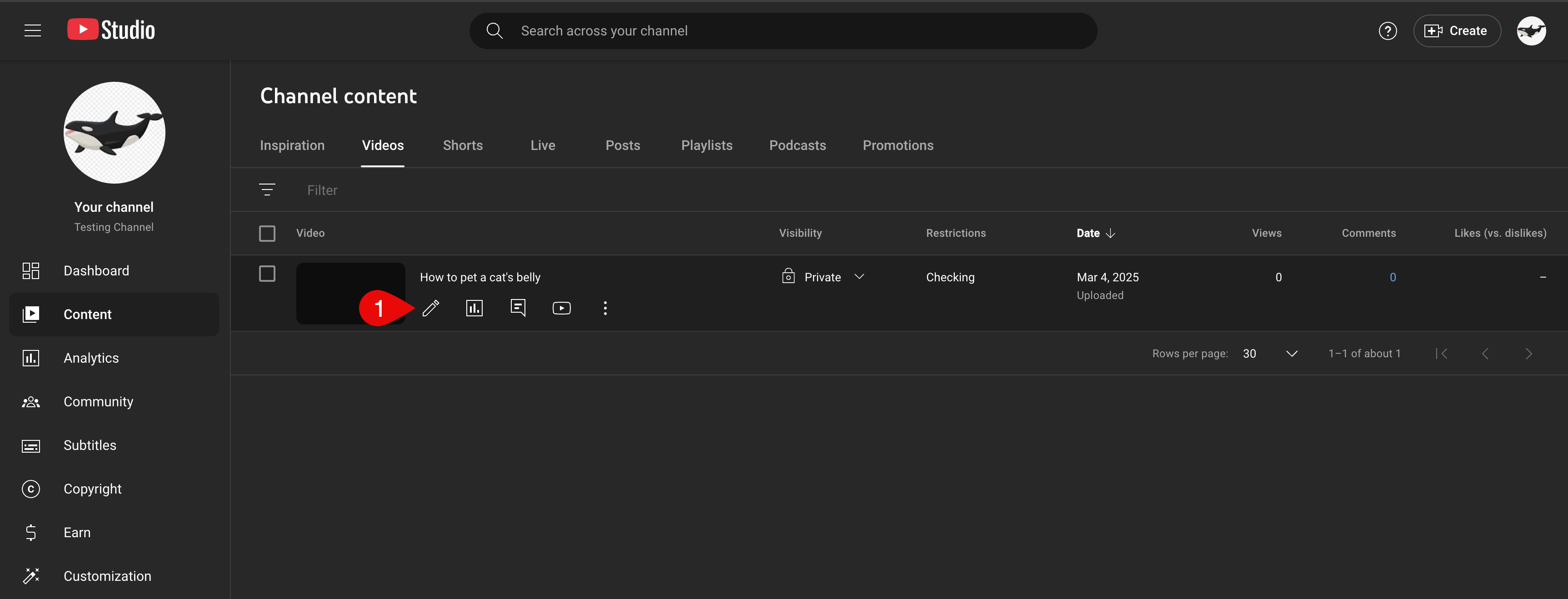
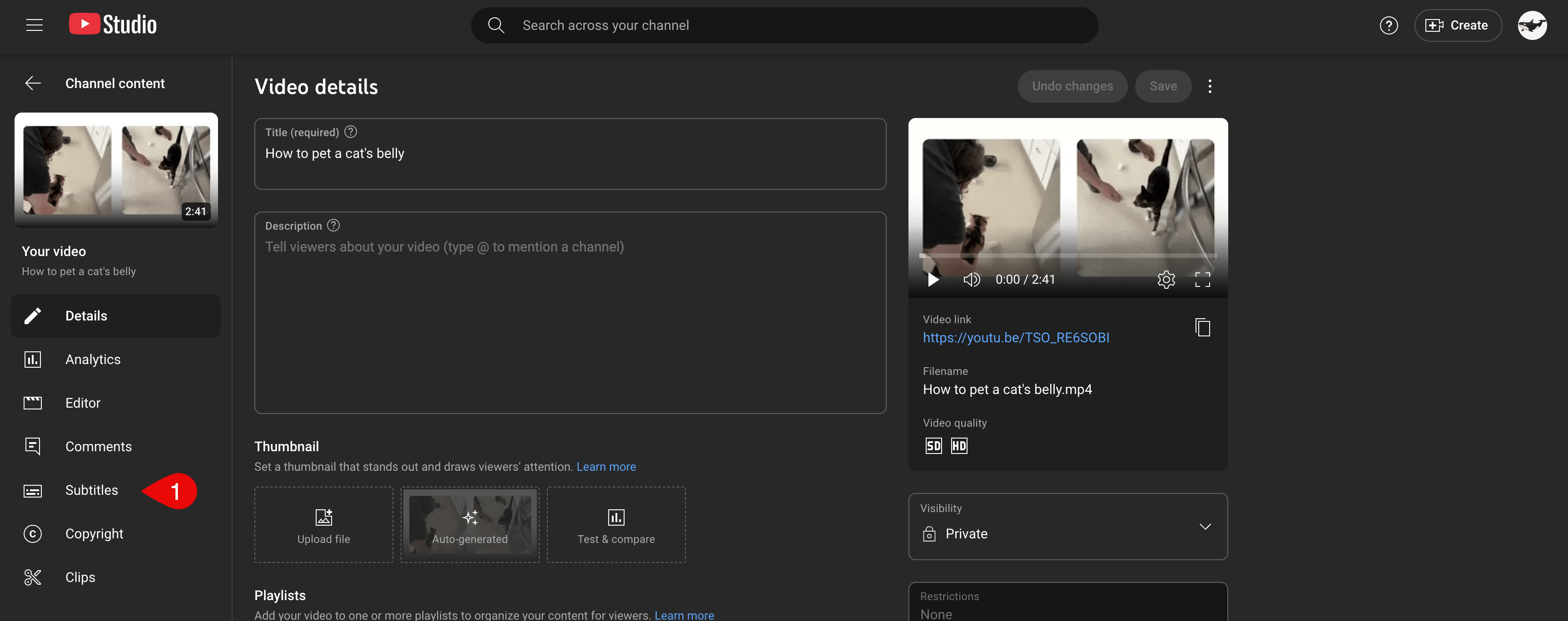
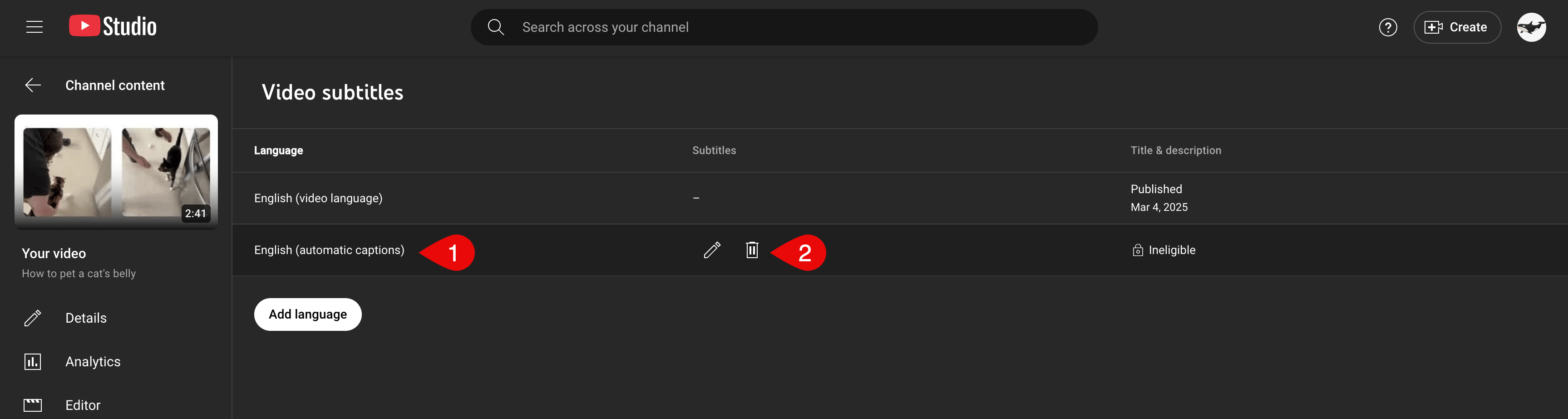
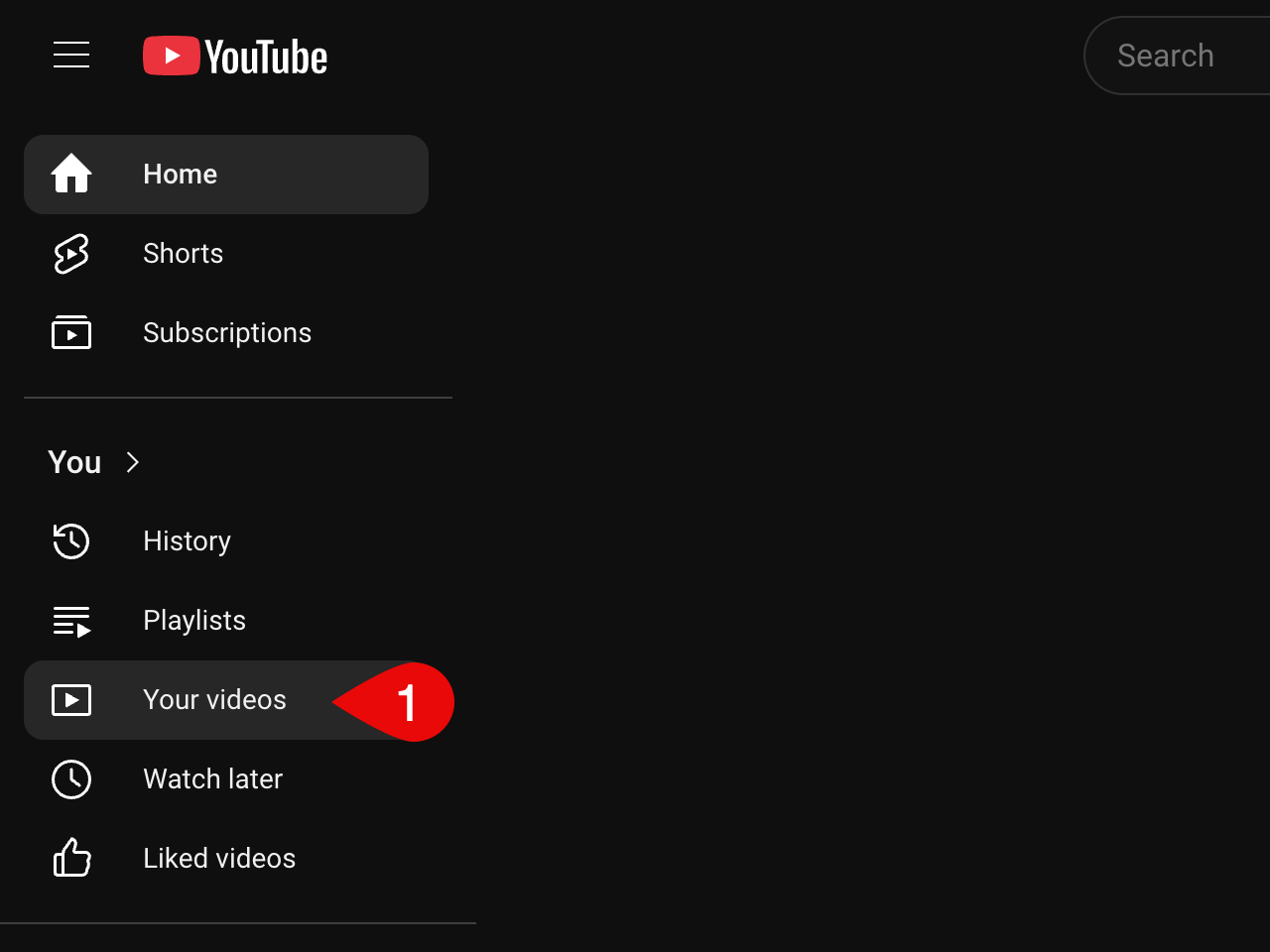
Navigate to YouTube and click on Your videos in the left-hand sidebar.On the Channel content page, mouse over your video then select the Details button.On the Video details page, click the Subtitles menu in the left-hand sidebar.Once the captions have finished processing, they will appear as an “English (Automatic)” subtitle.
NoteThey may not be visible for some time after the upload has finished processing, depending upon the length of your video.
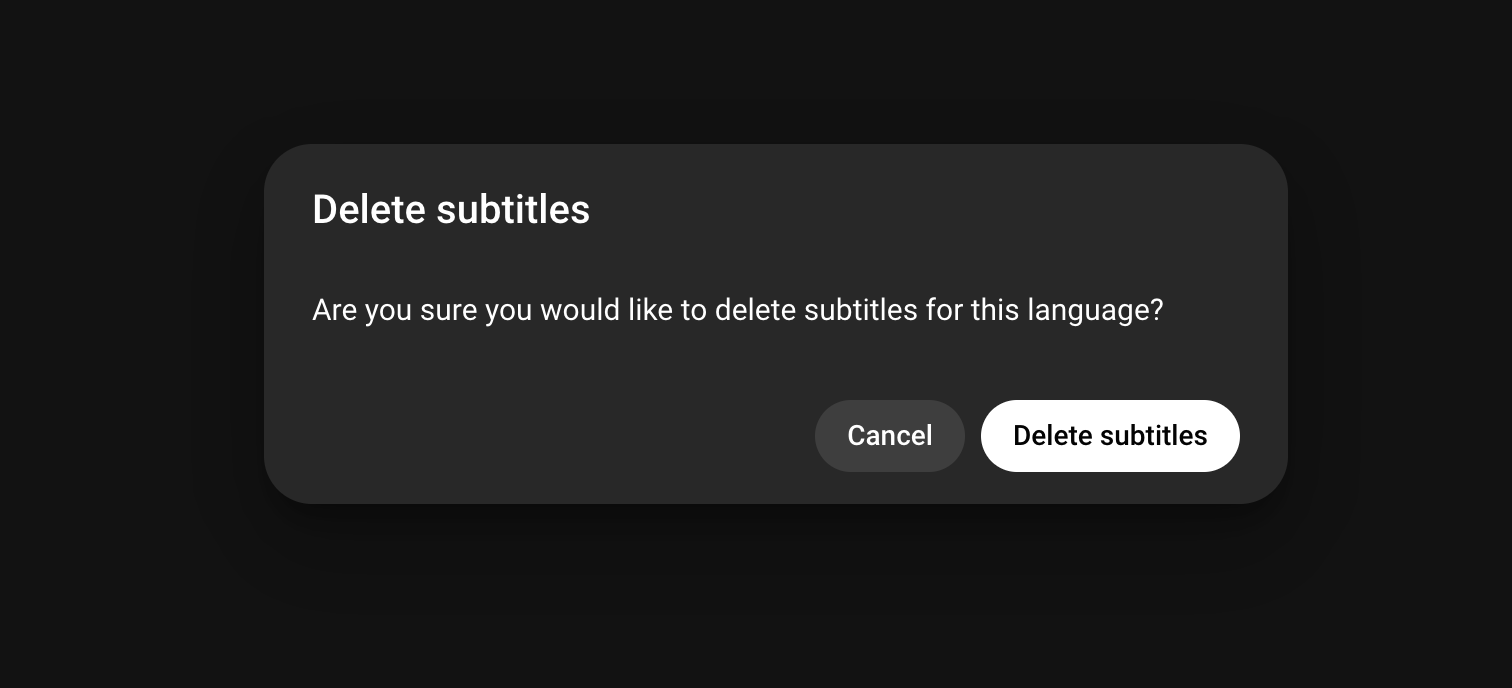
Click on the Options button to the right of the subtitle line and select Delete. When prompted, confirm your selection by pressing Delete Captions.Once complete, you can then add your own Descript-corrected subtitles. See: Adding subtitles to YouTube videos
{"docsConfig":{"theme":"mint","$schema":"https://mintlify.com/docs.json","name":"Descript Help Center","description":"User guides and documentation for Descript, a text-based video and audio editor.","colors":{"primary":"#651A39","light":"#CDCDFE","dark":"#F73B3B"},"logo":{"light":"https://mintcdn.com/descript-5bf56f3f/cSbTRRN32pg3UC1d/images/01a_Logo_2_color_Dark.png?fit=max\u0026auto=format\u0026n=cSbTRRN32pg3UC1d\u0026q=85\u0026s=5d5e4bea817ea025e6f7daf713a7fcfe","dark":"https://mintcdn.com/descript-5bf56f3f/cSbTRRN32pg3UC1d/images/01b_Logo_2_color_Light.png?fit=max\u0026auto=format\u0026n=cSbTRRN32pg3UC1d\u0026q=85\u0026s=90296d892f5b71071480e08d18b959b8"},"favicon":"https://mintcdn.com/descript-5bf56f3f/cSbTRRN32pg3UC1d/images/02a_Monogram_Primary.png?fit=max\u0026auto=format\u0026n=cSbTRRN32pg3UC1d\u0026q=85\u0026s=0dcc0c665590f0d18907633e2c109a25","api":{"openapi":"developers/openapi.json"},"appearance":{"default":"system"},"background":{"color":{"light":"#fdfcfc","dark":"#110A0D"}},"navbar":{"links":[]},"footer":{"socials":{"x":"https://x.com/descript","website":"https://www.descript.com","discord":"https://discord.com/channels/764925197379174411/960303941789294602","reddit":"https://www.reddit.com/r/Descript","facebook":"https://www.facebook.com/descriptapp"}},"fonts":{"heading":{"family":"Booton SemiBold","weight":500},"body":{"family":"Booton Regular","weight":500}},"styling":{"eyebrows":"breadcrumbs","latex":false},"integrations":{"ga4":{"measurementId":"G-5C5EVM1H51"},"posthog":{"apiKey":"phc_w3ZqFHxxJraLWo3LU7wfDkCEhJZLo0X22W9e0VFu2Vu","sessionRecording":true}},"contextual":{"options":["copy","view","assistant","chatgpt","claude","perplexity","grok","aistudio","mcp","cursor","vscode","download-spec","download-pdf"],"display":"header"},"interaction":{"drilldown":false},"navigation":{"pages":[]}},"deployment":{"deploymentMetadataValue":{"subdomain":"descript-5bf56f3f","hasAudioNarration":false,"actualSubdomain":"descript-5bf56f3f","customDomains":["help.descript.com","docs.descriptapi.com"],"gitSource":{"type":"github","owner":"descriptinc","repo":"descript","deployBranch":"main","contentDirectory":"help-center","isPrivate":true,"mountPath":"","label":"","isBase":true},"chroma":{"liveDeploymentHistoryId":"6aecb01564441d6863c94a59","collectionId":"2288632b-54a3-44a7-895f-b76364638fa0","schemaVersion":"v3","latestBuiltDeploymentHistoryId":"6aecb01564441d6863c94a59"},"entitlements":{"AI_CHAT":{"status":"ENABLED"},"REMOVE_BRANDING":{"status":"ENABLED"},"CONTEXTUAL_FEEDBACK":{"status":"ENABLED"},"CODE_SNIPPET_FEEDBACK":{"status":"ENABLED"},"WEB_MCP":{"status":"ENABLED"},"NARRATION":{"status":"ENABLED"}},"buildId":"6aee5c586ef4287a44197d0d","clientVersion":"0.0.4076","searchFilterCounts":[{"language":"default","tag":"Help Center","count":333},{"language":"default","tag":"SquadCast","count":67},{"language":"default","tag":"Script editing","count":34},{"language":"default","tag":"Export \u0026 share","count":33},{"language":"default","tag":"Record","count":28},{"language":"default","tag":"Visuals","count":28},{"language":"default","tag":"Add \u0026 manage media","count":25},{"language":"default","tag":"Effects, animations, transitions","count":23},{"language":"default","tag":"Troubleshooting","count":20},{"language":"default","tag":"Billing, payments, plans","count":19}],"searchSettings":{"isFiltersEnabled":false,"showContentSnippets":true,"maxResults":12}},"assistantConfig":{"enableAskAiButton":false,"enableStarterQuestions":false,"enableContextualStarterQuestions":false,"enableAskAiSearchBar":true,"deflection":{"enabled":true,"type":"link","url":"http://descript.zendesk.com/hc/en-us/requests/new"}},"basePath":"","hasChatPermissions":true,"hasWebMcpPermissions":true,"toggles":[{"name":"kill-isr","enabled":true,"variant":{"name":"disabled","enabled":false,"feature_enabled":true},"impressionData":false},{"name":"agent-mintlify-slack","enabled":true,"variant":{"name":"disabled","enabled":false,"feature_enabled":true},"impressionData":false},{"name":"agent-integrations-settings","enabled":true,"variant":{"name":"disabled","enabled":false,"feature_enabled":true},"impressionData":false},{"name":"rbac-expansion","enabled":true,"variant":{"name":"disabled","enabled":false,"feature_enabled":true},"impressionData":false},{"name":"automations-pr-grouping","enabled":true,"variant":{"name":"disabled","enabled":false,"feature_enabled":true},"impressionData":false},{"name":"custom-prefix","enabled":true,"variant":{"name":"disabled","enabled":false,"feature_enabled":true},"impressionData":false},{"name":"analytics-v7","enabled":true,"variant":{"name":"disabled","enabled":false,"feature_enabled":true},"impressionData":false},{"name":"user-flows-analytics","enabled":true,"variant":{"name":"disabled","enabled":false,"feature_enabled":true},"impressionData":false},{"name":"no-publish-flow","enabled":true,"variant":{"name":"disabled","enabled":false,"feature_enabled":true},"impressionData":false},{"name":"workos-onboarding","enabled":true,"variant":{"name":"disabled","enabled":false,"feature_enabled":true},"impressionData":false},{"name":"llms-txt-v2","enabled":true,"variant":{"name":"disabled","enabled":false,"feature_enabled":true},"impressionData":false},{"name":"snapshot-serving-live","enabled":true,"variant":{"name":"disabled","enabled":false,"feature_enabled":true},"impressionData":false},{"name":"stripTemperatureMiddleware","enabled":true,"variant":{"name":"disabled","enabled":false,"feature_enabled":true},"impressionData":false},{"name":"support-platform-pylon-zendesk","enabled":true,"variant":{"name":"disabled","enabled":false,"feature_enabled":true},"impressionData":false},{"name":"snapshot-serving","enabled":true,"variant":{"name":"disabled","enabled":false,"feature_enabled":true},"impressionData":false},{"name":"instant-rollback","enabled":true,"variant":{"name":"disabled","enabled":false,"feature_enabled":true},"impressionData":false},{"name":"granular-notifications-server","enabled":true,"variant":{"name":"disabled","enabled":false,"feature_enabled":true},"impressionData":false},{"name":"granular-notifications","enabled":true,"variant":{"name":"disabled","enabled":false,"feature_enabled":true},"impressionData":false},{"name":"automations-fable","enabled":true,"variant":{"name":"disabled","enabled":false,"feature_enabled":true},"impressionData":false},{"name":"fixed-ai-action-pricing","enabled":true,"variant":{"name":"disabled","enabled":false,"feature_enabled":true},"impressionData":false},{"name":"automation-resolve-merge-conflict","enabled":true,"variant":{"name":"disabled","enabled":false,"feature_enabled":true},"impressionData":false},{"name":"scoped-publishing","enabled":true,"variant":{"name":"disabled","enabled":false,"feature_enabled":true},"impressionData":false},{"name":"mintql","enabled":true,"variant":{"name":"disabled","enabled":false,"feature_enabled":true},"impressionData":false},{"name":"page-level-analytics","enabled":true,"variant":{"name":"disabled","enabled":false,"feature_enabled":true},"impressionData":false},{"name":"editor-version-history-v2","enabled":true,"variant":{"name":"disabled","enabled":false,"feature_enabled":true},"impressionData":false},{"name":"instinct-self-updating-docs","enabled":true,"variant":{"name":"disabled","enabled":false,"feature_enabled":true},"impressionData":false},{"name":"billing-page-v2","enabled":true,"variant":{"name":"disabled","enabled":false,"feature_enabled":true},"impressionData":false},{"name":"full-page-search","enabled":true,"variant":{"name":"disabled","enabled":false,"feature_enabled":true},"impressionData":false},{"name":"workspace-projects","enabled":true,"variant":{"name":"disabled","enabled":false,"feature_enabled":true},"impressionData":false},{"name":"assistant-v5","enabled":true,"variant":{"name":"disabled","enabled":false,"feature_enabled":true},"impressionData":false},{"name":"fork-pr-previews","enabled":true,"variant":{"name":"disabled","enabled":false,"feature_enabled":true},"impressionData":false},{"name":"revalidation-jwt","enabled":true,"variant":{"name":"disabled","enabled":false,"feature_enabled":true},"impressionData":false},{"name":"workos-sso-scim","enabled":true,"variant":{"name":"disabled","enabled":false,"feature_enabled":true},"impressionData":false},{"name":"hobby-abuse-scan","enabled":true,"variant":{"name":"disabled","enabled":false,"feature_enabled":true},"impressionData":false},{"name":"dashboard-inbox","enabled":true,"variant":{"name":"disabled","enabled":false,"feature_enabled":true},"impressionData":false},{"name":"workos-signup","enabled":true,"variant":{"name":"disabled","enabled":false,"feature_enabled":true},"impressionData":false},{"name":"turbopuffer-dual-write","enabled":true,"variant":{"name":"disabled","enabled":false,"feature_enabled":true},"impressionData":false},{"name":"workos-enabled","enabled":true,"variant":{"name":"disabled","enabled":false,"feature_enabled":true},"impressionData":false},{"name":"approve-review-flow","enabled":true,"variant":{"name":"disabled","enabled":false,"feature_enabled":true},"impressionData":false},{"name":"editor-metadata","enabled":true,"variant":{"name":"disabled","enabled":false,"feature_enabled":true},"impressionData":false},{"name":"sso-setup-deadline-banner","enabled":true,"variant":{"name":"disabled","enabled":false,"feature_enabled":true},"impressionData":false},{"name":"turbopuffer-serve","enabled":true,"variant":{"name":"disabled","enabled":false,"feature_enabled":true},"impressionData":false},{"name":"live-agents","enabled":true,"variant":{"name":"disabled","enabled":false,"feature_enabled":true},"impressionData":false},{"name":"comment-mode","enabled":true,"variant":{"name":"disabled","enabled":false,"feature_enabled":true},"impressionData":false}],"googleFontsInlined":false},"customCss":[{"filePath":"style.css","content":".effect-anchor{scroll-margin-top:6rem}tr:has(.effect-anchor:target){background-color:rgba(101, 26, 57, 0.07)}.dark tr:has(.effect-anchor:target){background-color:rgba(205, 205, 254, 0.1)}tr:has(.effect-anchor) td ul{margin:0}.custom-card{backdrop-filter:brightness(1.06);-webkit-backdrop-filter:brightness(1.06);border:1.5px solid rgba(0, 0, 0, 0.12);border-radius:1rem;transition:transform 0.15s ease,\n box-shadow 0.15s ease,\n border-color 0.15s ease}.custom-card:hover{transform:translateY(-2px);box-shadow:0 4px 8px rgba(0, 0, 0, 0.08)}.dark .custom-card{border-color:rgba(255, 255, 255, 0.14)}.dark .custom-card:hover{border-color:rgba(255, 255, 255, 0.22)}html:not([data-current-path^=\"/squadcast\"]):not([data-current-path^=\"/developers\"]) .sidebar-group-header,html:not([data-current-path^=\"/squadcast\"]):not([data-current-path^=\"/developers\"]) .sidebar-group-header *,html:not([data-current-path^=\"/squadcast\"]):not([data-current-path^=\"/developers\"]) .sidebar-group-header h3.sidebar-title,html:not([data-current-path^=\"/squadcast\"]):not([data-current-path^=\"/developers\"]) .sidebar-group-header h3.sidebar-title span{font-weight:800!important}.dark img[src*=\"squadcast-logo-coin-dark\"]{content:url('/images/squadcast-logo-coin-light.png')}"}],"page":{"pagePath":"export-and-share/youtube-correct-captions","slug":"/export-and-share/youtube-correct-captions","pageMetadata":{"title":"Correcting misspelled captions after uploading to YouTube","description":"Replace YouTube's auto-captions with your Descript transcript.","href":"/export-and-share/youtube-correct-captions"},"description":{"compiledSource":"\"use strict\";\nconst {jsx: _jsx} = arguments[0];\nconst {useMDXComponents: _provideComponents} = arguments[0];\nfunction _createMdxContent(props) {\n const _components = {\n p: \"p\",\n ..._provideComponents(),\n ...props.components\n };\n return _jsx(_components.p, {\n children: \"Replace YouTube’s auto-captions with your Descript transcript.\"\n });\n}\nfunction MDXContent(props = {}) {\n const {wrapper: MDXLayout} = {\n ..._provideComponents(),\n ...props.components\n };\n return MDXLayout ? _jsx(MDXLayout, {\n ...props,\n children: _jsx(_createMdxContent, {\n ...props\n })\n }) : _createMdxContent(props);\n}\nreturn {\n default: MDXContent\n};\n","frontmatter":{},"scope":{}},"pageType":"default","mdx":{"mdxSource":{"compiledSource":"\"use strict\";const{Fragment:_Fragment,jsx:_jsx,jsxs:_jsxs}=arguments[0];const{useMDXComponents:_provideComponents}=arguments[0];function _createMdxContent(props){const _components={a:`a`,p:`p`,strong:`strong`,..._provideComponents(),...props.components},{Heading,Note,OptimizedImage}=_components;if(!Heading)_missingMdxReference(`Heading`,true);if(!Note)_missingMdxReference(`Note`,true);if(!OptimizedImage)_missingMdxReference(`OptimizedImage`,true);return _jsxs(_Fragment,{children:[_jsx(_components.p,{children:`You may notice that after uploading your completed video to YouTube your video contains captions that differ from your Descript captions. YouTube has a feature that automatically generates captions for videos and makes them available to viewers if not removed or replaced.`}),`\n`,_jsx(Heading,{level:`2`,id:`removing-youtube-automatic-captions`,children:`Removing YouTube Automatic Captions`}),`\n`,_jsxs(_components.p,{children:[`Navigate to YouTube and click on `,_jsx(_components.strong,{children:`Your videos`}),` in the left-hand sidebar.`]}),`\n`,_jsx(OptimizedImage,{src:`https://mintcdn.com/descript-5bf56f3f/PCHXsjvSIJj69pdP/images/external/descript-34729758785549-fbc0f60548.png?fit=max\u0026auto=format\u0026n=PCHXsjvSIJj69pdP\u0026q=85\u0026s=bbd57cb3685e3e579ebb5d3efbb345c7`,alt:`2025-03-04_13-11-27.png`,\"data-og-width\":`1280`,width:`1280`,\"data-og-height\":`960`,height:`960`,\"data-path\":`images/external/descript-34729758785549-fbc0f60548.png`,\"data-optimize\":`true`,\"data-opv\":`3`,srcset:`https://mintcdn.com/descript-5bf56f3f/PCHXsjvSIJj69pdP/images/external/descript-34729758785549-fbc0f60548.png?w=280\u0026fit=max\u0026auto=format\u0026n=PCHXsjvSIJj69pdP\u0026q=85\u0026s=4da83d06dbc3a262d9694097600c0e17 280w, https://mintcdn.com/descript-5bf56f3f/PCHXsjvSIJj69pdP/images/external/descript-34729758785549-fbc0f60548.png?w=560\u0026fit=max\u0026auto=format\u0026n=PCHXsjvSIJj69pdP\u0026q=85\u0026s=2c7522b88b69cc747ec9e98d234b7faf 560w, https://mintcdn.com/descript-5bf56f3f/PCHXsjvSIJj69pdP/images/external/descript-34729758785549-fbc0f60548.png?w=840\u0026fit=max\u0026auto=format\u0026n=PCHXsjvSIJj69pdP\u0026q=85\u0026s=f89df9b958c3aaabfa28b1641315eb05 840w, https://mintcdn.com/descript-5bf56f3f/PCHXsjvSIJj69pdP/images/external/descript-34729758785549-fbc0f60548.png?w=1100\u0026fit=max\u0026auto=format\u0026n=PCHXsjvSIJj69pdP\u0026q=85\u0026s=530ad9883277dc89dc3145c74896a94a 1100w, https://mintcdn.com/descript-5bf56f3f/PCHXsjvSIJj69pdP/images/external/descript-34729758785549-fbc0f60548.png?w=1650\u0026fit=max\u0026auto=format\u0026n=PCHXsjvSIJj69pdP\u0026q=85\u0026s=3f322fbdec717efb0112df7286fb4e37 1650w, https://mintcdn.com/descript-5bf56f3f/PCHXsjvSIJj69pdP/images/external/descript-34729758785549-fbc0f60548.png?w=2500\u0026fit=max\u0026auto=format\u0026n=PCHXsjvSIJj69pdP\u0026q=85\u0026s=02910d91f3d0df705fe94ebe60e54482 2500w`}),`\n`,_jsxs(_components.p,{children:[`On the Channel content page, mouse over your video then select the\\xA0`,_jsx(_components.strong,{children:`Details`}),` button.`]}),`\n`,_jsx(OptimizedImage,{src:`https://mintcdn.com/descript-5bf56f3f/PCHXsjvSIJj69pdP/images/external/descript-34729758786701-cce4c1a65e.png?fit=max\u0026auto=format\u0026n=PCHXsjvSIJj69pdP\u0026q=85\u0026s=6a6edfc559a1290ce6f326dca0764162`,alt:`2025-03-04_13-10-09.png`,\"data-og-width\":`3450`,width:`3450`,\"data-og-height\":`1318`,height:`1318`,\"data-path\":`images/external/descript-34729758786701-cce4c1a65e.png`,\"data-optimize\":`true`,\"data-opv\":`3`,srcset:`https://mintcdn.com/descript-5bf56f3f/PCHXsjvSIJj69pdP/images/external/descript-34729758786701-cce4c1a65e.png?w=280\u0026fit=max\u0026auto=format\u0026n=PCHXsjvSIJj69pdP\u0026q=85\u0026s=9eaded2eee1ac9bae7e10565cacd3b80 280w, https://mintcdn.com/descript-5bf56f3f/PCHXsjvSIJj69pdP/images/external/descript-34729758786701-cce4c1a65e.png?w=560\u0026fit=max\u0026auto=format\u0026n=PCHXsjvSIJj69pdP\u0026q=85\u0026s=02b974de10ba02bbada5cd56ca7a41a3 560w, https://mintcdn.com/descript-5bf56f3f/PCHXsjvSIJj69pdP/images/external/descript-34729758786701-cce4c1a65e.png?w=840\u0026fit=max\u0026auto=format\u0026n=PCHXsjvSIJj69pdP\u0026q=85\u0026s=7566dfeec29af1095a8734badbc62c18 840w, https://mintcdn.com/descript-5bf56f3f/PCHXsjvSIJj69pdP/images/external/descript-34729758786701-cce4c1a65e.png?w=1100\u0026fit=max\u0026auto=format\u0026n=PCHXsjvSIJj69pdP\u0026q=85\u0026s=6922de94c76fd1af03fe1502aef8253f 1100w, https://mintcdn.com/descript-5bf56f3f/PCHXsjvSIJj69pdP/images/external/descript-34729758786701-cce4c1a65e.png?w=1650\u0026fit=max\u0026auto=format\u0026n=PCHXsjvSIJj69pdP\u0026q=85\u0026s=d70fafa6d77d77db51a9f075fa5bdcd9 1650w, https://mintcdn.com/descript-5bf56f3f/PCHXsjvSIJj69pdP/images/external/descript-34729758786701-cce4c1a65e.png?w=2500\u0026fit=max\u0026auto=format\u0026n=PCHXsjvSIJj69pdP\u0026q=85\u0026s=00c712d7b06a7f0ec65094ed3be1e773 2500w`}),`\n`,_jsxs(_components.p,{children:[`On the Video details page, click the `,_jsx(_components.strong,{children:`Subtitles`}),` menu in the left-hand sidebar.`]}),`\n`,_jsx(OptimizedImage,{src:`https://mintcdn.com/descript-5bf56f3f/PCHXsjvSIJj69pdP/images/external/descript-34729758787981-ae70033444.png?fit=max\u0026auto=format\u0026n=PCHXsjvSIJj69pdP\u0026q=85\u0026s=112cb34988ea1b4cd1eae0fe59e83524`,alt:`2025-03-04_13-12-25.png`,\"data-og-width\":`3452`,width:`3452`,\"data-og-height\":`1368`,height:`1368`,\"data-path\":`images/external/descript-34729758787981-ae70033444.png`,\"data-optimize\":`true`,\"data-opv\":`3`,srcset:`https://mintcdn.com/descript-5bf56f3f/PCHXsjvSIJj69pdP/images/external/descript-34729758787981-ae70033444.png?w=280\u0026fit=max\u0026auto=format\u0026n=PCHXsjvSIJj69pdP\u0026q=85\u0026s=1b62dc12cca76ad9425e7b250a16bf86 280w, https://mintcdn.com/descript-5bf56f3f/PCHXsjvSIJj69pdP/images/external/descript-34729758787981-ae70033444.png?w=560\u0026fit=max\u0026auto=format\u0026n=PCHXsjvSIJj69pdP\u0026q=85\u0026s=ddcf208d10fffc053da5e9b0c63e14c8 560w, https://mintcdn.com/descript-5bf56f3f/PCHXsjvSIJj69pdP/images/external/descript-34729758787981-ae70033444.png?w=840\u0026fit=max\u0026auto=format\u0026n=PCHXsjvSIJj69pdP\u0026q=85\u0026s=c55c77deecb2ff61b78f715a1630a712 840w, https://mintcdn.com/descript-5bf56f3f/PCHXsjvSIJj69pdP/images/external/descript-34729758787981-ae70033444.png?w=1100\u0026fit=max\u0026auto=format\u0026n=PCHXsjvSIJj69pdP\u0026q=85\u0026s=c7373f9c54346fae9a2d49c384482f52 1100w, https://mintcdn.com/descript-5bf56f3f/PCHXsjvSIJj69pdP/images/external/descript-34729758787981-ae70033444.png?w=1650\u0026fit=max\u0026auto=format\u0026n=PCHXsjvSIJj69pdP\u0026q=85\u0026s=4eb4248c9feb62f21d22e80c8f6d541d 1650w, https://mintcdn.com/descript-5bf56f3f/PCHXsjvSIJj69pdP/images/external/descript-34729758787981-ae70033444.png?w=2500\u0026fit=max\u0026auto=format\u0026n=PCHXsjvSIJj69pdP\u0026q=85\u0026s=7e80710b4ee4712f8e9ea54f841e5d00 2500w`}),`\n`,_jsx(_components.p,{children:`Once the captions have finished processing, they will appear as an “English (Automatic)” subtitle.`}),`\n`,_jsx(OptimizedImage,{src:`https://mintcdn.com/descript-5bf56f3f/PCHXsjvSIJj69pdP/images/external/descript-34729786901005-00d0ce1ce1.png?fit=max\u0026auto=format\u0026n=PCHXsjvSIJj69pdP\u0026q=85\u0026s=ad460eb33aa7469e53c1ebbc79959fa2`,alt:`2025-03-04_13-13-42.png`,\"data-og-width\":`3454`,width:`3454`,\"data-og-height\":`922`,height:`922`,\"data-path\":`images/external/descript-34729786901005-00d0ce1ce1.png`,\"data-optimize\":`true`,\"data-opv\":`3`,srcset:`https://mintcdn.com/descript-5bf56f3f/PCHXsjvSIJj69pdP/images/external/descript-34729786901005-00d0ce1ce1.png?w=280\u0026fit=max\u0026auto=format\u0026n=PCHXsjvSIJj69pdP\u0026q=85\u0026s=fc779fdd3572fedf4b5ba0d13a67d08f 280w, https://mintcdn.com/descript-5bf56f3f/PCHXsjvSIJj69pdP/images/external/descript-34729786901005-00d0ce1ce1.png?w=560\u0026fit=max\u0026auto=format\u0026n=PCHXsjvSIJj69pdP\u0026q=85\u0026s=ccd71af0fe09050fb86e7d442657b662 560w, https://mintcdn.com/descript-5bf56f3f/PCHXsjvSIJj69pdP/images/external/descript-34729786901005-00d0ce1ce1.png?w=840\u0026fit=max\u0026auto=format\u0026n=PCHXsjvSIJj69pdP\u0026q=85\u0026s=79a1b4af463148ef2d38f4d7240d0ec1 840w, https://mintcdn.com/descript-5bf56f3f/PCHXsjvSIJj69pdP/images/external/descript-34729786901005-00d0ce1ce1.png?w=1100\u0026fit=max\u0026auto=format\u0026n=PCHXsjvSIJj69pdP\u0026q=85\u0026s=428d9a116ab5fdfbc6a2197557cd99fc 1100w, https://mintcdn.com/descript-5bf56f3f/PCHXsjvSIJj69pdP/images/external/descript-34729786901005-00d0ce1ce1.png?w=1650\u0026fit=max\u0026auto=format\u0026n=PCHXsjvSIJj69pdP\u0026q=85\u0026s=5f0d54a28cc6790b2686061aed40c4e3 1650w, https://mintcdn.com/descript-5bf56f3f/PCHXsjvSIJj69pdP/images/external/descript-34729786901005-00d0ce1ce1.png?w=2500\u0026fit=max\u0026auto=format\u0026n=PCHXsjvSIJj69pdP\u0026q=85\u0026s=3ecf30e01cae15fcfbf16b40265aa567 2500w`}),`\n`,_jsxs(Note,{children:[_jsx(_components.p,{children:_jsx(_components.strong,{children:`Note`})}),_jsx(_components.p,{children:`They may not be visible for some time after the upload has finished processing, depending upon the length of your video.`})]}),`\n`,_jsxs(_components.p,{children:[`Click on the `,_jsx(_components.strong,{children:`Options`}),` button to the right of the subtitle line and select\\xA0`,_jsx(_components.strong,{children:`Delete`}),`. When prompted, confirm your selection by pressing\\xA0`,_jsx(_components.strong,{children:`Delete Captions`}),`.`]}),`\n`,_jsx(OptimizedImage,{src:`https://mintcdn.com/descript-5bf56f3f/PCHXsjvSIJj69pdP/images/external/descript-34729786901261-020a3c738a.png?fit=max\u0026auto=format\u0026n=PCHXsjvSIJj69pdP\u0026q=85\u0026s=608c6335566614321189bc0e59613e55`,alt:`2025-03-04_13-14-19.png`,\"data-og-width\":`1512`,width:`1512`,\"data-og-height\":`688`,height:`688`,\"data-path\":`images/external/descript-34729786901261-020a3c738a.png`,\"data-optimize\":`true`,\"data-opv\":`3`,srcset:`https://mintcdn.com/descript-5bf56f3f/PCHXsjvSIJj69pdP/images/external/descript-34729786901261-020a3c738a.png?w=280\u0026fit=max\u0026auto=format\u0026n=PCHXsjvSIJj69pdP\u0026q=85\u0026s=af6101066050286b38799e1cd8a8fab9 280w, https://mintcdn.com/descript-5bf56f3f/PCHXsjvSIJj69pdP/images/external/descript-34729786901261-020a3c738a.png?w=560\u0026fit=max\u0026auto=format\u0026n=PCHXsjvSIJj69pdP\u0026q=85\u0026s=cb6baef847d8d151056b1a46e1dff6bd 560w, https://mintcdn.com/descript-5bf56f3f/PCHXsjvSIJj69pdP/images/external/descript-34729786901261-020a3c738a.png?w=840\u0026fit=max\u0026auto=format\u0026n=PCHXsjvSIJj69pdP\u0026q=85\u0026s=d08e9a17c3c521d25392733dee5c6310 840w, https://mintcdn.com/descript-5bf56f3f/PCHXsjvSIJj69pdP/images/external/descript-34729786901261-020a3c738a.png?w=1100\u0026fit=max\u0026auto=format\u0026n=PCHXsjvSIJj69pdP\u0026q=85\u0026s=a57896ea5e4ec890cde64297ddf1d548 1100w, https://mintcdn.com/descript-5bf56f3f/PCHXsjvSIJj69pdP/images/external/descript-34729786901261-020a3c738a.png?w=1650\u0026fit=max\u0026auto=format\u0026n=PCHXsjvSIJj69pdP\u0026q=85\u0026s=fee7b35adf4645270b763e4618cb8b0c 1650w, https://mintcdn.com/descript-5bf56f3f/PCHXsjvSIJj69pdP/images/external/descript-34729786901261-020a3c738a.png?w=2500\u0026fit=max\u0026auto=format\u0026n=PCHXsjvSIJj69pdP\u0026q=85\u0026s=f1b54584614721fec43bcb827a6f14dc 2500w`}),`\n`,_jsxs(_components.p,{children:[`Once complete, you can then add your own Descript-corrected subtitles. See: `,_jsx(_components.a,{href:`/export-and-share/youtube-add-subtitles`,children:`Adding subtitles to YouTube videos`})]})]})}function MDXContent(props={}){const{wrapper:MDXLayout}={..._provideComponents(),...props.components};return MDXLayout?_jsx(MDXLayout,{...props,children:_jsx(_createMdxContent,{...props})}):_createMdxContent(props)}return{default:MDXContent};function _missingMdxReference(id,component){throw new Error(`Expected `+(component?`component`:`object`)+\" `\"+id+\"` to be defined: you likely forgot to import, pass, or provide it.\")}","frontmatter":{},"scope":{"config":{},"pageMetadata":{"title":"Correcting misspelled captions after uploading to YouTube","description":"Replace YouTube's auto-captions with your Descript transcript.","href":"/export-and-share/youtube-correct-captions"}}},"mdxSourceWithNoJs":null},"mdxExtracts":{"tableOfContents":[{"title":"Removing YouTube Automatic Captions","slug":"removing-youtube-automatic-captions","depth":2,"children":[]}],"codeExamples":{}},"jsLinks":["/_mintlify/custom/descript-5bf56f3f/2dc3a904ed64e2d6/analytics.js","/_mintlify/custom/descript-5bf56f3f/0f2d12095d1f7fa5/legacy-hash-redirect.js"],"subdomain":"descript-5bf56f3f","siteName":"Descript Help Center","title":"Correcting misspelled captions after uploading to YouTube - Descript Help Center","relatedPagesConfig":{"enabled":true,"limit":5,"mode":"automatic"},"navMaps":{"firstHrefInVersion":{},"firstHrefInLanguage":{}},"lastModified":"2026-08-18T22:26:41.230Z","originalFileLocation":"export-and-share/youtube-correct-captions.mdx"},"headHtml":"\u003cscript data-mint-head>(function(){var d=document.documentElement,p=null;if(!p){try{p=localStorage.getItem(\"isDarkMode\")}catch(e){}if(p==='true')p='dark';else if(p==='false')p='light';if(p!=='light'\u0026\u0026p!=='dark'\u0026\u0026p!=='system')p=\"system\"}var r=p==='system'?(matchMedia(\"(prefers-color-scheme: dark)\").matches?'dark':'light'):p;d.classList.remove(r==='dark'?'light':'dark');d.classList.add(r);d.setAttribute(\"data-theme-preference\",p)})();\u003c/script>\u003cmeta data-mint-head name=\"description\" content=\"Replace YouTube\u0026#x27;s auto-captions with your Descript transcript.\">\u003cmeta data-mint-head name=\"application-name\" content=\"Descript Help Center\">\u003cmeta data-mint-head name=\"generator\" content=\"Mintlify\">\u003clink data-mint-head rel=\"icon\" type=\"image/png\" sizes=\"192x192\" href=\"/mintlify-assets/_mintlify/favicons/descript-5bf56f3f/kFeqHqu-v8e5VpSc/_generated/favicon/android-chrome-192x192.png\" media=\"(prefers-color-scheme: light)\">\u003clink data-mint-head rel=\"apple-touch-icon\" type=\"image/png\" sizes=\"180x180\" href=\"/mintlify-assets/_mintlify/favicons/descript-5bf56f3f/kFeqHqu-v8e5VpSc/_generated/favicon/apple-touch-icon.png\">\u003clink data-mint-head rel=\"icon\" type=\"image/png\" sizes=\"16x16\" href=\"/mintlify-assets/_mintlify/favicons/descript-5bf56f3f/kFeqHqu-v8e5VpSc/_generated/favicon/favicon-16x16.png\" media=\"(prefers-color-scheme: light)\">\u003clink data-mint-head rel=\"icon\" type=\"image/png\" sizes=\"32x32\" href=\"/mintlify-assets/_mintlify/favicons/descript-5bf56f3f/kFeqHqu-v8e5VpSc/_generated/favicon/favicon-32x32.png\" media=\"(prefers-color-scheme: light)\">\u003clink data-mint-head rel=\"shortcut icon\" type=\"image/x-icon\" href=\"/mintlify-assets/_mintlify/favicons/descript-5bf56f3f/kFeqHqu-v8e5VpSc/_generated/favicon/favicon.ico\" media=\"(prefers-color-scheme: light)\">\u003clink data-mint-head rel=\"icon\" type=\"image/png\" sizes=\"192x192\" href=\"/mintlify-assets/_mintlify/favicons/descript-5bf56f3f/kFeqHqu-v8e5VpSc/_generated/favicon-dark/android-chrome-192x192.png\" media=\"(prefers-color-scheme: dark)\">\u003clink data-mint-head rel=\"icon\" type=\"image/png\" sizes=\"16x16\" href=\"/mintlify-assets/_mintlify/favicons/descript-5bf56f3f/kFeqHqu-v8e5VpSc/_generated/favicon-dark/favicon-16x16.png\" media=\"(prefers-color-scheme: dark)\">\u003clink data-mint-head rel=\"icon\" type=\"image/png\" sizes=\"32x32\" href=\"/mintlify-assets/_mintlify/favicons/descript-5bf56f3f/kFeqHqu-v8e5VpSc/_generated/favicon-dark/favicon-32x32.png\" media=\"(prefers-color-scheme: dark)\">\u003clink data-mint-head rel=\"shortcut icon\" type=\"image/x-icon\" href=\"/mintlify-assets/_mintlify/favicons/descript-5bf56f3f/kFeqHqu-v8e5VpSc/_generated/favicon-dark/favicon.ico\" media=\"(prefers-color-scheme: dark)\">\u003cmeta data-mint-head property=\"og:title\" content=\"Correcting misspelled captions after uploading to YouTube - Descript Help Center\">\u003cmeta data-mint-head property=\"og:description\" content=\"Replace YouTube\u0026#x27;s auto-captions with your Descript transcript.\">\u003cmeta data-mint-head property=\"og:site_name\" content=\"Descript Help Center\">\u003cmeta data-mint-head property=\"og:url\" content=\"https://help.descript.com/export-and-share/youtube-correct-captions\">\u003cmeta data-mint-head property=\"og:type\" content=\"website\">\u003cmeta data-mint-head property=\"og:image\" content=\"https://descript-5bf56f3f.mintlify.site/_mintlify/api/og/v2?division=Export+to+a+host+platform\u0026amp;title=Correcting+misspelled+captions+after+uploading+to+YouTube\u0026amp;description=Replace+YouTube%27s+auto-captions+with+your+Descript+transcript.\u0026amp;theme=f81376d507a7ea740b835510\u0026amp;signature=edffeb465174694aa910935fb67acc54ca1e6a4784b9ca17ac1d72b9bfb299b3\">\u003cmeta data-mint-head property=\"og:image:width\" content=\"1200\">\u003cmeta data-mint-head property=\"og:image:height\" content=\"630\">\u003cmeta data-mint-head name=\"twitter:card\" content=\"summary_large_image\">\u003cmeta data-mint-head name=\"twitter:title\" content=\"Correcting misspelled captions after uploading to YouTube - Descript Help Center\">\u003cmeta data-mint-head name=\"twitter:description\" content=\"Replace YouTube\u0026#x27;s auto-captions with your Descript transcript.\">\u003cmeta data-mint-head name=\"twitter:image\" content=\"https://descript-5bf56f3f.mintlify.site/_mintlify/api/og/v2?division=Export+to+a+host+platform\u0026amp;title=Correcting+misspelled+captions+after+uploading+to+YouTube\u0026amp;description=Replace+YouTube%27s+auto-captions+with+your+Descript+transcript.\u0026amp;theme=f81376d507a7ea740b835510\u0026amp;signature=edffeb465174694aa910935fb67acc54ca1e6a4784b9ca17ac1d72b9bfb299b3\">\u003cmeta data-mint-head name=\"twitter:image:width\" content=\"1200\">\u003cmeta data-mint-head name=\"twitter:image:height\" content=\"630\">\u003cmeta data-mint-head name=\"msapplication-config\" content=\"/mintlify-assets/_mintlify/favicons/descript-5bf56f3f/kFeqHqu-v8e5VpSc/_generated/favicon/browserconfig.xml\">\u003cmeta data-mint-head name=\"apple-mobile-web-app-title\" content=\"Descript Help Center\">\u003cmeta data-mint-head name=\"msapplication-TileColor\" content=\"#651A39\">\u003clink data-mint-head rel=\"canonical\" href=\"https://help.descript.com/export-and-share/youtube-correct-captions\">\u003clink data-mint-head rel=\"alternate\" type=\"application/xml\" href=\"/sitemap.xml\">\u003clink data-mint-head rel=\"alternate\" type=\"text/markdown\" href=\"/export-and-share/youtube-correct-captions.md\">\u003cscript data-mint-head type=\"application/ld+json\">{\"@context\":\"https://schema.org\",\"@graph\":[{\"@type\":\"Organization\",\"@id\":\"https://help.descript.com/#organization\",\"name\":\"Descript Help Center\",\"url\":\"https://help.descript.com\",\"logo\":{\"@type\":\"ImageObject\",\"url\":\"https://mintcdn.com/descript-5bf56f3f/cSbTRRN32pg3UC1d/images/01a_Logo_2_color_Dark.png?fit=max\u0026auto=format\u0026n=cSbTRRN32pg3UC1d\u0026q=85\u0026s=5d5e4bea817ea025e6f7daf713a7fcfe\"}},{\"@type\":\"WebSite\",\"@id\":\"https://help.descript.com#website\",\"name\":\"Descript Help Center\",\"url\":\"https://help.descript.com\",\"publisher\":{\"@id\":\"https://help.descript.com/#organization\"}},{\"@type\":\"WebPage\",\"@id\":\"https://help.descript.com/export-and-share/youtube-correct-captions#webpage\",\"url\":\"https://help.descript.com/export-and-share/youtube-correct-captions\",\"name\":\"Correcting misspelled captions after uploading to YouTube\",\"description\":\"Replace YouTube's auto-captions with your Descript transcript.\",\"dateModified\":\"2026-08-18T22:26:41.230Z\",\"isPartOf\":{\"@id\":\"https://help.descript.com#website\"},\"breadcrumb\":{\"@id\":\"https://help.descript.com/export-and-share/youtube-correct-captions#breadcrumb\"}},{\"@type\":\"BreadcrumbList\",\"@id\":\"https://help.descript.com/export-and-share/youtube-correct-captions#breadcrumb\",\"itemListElement\":[{\"@type\":\"ListItem\",\"position\":1,\"name\":\"Export \u0026 share\",\"item\":\"https://help.descript.com/export-and-share/export-and-publishing-overview\"},{\"@type\":\"ListItem\",\"position\":2,\"name\":\"Export to a host platform\",\"item\":\"https://help.descript.com/export-and-share/buzzsprout\"},{\"@type\":\"ListItem\",\"position\":3,\"name\":\"Correcting misspelled captions after uploading to YouTube\",\"item\":\"https://help.descript.com/export-and-share/youtube-correct-captions\"}]},{\"@type\":[\"Article\",\"TechArticle\"],\"@id\":\"https://help.descript.com/export-and-share/youtube-correct-captions#article\",\"headline\":\"Correcting misspelled captions after uploading to YouTube\",\"name\":\"Correcting misspelled captions after uploading to YouTube\",\"description\":\"Replace YouTube's auto-captions with your Descript transcript.\",\"url\":\"https://help.descript.com/export-and-share/youtube-correct-captions\",\"mainEntityOfPage\":{\"@id\":\"https://help.descript.com/export-and-share/youtube-correct-captions#webpage\"},\"dateModified\":\"2026-08-18T22:26:41.230Z\",\"publisher\":{\"@id\":\"https://help.descript.com/#organization\"},\"isPartOf\":{\"@id\":\"https://help.descript.com#website\"}}]}\u003c/script>","siteName":"Descript Help Center","nav":{"global":null,"tabs":[{"tab":"Help Center","icon":"life-ring","groups":[{"group":"Home","icon":"house","pages":[{"title":"Welcome","mode":"frame","href":""}]},{"group":"Descript terms and concepts","icon":"book","hidden":true,"pages":[{"title":"Descript terminology and concepts","href":"/descript-terms-and-concepts"}]},{"group":"Getting started","icon":"rocket","pages":[{"title":"Get started with Descript","sidebarTitle":"Get started with Descript","href":"/getting-started/get-started-with-descript"},{"group":"Set up and install","pages":[{"title":"Sign in to Descript","sidebarTitle":"Sign in","href":"/getting-started/sign-in"},{"title":"Download and install Descript","href":"/getting-started/install"},{"title":"Descript for web","sidebarTitle":"Descript for web","href":"/getting-started/descript-for-web"},{"title":"Descript system requirements","sidebarTitle":"System requirements","href":"/getting-started/descript-system-requirements"},{"title":"Uninstalling Descript","href":"/getting-started/uninstalling-descript"}]},{"group":"Edit your first project","pages":[{"title":"Create a new project","href":"/getting-started/create-a-new-project"},{"title":"Import and upload files into Descript","href":"/getting-started/import-overview"},{"title":"Add a file to the script","href":"/getting-started/add-a-file-to-the-script"},{"title":"Edit like a doc","sidebarTitle":"Edit like a doc","href":"/getting-started/edit-like-a-doc"},{"title":"Scenes overview","href":"/getting-started/scenes"},{"title":"Underlord (Beta): Your AI co-editor in Descript","sidebarTitle":"Underlord","href":"/getting-started/underlord-beta-your-ai-co-editor-in-descript"}]}]},{"group":"Switch to Descript","icon":"arrow-right-arrow-left","pages":[{"title":"Switch from Riverside to Descript","sidebarTitle":"Switch from Riverside","href":"/switch-from-riverside"}]},{"group":"Descript tour","icon":"compass","pages":[{"title":"Navigating Descript","sidebarTitle":"Navigating Descript","href":"/descript-tour/navigating-descript"},{"title":"Drive view","sidebarTitle":"Drive view","href":"/descript-tour/drive-view"},{"group":"The Descript editor","pages":[{"title":"The editor interface","href":"/descript-tour/the-editor-interface"},{"title":"Playback and navigation","href":"/descript-tour/playback-and-navigation"},{"title":"Customize the editor","href":"/descript-tour/customize-the-editor"},{"title":"Multi-window editing","href":"/descript-tour/multi-window-editing"},{"title":"Project panel","href":"/descript-tour/project-panel"},{"title":"Properties panel","href":"/descript-tour/properties-panel"},{"title":"Find and add media with the Media panel","sidebarTitle":"Media panel","href":"/descript-tour/media-panel"},{"title":"Manage the editor layout with the view menu","href":"/descript-tour/view-menu"}]},{"group":"Toolbars, shortcuts","pages":[{"title":"Action bar","href":"/descript-tour/action-bar"},{"title":"Selection toolbar","href":"/descript-tour/selection-toolbar"},{"title":"Keyboard shortcuts","href":"/descript-tour/keyboard-shortcuts"},{"title":"Copy and paste attributes","href":"/descript-tour/copy-paste-attributes"}]},{"group":"AI Tools","pages":[{"title":"AI tools overview","href":"/descript-tour/ai-tools-overview"},{"title":"Sound good with AI tools","href":"/descript-tour/sound-good-tools"},{"title":"Look good with AI tools","href":"/descript-tour/look-good-tools"},{"title":"Repurpose with AI tools","href":"/descript-tour/repurpose-tools"},{"title":"Publish with AI tools","href":"/descript-tour/publish-tools"},{"title":"Write with AI tools","href":"/descript-tour/write-tools"}]}]},{"group":"Record","icon":"microphone","pages":[{"title":"Choose a recording method in Descript","sidebarTitle":"Recorder overview","href":"/record/editor-recorder-overview"},{"group":"Rooms","pages":[{"title":"Get started with Descript Rooms","sidebarTitle":"Rooms overview","href":"/record/rooms-overview"},{"title":"Create a Rooms session and invite participants","href":"/record/host-guide"},{"title":"Join a Descript Room","href":"/record/guest-guide"},{"title":"Record in a Descript Room","href":"/record/record-in-a-descript-room"},{"title":"Rooms: Recording checklist","sidebarTitle":"Recording checklist","href":"/record/recording-checklist"},{"title":"Control Room overview","href":"/record/control-room"},{"title":"Roles in Descript Rooms","sidebarTitle":"Roles","href":"/record/roles"},{"title":"Descript Rooms settings","href":"/record/room-settings"},{"title":"Use push-to-talk in the Control Room","sidebarTitle":"Push-to-talk","href":"/record/push-to-talk"},{"title":"Leave editor comments during a live room session","sidebarTitle":"Rooms comments","href":"/record/comments"},{"title":"Schedule a Descript Rooms session","href":"/record/schedule"},{"title":"Edit a Descript Rooms project","href":"/record/edit"},{"title":"Audio and video quality","href":"/record/quality"},{"title":"Async recordings","sidebarTitle":"Async recordings","href":"/record/async-recordings"}]},{"group":"Editor recorder","pages":[{"title":"Choose a recording method in Descript","sidebarTitle":"Recorder overview","href":"/record/editor-recorder-overview"},{"title":"How to use the editor recorder in Descript","href":"/record/editor-recorder"},{"title":"How to record multiple USB mics or devices at the same time on macOS","href":"/record/multi-device-macos"},{"title":"Unsupported recording devices and services","href":"/record/unsupported"}]},{"group":"Screen recording","pages":[{"title":"How to use the screen recorder in the Descript desktop app","href":"/record/screen-recorder"},{"title":"Record a slideshow presentation with Descript","href":"/record/presentation"}]},{"title":"Record with Descript's built-in teleprompter","sidebarTitle":"Teleprompter","href":"/record/record-with-descript-s-built-in-teleprompter"},{"group":"Troubleshooting","pages":[{"title":"Troubleshooting recorder issues","href":"/record/troubleshooting"},{"title":"Recording performance issues: Low frame rate or sync problems","href":"/record/frame-rate-sync"},{"title":"Troubleshooting recording device connection issues","href":"/record/device-connection"},{"title":"Recover a lost Descript recording","href":"/record/recover"},{"title":"Recover and replace stalled Rooms recordings","href":"/record/rooms-recover-replace"},{"title":"Troubleshooting issues with Descript Rooms","href":"/record/rooms-ts"},{"title":"Frequently asked questions about Descript Rooms","href":"/record/rooms-faq"}]}]},{"group":"Add \u0026 manage media","icon":"photo-film","pages":[{"group":"Import","pages":[{"title":"Import and upload files into Descript","href":"/getting-started/import-overview"},{"title":"Upload a file from your computer","href":"/add-and-manage-media/local"},{"title":"Import files from Google Drive","href":"/add-and-manage-media/google-drive"},{"title":"Import files from other projects","href":"/add-and-manage-media/projects"},{"title":"Upload a slide deck (PDF) into Descript","href":"/add-and-manage-media/slides"},{"title":"Import Brand Studio media into your project","href":"/add-and-manage-media/brand-media"},{"title":"Import Zoom recordings into Descript","href":"/add-and-manage-media/zoom"},{"title":"Import files using edit in Descript","tag":"beta","href":"/add-and-manage-media/editInDescript"},{"title":"Importing Captivate episodes directly into Descript (Beta)","href":"/add-and-manage-media/captivate"},{"title":"Importing Restream recordings directly into Descript (Beta)","href":"/add-and-manage-media/restream"},{"title":"Supported file types","href":"/add-and-manage-media/supported-file-types"}]},{"group":"Media Library","pages":[{"title":"Media library","sidebarTitle":"Media library","href":"/add-and-manage-media/media-library-overview"},{"title":"Import media library files to your project","href":"/add-and-manage-media/import-media-library"}]},{"group":"Stock media","pages":[{"title":"Find and add media with the Media panel","sidebarTitle":"Media panel","href":"/descript-tour/media-panel"},{"title":"How to avoid and resolve YouTube copyright strikes when using stock media","href":"/add-and-manage-media/copyright-strikes"}]},{"group":"Manage media files","pages":[{"title":"Project file actions","href":"/add-and-manage-media/project-file-actions"},{"title":"Replace file","href":"/add-and-manage-media/replace-file"},{"title":"Repair audio drift","href":"/add-and-manage-media/repair-audio-drift"},{"title":"Adjust A/V sync offset for a media file","href":"/add-and-manage-media/av-sync"},{"title":"Flatten tracks","href":"/add-and-manage-media/flatten-tracks"},{"title":"Troubleshooting audio and video sync issues","href":"/add-and-manage-media/ts-av-issues"},{"title":"Troubleshooting missing file errors","href":"/add-and-manage-media/ts-missing-files"},{"title":"Why is my import or upload taking so long?","href":"/add-and-manage-media/ts-import-lag"},{"title":"Fix color problems when importing HDR videos into Descript","href":"/add-and-manage-media/ts-hdr"}]},{"sidebarTitle":"Search","title":"Search","href":"/add-and-manage-media/search-your-drive"}]},{"group":"Script editing","icon":"edit","pages":[{"title":"Edit like a doc","sidebarTitle":"Edit like a doc","href":"/getting-started/edit-like-a-doc"},{"group":"Transcription","pages":[{"title":"Automatic transcription","href":"/script-editing/automatic-transcription"},{"title":"Supported transcription languages","href":"/script-editing/supported-transcription-languages"},{"title":"Use your own transcript","href":"/script-editing/import-transcript"},{"title":"The wordbar","href":"/script-editing/the-wordbar"},{"title":"Realign words in a transcript","href":"/script-editing/realign-range"},{"title":"Transcription glossary","href":"/script-editing/transcription-glossary"}]},{"group":"Making edits","pages":[{"title":"Add a file to the script","href":"/getting-started/add-a-file-to-the-script"},{"title":"Deleting vs ignoring script text","href":"/script-editing/delete-vs-ignore"},{"title":"Filler words","href":"/script-editing/filler-words"},{"title":"Edit boundaries","href":"/script-editing/edit-boundaries"},{"title":"Restore removed media","href":"/script-editing/restore-removed-media"},{"title":"Edit word gaps in your script","href":"/script-editing/word-gaps"},{"title":"Highlight text and copy highlights","href":"/script-editing/highlights"},{"title":"Markers and chapters","href":"/script-editing/markers-chapters"},{"title":"Replace script track","href":"/script-editing/replace-script-track"},{"title":"Search in script tool","href":"/script-editing/search-in-script-tool"},{"title":"Wordless media in your script (Beta)","href":"/script-editing/wordless-media"}]},{"group":"Corrections \u0026 pacing","pages":[{"title":"Correct your transcript","href":"/script-editing/correct-your-transcript"},{"title":"Shorten Word Gaps","href":"/script-editing/shorten-word-gaps"},{"title":"Edit for Clarity","href":"/script-editing/edit-for-clarity"},{"title":"Trim and adjust spaces between words","href":"/script-editing/trim-and-adjust-spaces-between-words"}]},{"group":"Regenerate","pages":[{"title":"Regenerate overview","href":"/script-editing/regenerate-overview"},{"title":"Smooth jumpy or awkward audio cuts with Regenerate","href":"/script-editing/fix-take"},{"title":"Smooth jump cuts","sidebarTitle":"Smooth jump cuts","tag":"New","href":"/script-editing/smooth-jump-cuts"},{"title":"Use Regenerate to edit or change recorded audio","href":"/script-editing/change-meaning"}]},{"group":"Speakers","pages":[{"title":"Speakers overview","sidebarTitle":"Speakers","href":"/script-editing/speakers"},{"title":"Speaker labels","sidebarTitle":"Speaker labels","href":"/script-editing/speaker-labels"},{"title":"Automatic speaker detection","href":"/script-editing/speaker-detection"}]},{"group":"Multi-track (sequences)","pages":[{"title":"Sequence overview","href":"/script-editing/multi-track-sequences-overview"},{"title":"Create a sequence","href":"/script-editing/create-a-sequence"},{"title":"Edit individual tracks with the Sequence Editor","href":"/script-editing/sequence-editor"},{"title":"Detach audio","href":"/script-editing/detach-audio"},{"title":"Fix duplicate transcripts or mic bleed","href":"/script-editing/fix-duplicate-transcripts-or-mic-bleed"}]}]},{"group":"Visuals","icon":"image","pages":[{"group":"Scenes","pages":[{"title":"Scene Editor overview","href":"/visuals/scene-editor-overview"},{"title":"Scene boundaries","href":"/visuals/boundaries"},{"title":"Scene properties","href":"/visuals/properties"},{"title":"Splitting vs. creating a new scene","href":"/visuals/split-vs-create"},{"title":"Control how layers behave across scenes in Descript","href":"/visuals/scenes-layers"},{"title":"Attaching a layer to a scene","href":"/visuals/attach-layer"},{"title":"Reorder scenes","href":"/visuals/reorder"}]},{"title":"Scene Editor tools","sidebarTitle":"Scene editor tools","href":"/visuals/scene-editor-tools"},{"group":"Working with layers and clips","pages":[{"title":"Layer and clip overview","href":"/visuals/working-with-layers-and-clips-overview"},{"title":"Adjust layer properties","href":"/visuals/layer-properties"},{"title":"Adjust clip speed, duration, or looping","href":"/visuals/clip-properties"},{"title":"Add layers to your composition","href":"/visuals/add-layer"},{"title":"Layer visibility and order","href":"/visuals/layer-visibility"},{"title":"Lock layers in Descript","href":"/visuals/lock-layers"},{"title":"Multi-select: Move, resize, and align layers together","href":"/visuals/multi-select"},{"title":"Replace media (B-roll, images, audio) in your composition","href":"/visuals/replace-media"},{"title":"Apply color, gradients, and stroke to elements","sidebarTitle":"Fill and stroke","href":"/visuals/color-stroke"},{"title":"Placeholder layers","href":"/visuals/placeholder-layers"},{"title":"Visual roles","href":"/visuals/visual-roles"}]},{"group":"Captions, shapes, elements","pages":[{"title":"Captions","href":"/visuals/captions"},{"title":"Add and customize text layers","href":"/visuals/text-layers"},{"title":"Shape layers","href":"/visuals/shapes"},{"title":"Waveforms","href":"/visuals/waveforms"},{"title":"Progress bars","href":"/visuals/progress-bars"},{"title":"Custom fonts","href":"/visuals/custom-fonts"}]},{"group":"Speaker framing","pages":[{"title":"Automatic Multicam","href":"/visuals/automatic-multicam"},{"title":"Center active speaker (Beta)","href":"/visuals/center-active-speaker"}]},{"title":"Save a frame from your video","sidebarTitle":"Save a frame from your video","href":"/visuals/save-a-frame-from-your-video"},{"group":"AI-assisted visual editing","pages":[{"title":"AI video maker","sidebarTitle":"AI Video Maker","href":"/ai-assistant/ai-video-maker"},{"title":"Create a first-draft video with Quick Design","sidebarTitle":"Create a first-draft video with Quick design","href":"/ai-assistant/quick-design"}]}]},{"group":"Timeline","icon":"timeline","pages":[{"title":"Timeline overview","sidebarTitle":"Timeline overview","href":"/timeline/timeline-overview"},{"group":"Timeline tools","pages":[{"title":"Advanced timeline tools","href":"/timeline/timeline-tools"},{"title":"The split button: How to split scenes and layers directly in the timeline","href":"/timeline/split-button"},{"title":"Automatic microfades","href":"/timeline/automatic-microfades"}]},{"title":"Freeze frames","sidebarTitle":"Freeze frames","href":"/timeline/freeze-frames"},{"title":"Using gap clips","sidebarTitle":"Using gap clips","href":"/timeline/using-gap-clips"}]},{"group":"Generative media","icon":"wand-magic-sparkles","pages":[{"group":"AI images, video, and sound","pages":[{"title":"Extend video with AI","href":"/generative-media/extend-video"},{"title":"Edit images with AI","href":"/generative-media/edit-with-ai"},{"title":"Create AI video transitions with start and end frame","href":"/generative-media/last-frame"},{"title":"Generate a YouTube thumbnail","href":"/generative-media/yt-thumbnail"},{"title":"Generate AI images and video","href":"/generative-media/generate-media"},{"title":"Generate AI music and sound effects","href":"/generative-media/generate-audio"},{"title":"Generative media style library","href":"/generative-media/style-library"},{"title":"Generative image and video models in Descript","href":"/generative-media/models"}]},{"group":"Avatars","pages":[{"title":"Avatars overview","sidebarTitle":"Overview","href":"/generative-media/overview"},{"title":"Create your avatar","sidebarTitle":"Create an avatar","href":"/generative-media/create-your-avatar"},{"title":"Troubleshooting avatars","sidebarTitle":"Troubleshooting","href":"/generative-media/troubleshooting"}]}]},{"group":"Effects, animations, transitions","icon":"sparkles","pages":[{"title":"Visual and audio effects overview","sidebarTitle":"Visual and audio effects overview","href":"/effects-animations-transitions/overview"},{"title":"Apply and adjust effects","sidebarTitle":"Apply and adjust effects","href":"/effects-animations-transitions/apply-adjust"},{"group":"Visual effects","pages":[{"title":"Eye Contact","href":"/effects-animations-transitions/eye-contact"},{"title":"Green Screen","href":"/effects-animations-transitions/green-screen"},{"title":"Blur speaker background","href":"/effects-animations-transitions/blur-speaker-background"},{"title":"Glass blur","href":"/effects-animations-transitions/glass-blur"},{"title":"Color adjustments","href":"/effects-animations-transitions/color-adjustments"},{"title":"Touch up your appearance with skin smoothing","sidebarTitle":"Skin smoothing","href":"/effects-animations-transitions/skin-smoothing"}]},{"group":"Audio effects","pages":[{"title":"Studio Sound","href":"/effects-animations-transitions/studio-sound"},{"title":"EQ","href":"/effects-animations-transitions/eq"},{"title":"Lower audio of other layers","href":"/effects-animations-transitions/lower-other-audio"},{"title":"Adjust volume and pan audio","href":"/effects-animations-transitions/volume-pan"},{"title":"Auto-leveling","href":"/effects-animations-transitions/auto-leveling"},{"title":"Composition audio properties","href":"/effects-animations-transitions/composition-audio-properties"},{"title":"Room tone","href":"/effects-animations-transitions/room-tone"},{"title":"Volume automation and keyframes","href":"/effects-animations-transitions/volume-automation-and-keyframes"},{"title":"Volume unit meter","sidebarTitle":"Volume unit meter","href":"/effects-animations-transitions/vu-meter"}]},{"group":"Animations \u0026 transitions","pages":[{"title":"Animate visual layers","href":"/effects-animations-transitions/animate-visual-layers"},{"title":"Animate text and captions","sidebarTitle":"Text animations","href":"/effects-animations-transitions/text-animations"},{"title":"Transitions","href":"/effects-animations-transitions/transitions"},{"title":"Smart transitions","href":"/effects-animations-transitions/smart-transitions"},{"title":"Ken Burns animation","href":"/effects-animations-transitions/ken-burns-animation"},{"title":"Add a zoom effect with a custom animation","href":"/effects-animations-transitions/custom-zoom"}]}]},{"group":"AI speech","icon":"volume-high","pages":[{"group":"Text-to-speech audio","pages":[{"title":"Generate text-to-speech audio","sidebarTitle":"Text-to-speech audio","href":"/ai-speech/tts"},{"title":"Write mode","href":"/ai-speech/write-mode"},{"title":"Stock AI voices","sidebarTitle":"Stock AI voices","href":"/ai-speech/stock-voices"},{"title":"Convert recorded audio to AI speech","sidebarTitle":"Convert to AI speech","href":"/ai-speech/convert-to-ai-speech"},{"title":"AI Speaker pronunciation tips","sidebarTitle":"Pronunciation","href":"/ai-speech/pronunciation"},{"title":"Convert AI speech to a standard audio layer","sidebarTitle":"Convert to standard audio","href":"/ai-speech/convert-to-audio"},{"title":"AI text-to-speech colors","sidebarTitle":"Text-to-speech colors","href":"/ai-speech/tts-colors"}]},{"group":"Voice clones / custom speakers","pages":[{"title":"Create a custom voice clone","sidebarTitle":"Create a voice clone","href":"/ai-speech/custom-speaker"},{"title":"Manage your AI Speakers","href":"/ai-speech/sharing"}]},{"title":"Troubleshooting and using AI Speakers","sidebarTitle":"Troubleshooting and using AI speakers","href":"/ai-speech/troubleshooting"}]},{"group":"Templates \u0026 presets","icon":"layer-group","pages":[{"group":"Prompt templates","pages":[{"title":"Move your templates to skills","sidebarTitle":"Move templates to skills","href":"/templates-and-presets/custom-templates"}]},{"group":"Reusable visuals and media","pages":[{"title":"Layout packs overview","href":"/templates-and-presets/overview"},{"title":"Save your own layouts","href":"/templates-and-presets/layouts-save"},{"title":"Remix a layout pack","href":"/templates-and-presets/layouts-remix"},{"title":"Generate a layout pack","href":"/templates-and-presets/layouts-generate"},{"title":"Share a custom layout pack","href":"/templates-and-presets/layouts-sharing"},{"title":"Change a drive's default layout pack","sidebarTitle":"Change a drive's default layout pack","href":"/templates-and-presets/layouts-default"},{"title":"Apply a layout to a scene","href":"/templates-and-presets/layouts-apply"},{"title":"How layouts interact with scenes and the script","href":"/templates-and-presets/layouts-behavior"},{"title":"Aspect ratio consideration for custom layout packs","href":"/templates-and-presets/layouts-aspect"}]}]},{"group":"Repurpose","icon":"recycle","pages":[{"title":"Create Clips from your content","sidebarTitle":"Create clips from your content","href":"/repurpose/create-clips-from-your-content"},{"group":"Translate \u0026 dub","pages":[{"title":"Translate and dub speech overview","href":"/repurpose/translate-overview"},{"title":"Dub speech to add translated voiceover","href":"/repurpose/dubbing"},{"title":"Translate your captions into another language","href":"/repurpose/translate-captions"},{"title":"Manage your \"do not translate\" list","href":"/repurpose/do-not-translate"},{"title":"Make dubbed speech look authentic with lip sync","href":"/repurpose/lip-sync"}]}]},{"group":"Export \u0026 share","icon":"share-from-square","pages":[{"title":"Export and publishing overview","sidebarTitle":"Export and publishing overview","href":"/export-and-share/export-and-publishing-overview"},{"title":"How Descript controls export quality and file size","sidebarTitle":"How Descript controls export quality and file size","href":"/export-and-share/how-descript-controls-export-quality-and-file-size"},{"group":"Local export","pages":[{"title":"Export a video or GIF locally","href":"/export-and-share/video-gif"},{"title":"Export an audio file","href":"/export-and-share/audio"},{"title":"Export subtitles","href":"/export-and-share/subtitles"},{"title":"Export your transcript as a text file","href":"/export-and-share/transcript"},{"title":"Export to Google Drive","href":"/export-and-share/google-drive"},{"title":"Export individual sequence tracks as mono files","href":"/export-and-share/sequence-tracks"},{"title":"Timeline exports","sidebarTitle":"Timeline exports","href":"/export-and-share/timeline-exports"},{"title":"Remove embedded subtitles in locally exported videos","href":"/export-and-share/remove-embedded-subtitles"},{"title":"Troubleshoot video and audio issues with local exports","href":"/export-and-share/troubleshooting"}]},{"group":"Export to a host platform","pages":[{"title":"Export your content to Buzzsprout","href":"/export-and-share/buzzsprout"},{"title":"Export your content to Castos","href":"/export-and-share/castos"},{"title":"Export your content to Podbean","href":"/export-and-share/podbean"},{"title":"Export your content to Pinecast","href":"/export-and-share/pinecast"},{"title":"Export your content to Podcast.co","href":"/export-and-share/podcast-io"},{"title":"Export your content to Transistor","href":"/export-and-share/transistor"},{"title":"Export your content to Hello Audio","href":"/export-and-share/hello-audio"},{"title":"Export your content to Headliner","href":"/export-and-share/headliner"},{"title":"Export your content to Wistia","href":"/export-and-share/wistia"},{"title":"Export your content to VideoAsk","href":"/export-and-share/videoask"},{"title":"Export your content to eWebinar","href":"/export-and-share/ewebinar"},{"title":"Exporting Restream recordings","href":"/export-and-share/restream"},{"title":"Export your content to HubSpot","href":"/export-and-share/hubspot"},{"title":"Export to YouTube","href":"/export-and-share/youtube"},{"title":"Export Blubrry episodes","href":"/export-and-share/blubrry"},{"title":"Exporting Captivate episodes","href":"/export-and-share/captivate"},{"title":"Publishing to other hosting providers","href":"/export-and-share/others"},{"title":"Adding subtitles to YouTube videos","description":"Upload your Descript transcript to YouTube as an SRT or VTT file.","href":"/export-and-share/youtube-add-subtitles"},{"title":"Correcting misspelled captions after uploading to YouTube","href":"/export-and-share/youtube-correct-captions"}]},{"group":"Descript (web link)","pages":[{"title":"Export and publish content with Descript web links","description":"Exporting to a Descript web link (sometimes called \"publishing\" to a share page) creates a standalone page on share.descript.com with its own unique URL.","href":"/export-and-share/share-page"},{"title":"View, share, and manage a published share page","href":"/export-and-share/share-page-settings"}]},{"title":"Set and customize thumbnails","sidebarTitle":"Set and Customize Thumbnails","href":"/export-and-share/set-and-customize-thumbnails"}]},{"group":"AI-assistant","icon":"robot","pages":[{"group":"Underlord","pages":[{"title":"Underlord (Beta): Your AI co-editor in Descript","sidebarTitle":"Underlord","href":"/getting-started/underlord-beta-your-ai-co-editor-in-descript"},{"title":"How to write effective prompts for Descript’s AI features","href":"/ai-assistant/prompting"},{"title":"Undo or rollback changes made by Underlord (Beta)","href":"/ai-assistant/revert"},{"title":"Underlord instructions","hidden":true,"href":"/ai-assistant/underlord-instructions"},{"title":"Create and use Underlord skills","sidebarTitle":"Skills","href":"/ai-assistant/skills"}]},{"group":"Reusable prompt templates","pages":[{"title":"Move your templates to skills","sidebarTitle":"Move templates to skills","href":"/templates-and-presets/custom-templates"}]},{"title":"AI video maker","sidebarTitle":"AI Video Maker","href":"/ai-assistant/ai-video-maker"},{"title":"Create a first-draft video with Quick Design","sidebarTitle":"Create a first-draft video with Quick design","href":"/ai-assistant/quick-design"}]},{"group":"Working in projects","icon":"folder-open","pages":[{"title":"Projects and compositions overview","sidebarTitle":"Projects and compositions overview","href":"/working-in-projects/overview"},{"group":"Manage and organize projects","pages":[{"title":"Organize Projects with Folders","href":"/working-in-projects/folders"},{"title":"Move projects","href":"/working-in-projects/move"},{"title":"Duplicate","href":"/working-in-projects/duplicate"},{"title":"Delete or restore a project","sidebarTitle":"Delete and restore","href":"/working-in-projects/delete"}]},{"group":"Project settings and access","pages":[{"title":"Project settings","href":"/working-in-projects/project-settings"},{"title":"Project access and collaborators","href":"/working-in-projects/access"},{"title":"Change project ownership","href":"/working-in-projects/ownership"}]},{"group":"Compositions","pages":[{"title":"Audio-only compositions","href":"/working-in-projects/audio"},{"title":"Aspect ratio and video settings","href":"/working-in-projects/aspect-ratio"},{"title":"Viewing duration and word count","href":"/working-in-projects/duration-word-count"}]},{"group":"Saving \u0026 version control","pages":[{"title":"Version history","href":"/working-in-projects/version-history"},{"title":"Find and create project backup files","href":"/working-in-projects/backups"},{"title":"Save your work to the cloud","href":"/working-in-projects/save"},{"title":"Troubleshooting and recovering project edits that appear to have disappeared","href":"/working-in-projects/recover-project-edits"}]},{"title":"Project file management","sidebarTitle":"Project file management","href":"/working-in-projects/project-file-management"}]},{"group":"Branding","icon":"palette","pages":[{"group":"Brand Studio","pages":[{"title":"Brand Studio","sidebarTitle":"Brand Studio","href":"/branding/brand-studio"},{"title":"Brand Studio: Permissions","href":"/branding/bs-permissions"}]},{"title":"Use custom branding on share pages","sidebarTitle":"Use custom branding on share pages","href":"/branding/use-custom-branding-on-share-pages"}]},{"group":"API \u0026 MCP","icon":"code","pages":[{"group":"API","pages":[{"title":"Descript API","href":"/api-and-mcp/api"},{"title":"Call the API directly","sidebarTitle":"Raw API requests","href":"/api-and-mcp/other-endpoints"}]},{"title":"Connect Descript to Zapier","sidebarTitle":"Zapier","href":"/api-and-mcp/zapier"},{"group":"MCP","pages":[{"title":"Descript MCP overview","sidebarTitle":"MCP overview","href":"/api-and-mcp/mcp"},{"title":"Connect Descript to Claude","href":"/api-and-mcp/mcp-claude"},{"title":"Claude Motion","sidebarTitle":"Claude Motion","tag":"New","href":"/api-and-mcp/claude-motion"},{"title":"Connect Descript to ChatGPT","sidebarTitle":"ChatGPT","href":"/api-and-mcp/mcp-chatgpt"},{"title":"Connect Descript to any AI assistant (custom MCP)","href":"/api-and-mcp/mcp-custom"}]}]},{"group":"Account \u0026 app settings","icon":"gear","pages":[{"group":"Your account","pages":[{"title":"Change your email address","sidebarTitle":"Update email address","href":"/account-and-app-settings/update-email"},{"title":"Customize your profile image and name","href":"/account-and-app-settings/profile"},{"title":"Switch between multiple Descript accounts","href":"/account-and-app-settings/switch-accounts"},{"title":"Account data and privacy","href":"/account-and-app-settings/data-privacy"},{"title":"Delete your Descript account","sidebarTitle":"Delete your account","href":"/account-and-app-settings/delete-account"},{"title":"Manage email notifications","href":"/account-and-app-settings/email-notifications"},{"title":"Refer others and earn rewards","href":"/account-and-app-settings/refer"},{"title":"Troubleshooting signing into your Descript account","href":"/account-and-app-settings/troubleshooting"}]},{"group":"Your drives","pages":[{"title":"Create additional drives","href":"/account-and-app-settings/create-additional-drives"},{"title":"Switch between multiple drives","href":"/account-and-app-settings/switch-drives"},{"title":"Preparing for drive ownership transfer","href":"/account-and-app-settings/drive-transfer"},{"group":"Workspaces","pages":[{"title":"Workspaces","sidebarTitle":"Workspaces","href":"/team-management/workspaces"},{"title":"Hide the General workspace","href":"/team-management/hide-general-workspace"}]}]},{"group":"App settings","pages":[{"title":"App settings","href":"/account-and-app-settings/app-settings"},{"title":"Preview upcoming features with Descript Labs","href":"/account-and-app-settings/labs"},{"title":"Manage connected apps","href":"/account-and-app-settings/connected-apps"},{"title":"Connect Descript to LinkedIn","href":"/account-and-app-settings/linkedin"},{"title":"Descript on Raycast","href":"/account-and-app-settings/descript-on-raycast"}]}]},{"group":"Billing, payments, plans","icon":"credit-card","pages":[{"title":"How billing works in Descript","sidebarTitle":"How billing works in Descript","href":"/billing-payments-plans/overview"},{"group":"Plan management","pages":[{"title":"View and manage your drive subscription","href":"/billing-payments-plans/manage"},{"title":"Upgrade your plan","href":"/billing-payments-plans/upgrade"},{"title":"Downgrade or cancel a subscription","href":"/billing-payments-plans/cancel"},{"title":"Change my billing cycle","href":"/billing-payments-plans/change-term"}]},{"group":"Media minutes \u0026 AI credits","pages":[{"title":"Top ups: Buy additional media minutes and AI credits","href":"/billing-payments-plans/top-ups"},{"title":"Track and understand your media minutes and AI credits","href":"/billing-payments-plans/track-and-understand-your-media-minutes-and-ai-credits"}]},{"group":"Payments","pages":[{"title":"Invoice history","href":"/billing-payments-plans/invoice-history"},{"title":"Refund policy","href":"/billing-payments-plans/refund-policy"},{"title":"Manage and update your payment method","sidebarTitle":"Payment methods","href":"/billing-payments-plans/update"},{"title":"Add billing details and tax ID to your account","href":"/billing-payments-plans/taxid"},{"title":"Applying promo codes","href":"/billing-payments-plans/promo"},{"title":"Troubleshooting failed payments","href":"/billing-payments-plans/troubleshooting"},{"title":"Taxes on Descript subscriptions and fees","href":"/billing-payments-plans/taxes"},{"title":"How can I see when my subscription renews?","href":"/billing-payments-plans/plan-renew"},{"title":"Why has my account been charged?","href":"/billing-payments-plans/why-charged"}]},{"group":"Special plans","pages":[{"title":"Enterprise plan","href":"/billing-payments-plans/enterprise-plan"},{"title":"Non-profit and education subscription","href":"/billing-payments-plans/nfp-edu"},{"title":"Understanding your legacy and sunset plan","deprecated":true,"sidebarTitle":"Legacy \u0026 Sunset plans","href":"/billing-payments-plans/legacy-sunset"}]}]},{"group":"Team management","icon":"users","pages":[{"title":"Workspaces","sidebarTitle":"Workspaces","href":"/team-management/workspaces"},{"title":"Accept a drive membership invitation","sidebarTitle":"Accept a Drive membership invitation","href":"/team-management/accept-invite"},{"title":"Remove team members from a drive","sidebarTitle":"Remove team members from a Drive","href":"/team-management/remove"},{"title":"Drive roles overview","sidebarTitle":"Drive roles","href":"/team-management/drive-roles"},{"title":"Manage drive members","sidebarTitle":"Manage drive members","href":"/team-management/invite"},{"title":"Drive admins","sidebarTitle":"Drive admins","href":"/team-management/drive-admins"},{"title":"Change a drive's default layout pack","sidebarTitle":"Change a drive's default layout pack","href":"/templates-and-presets/layouts-default"}]},{"group":"Collaboration","icon":"comments","pages":[{"title":"Commenting in projects","sidebarTitle":"Commenting in projects","href":"/collaboration/project-comments"},{"title":"Project links","sidebarTitle":"Project links","href":"/collaboration/project-links"},{"title":"Cursor presence: See teammates’ cursors in real time","sidebarTitle":"Cursor Presence: See teammates’ cursors in real time","href":"/collaboration/cursor-presence"}]},{"group":"Connect with us","icon":"handshake","pages":[{"title":"Live events, webinars, and Descript community","sidebarTitle":"Live events, webinars, and Descript community","href":"/connect-with-us/community"},{"title":"The Descript affiliate program","sidebarTitle":"The Descript Affiliate Program","href":"/connect-with-us/affiliates"},{"title":"Becoming a supported content hosting partner","sidebarTitle":"Becoming a supported content hosting partner","href":"/connect-with-us/hosting-partners"},{"title":"Get help / contact Descript","sidebarTitle":"Get help / Contact Descript","href":"/connect-with-us/get-help"}]},{"group":"App troubleshooting","icon":"screwdriver-wrench","pages":[{"group":"Performance","pages":[{"title":"Troubleshoot editor performance and playback issues","sidebarTitle":"Performance and playback","href":"/app-troubleshooting/performance-playback"},{"title":"Troubleshooting a project that isn't saving","href":"/app-troubleshooting/project-saving"},{"title":"Troubleshooting GPU (graphics card) related issues","href":"/app-troubleshooting/gpu"},{"title":"Troubleshooting: Descript project won’t load, doesn't open, or is stuck","href":"/app-troubleshooting/project-stuck"},{"title":"This version of Descript is no longer supported","hidden":true,"href":"/app-troubleshooting/unsupported-version"}]},{"title":"How to resolve network connection issues","sidebarTitle":"How to resolve network connection issues","href":"/app-troubleshooting/how-to-resolve-network-connection-issues"},{"group":"FAQs","pages":[{"title":"The Descript status page","href":"/app-troubleshooting/status"},{"title":"What does the “Beta” label mean in Descript?","href":"/app-troubleshooting/beta"},{"title":"How Descript uses optimized assets (proxy files) to improve editing performance","href":"/app-troubleshooting/proxy-files"}]}]}]},{"tab":"SquadCast","icon":"microphone-alt","pages":[{"title":"SquadCast","href":"/squadcast/quickstart"}]},{"tab":"Developers","icon":"square-terminal","pages":[{"title":"Developers","href":"/developers"}]}]},"basePath":"","title":"Correcting misspelled captions after uploading to YouTube - Descript Help Center","buildId":"dpl_8LJbrAiZvr1K98WQNZXCyY5AvT34","deploymentId":"dpl_8LJbrAiZvr1K98WQNZXCyY5AvT34","dynamics":["a74be98ba7"],"chunks":["zoom-image-lightbox-DMoL6lHz.js","lightbox-handle-r17bVUz3.js"]}