

How Underlord uses AI creditsEach prompt uses credits for Underlord’s reasoning (the “agent brain”). When Underlord runs a tool or applies an effect on your behalf you’ll be charged for both the agent brain and the tool itself.Underlord is also non-deterministic: the same prompt can cost different amounts on different runs. All of these costs show up under “Underlord” in your Usage tab. For the full picture, see Track and understand your media minutes and AI credits.
How do I open / where is Underlord?
Open any project, click the Underlord icon in the right-hand sidebar, and start chatting with Underlord.Choose your model
Choose which model powers Underlord by clicking the model selector (the cube icon) near the bottom of the Underlord chat window. Premium models are available on paid plans.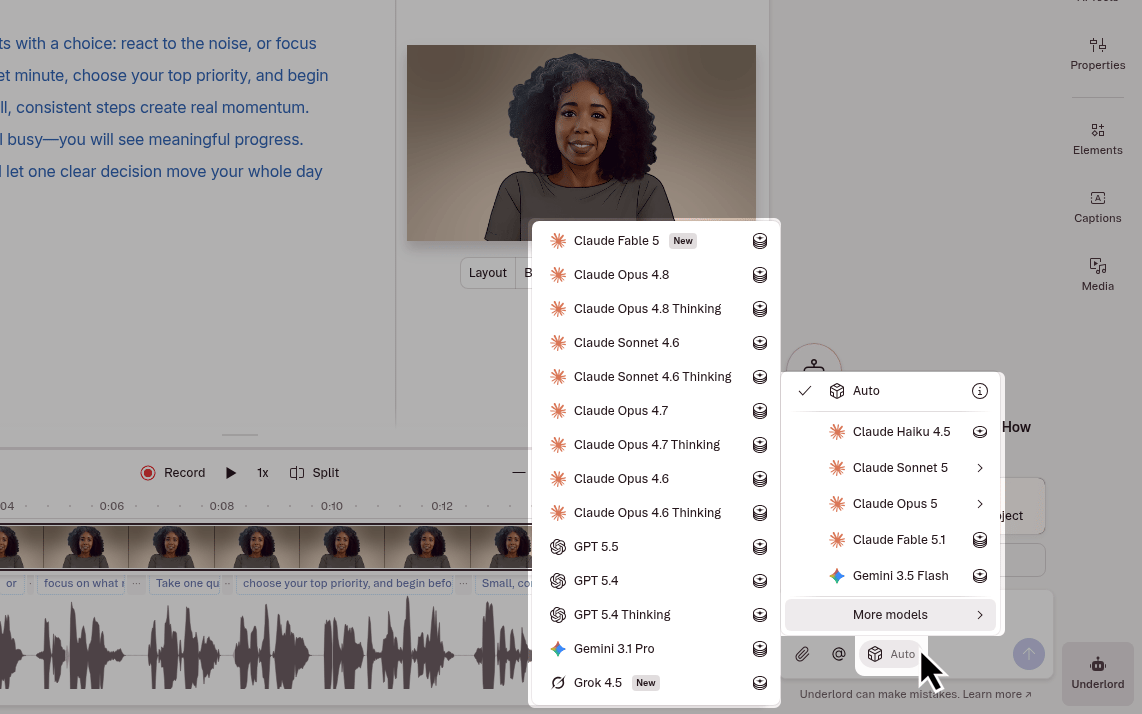
Available models
Open the model picker (cube icon) to choose a model. The names below match what you see in the app. Options in More models are on a second menu inside the picker. A few Claude models also have a separate Thinking row (extra coin icon). Main picker- Auto (Descript’s choice)
- GPT 6 Luna
- GPT 6.1 Sol
- Claude Sonnet 5.5
- Claude Opus 5.5
- Gemini 4 Argon
- Claude Fable 5.1
- Claude Fable 5
- Claude Opus 4.8
- Claude Opus 4.8 Thinking
- Claude Opus 5
- Claude Opus 5 Thinking
- Claude Sonnet 5
- Claude Sonnet 5 Thinking
- Claude Sonnet 4.6
- Claude Sonnet 4.6 Thinking
- Claude Haiku 5.5
- GPT 5.5
- GPT 6 Astra
- GPT 6 Astra Pro
- Gemini 3.8 Flash
- Gemini 3.5 Flash
- Gemini 3.1 Pro
- Grok 4.5
What can Underlord do?
Ask Underlord to help with nearly any editing goal. While we provide a few examples below, the possibilities are endless, and we encourage exploration. If you don’t see it here—try it anyway, and see what happens.
Running the same kind of edit again and again? Save the instructions as a skill and run it from the Underlord chat box.
Looking for AI Tool buttons?Tools like Remove Filler Words, Shorten Word Gaps, and Edit for Clarity are now part of the AI tools panel. You can still use them manually — or ask Underlord to take care of them for you as part of a prompt. Learn more about manually applying AI tools.
Search the web from Underlord
Underlord searches the public web for current facts to use in your videos and to help fact-check your scripts. Ask it to look something up in the chat. Example prompts:- Current events: “Make a 30-second short about today’s top tech headlines.”
- Fact-checking: “Search for current sources to check the stats in my script.”
- Brand references: “Look up Notion’s brand colors before styling this video.”
How to leave feedback
Underlord is still in beta, and we’re actively improving it. Try bold prompts, mix tasks together, and find out just how capable your new co-editor is. Try it out and let us know how it’s going. Click the thumbs up or thumbs down icon in the action bar below Underlord’s response, and drop us a note with your thoughts.
What to expect when working with Underlord
Descript’s AI features, including Underlord, are powered by large language models that can do remarkable things, but they’re still learning and sometimes get things wrong. These tools are designed to be helpful, fast, and flexible, but they don’t always know when they’re out of their depth. At times, Underlord might overpromise, make incorrect assumptions, or follow you into workflows it’s not equipped to complete. That can be frustrating, especially when you’re on a deadline or expecting hands-off results. We understand. We’re actively working to improve both the AI’s honesty and its humility. This means adding better safeguards so the agent doesn’t agree to do things it can’t actually deliver, and making it more transparent about its current limitations. In the meantime, Underlord works best when treated like a fast, talented collaborator who still needs clear instructions, context, and regular check-ins. For example, it can’t make edits in the background while you’re recording—it needs your narration or script in place first. And when you ask it to do something complex, it helps to check its work and give feedback as you go. Point Underlord at specific scenes, layers, or script passages to give it the context it needs. AI isn’t magic, but it is a powerful creative partner when used thoughtfully. As we continue improving Underlord, your experiences—good and bad—help shape its future. If you run into issues or have suggestions, we’d love to hear from you. Thanks for building with us.Run Underlord outside the editor
You can send Underlord prompts without opening a project:- From Zapier, use the Descript integration.
- From the command line or your own code, use the Descript API.
- From Claude, ChatGPT, or another AI assistant, use the Descript MCP.