

Keep learning with videosExplore more educational videos and workflows in Learn Learn Descript.
Where scenes appear in the editor
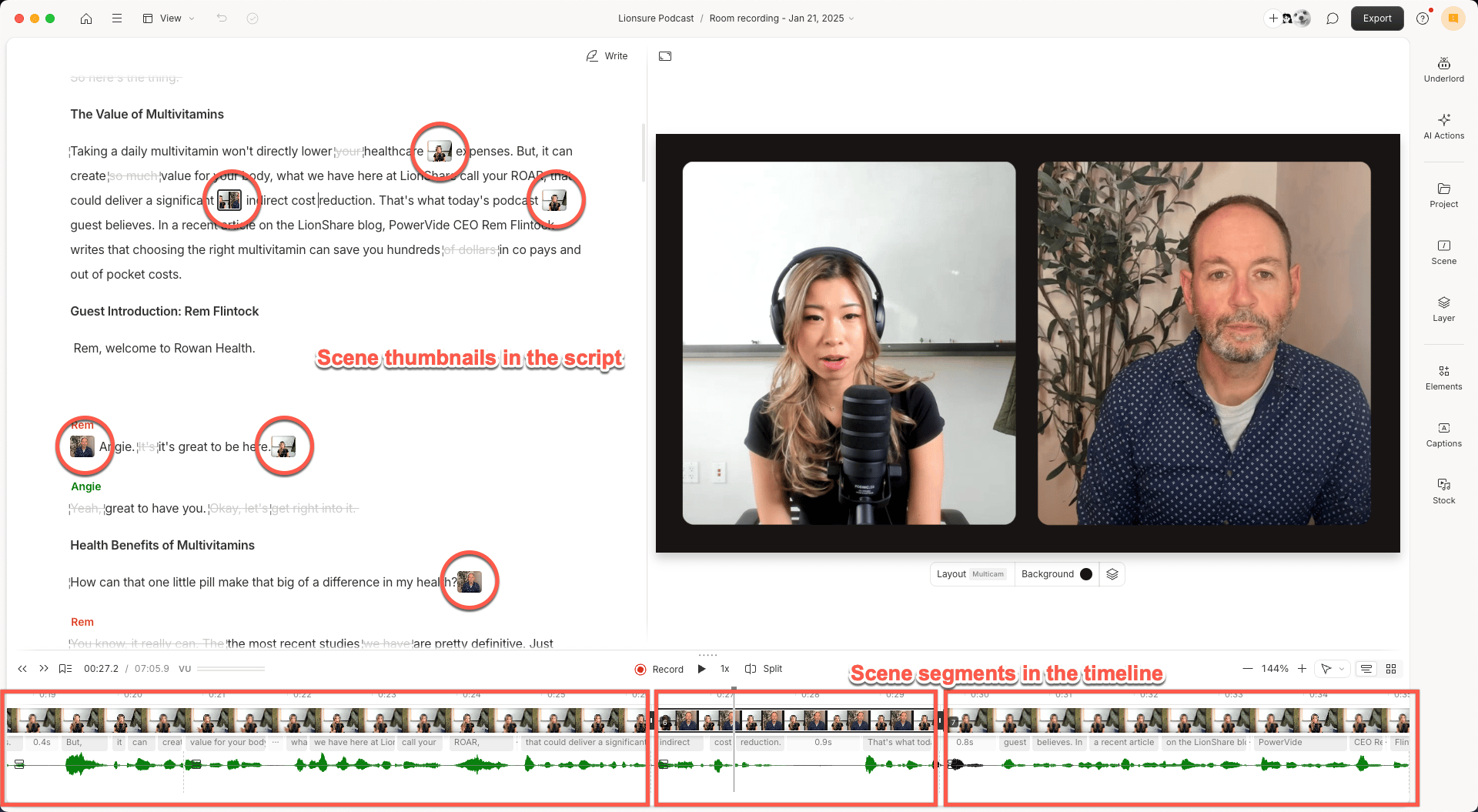
Scenes are represented in two places in the editor:- Script panel: Thumbnails indicate where each new scene begins.
- Timeline: Scenes appear as segments that contain their own layers. In storyboard view, scenes are represented visually with tiles.
Add a scene
You can add a new scene by:- Typing
/in the script panel to insert a scene boundary. Learn more about scene boundaries. - Right-clicking in the script and selecting Add scene from the context menu.
- Clicking Split in the timeline toolbar. Learn more about using the Split button.
What’s next?
Now that you understand how layouts work, explore these guides to help you design, apply, and manage them effectively:- Add, move, or delete a scene boundary — control where scenes begin and end.
- Adjust scene properties — change background color or gradient, apply effects, or add transitions.
- Reorder scenes — reorganize your content by dragging scenes in the script.
- Extend layers across multiple scenes — make visuals persist across cuts.
- Apply transitions between scenes — polish the flow from one scene to the next.
- Create and apply a layout — build a reusable visual style for your scenes.