

On a Legacy or Sunset plan?This article explains how usage is tracked on Descript’s current plans. If you’re on a Legacy or Sunset plan, usage works differently. See our Understanding your Legacy and Sunset plan guide for details.
What are media minutes?
Media minutes are the time you use when uploading or recording media in Descript — including video, audio, Room sessions, and screen, webcam, or microphone recordings. Still images count as 1 second each. In Descript, we refer to this usage as Media minutes; you may also see it referred to as media hours — both terms describe the same concept. Media minutes are used when you:- Upload audio or video files
- Record directly in Descript (Rooms or in a project)
- Add still images (1 image = 1 second)
Recording in RoomsRooms recordings use your media minutes, but only for the total length of the session — not per participant.For example, a 1-hour session with 5 participants will use 60 media minutes, not 300.
What are AI credits?
AI Credits are the units Descript uses to measure your use of AI-powered features. You use AI Credits whenever you apply or generate content using Descript’s AI tools, such as:- Underlord, our agentic co-editor
- Studio Sound
- Remove filler words
- Green Screen
- Eye Contact
- AI speech
- Avatars
- Generated video
- …and more
How many credits does each feature cost?
AI feature costs come in two flavors: some are predictable costs that scale with the size of the job, while others are non-deterministic and depend on what the AI ends up doing.When you apply AI features and effects manually
Cost scales with the size of the job. Run the same input twice and you’ll be charged the same amount both times. Things that affect what you pay:- Length of media. Longer audio, longer text-to-speech output, or more filler words removed = more credits used.
- Model selection. Generative tools let you pick from different models; more advanced models cost more (look for the coin stack icon: more coins = higher cost). Learn more about generative image and video models in Descript.
When you work with Underlord
Prompt Underlord with anything: edit any length of media, generate any kind of image, ask for any kind of help. That makes it non-deterministic: the same kind of task can use different amounts of credits depending on the length of media, the model selected, or what the AI ends up generating. Underlord credit costs reflect the work behind a request. Three things shape this cost:- Which model runs it. Underlord routes each request to the model best suited for the task. Different models carry different prices and different levels of reasoning.
- What that model costs. Each provider prices its model differently, and the credit cost follows that pricing.
- How much work the task actually takes. Underlord uses a model differently from moment to moment, depending on what the request needs.
- The “agent brain” (Underlord figuring out what to do)
- The tool itself (doing the actual work)
View your usage
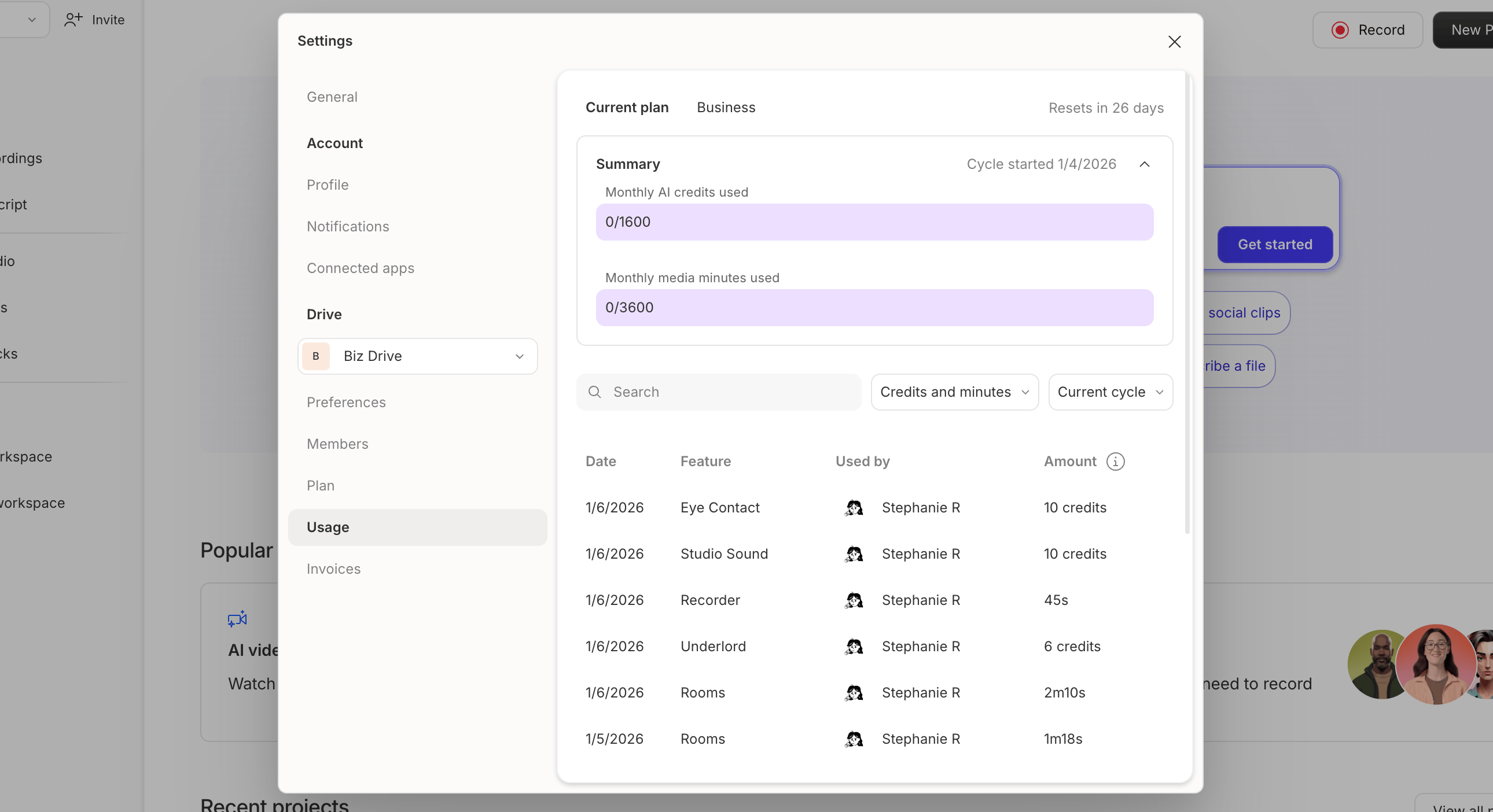
Check your usage of media minutes and AI credits anytime from the Usage tab in your App settings.- Open your Settings panel
- Choose a drive from the drop-down selector menu
- In the left sidebar, select the Usage tab
Export your usage to CSV
Download your drive’s usage as a CSV file to share with finance or analyze in a spreadsheet. Not available on Free plans.- Open Settings and select the Usage tab for the drive you want to export.
- Click the Export usage to CSV download icon at the right side of the filter row.
- Choose a start and end date. The range defaults to the last 30 days, and you can export up to 12 months (366 days) at a time. The end date can’t be later than today.
- Click Export.
Need additional media minutes or AI Credits?If you reach your monthly limit, you can add more Media minutes or AI Credits by purchasing a Top up from the Usage tab in your App Settings. Top ups are shared across your Drive and are available for one-time use without changing your subscription plan. Learn more about Top ups.