

System recommendations
Additional setup and performance tips
Free disk space
Descript uses cloud storage, but certain actions still rely on your local disk. We recommend keeping at least 20 GB of free space available, especially when working with larger projects.Screen recorder requirements
Screen recorder requires a dedicated GPU with a driver from 2021 or later. If your driver is outdated, we recommend against using the screen recorder. How to check your driver versionInternet speeds
50 Mbps download and 10 Mbps upload are the minimum recommended. Lower speeds may delay file uploads, project loading, and revision restores.Force software video decoding
When toggled on in App settings, this setting disables GPU-based video decoding and uses your CPU instead. If you’re seeing playback issues—such as scenes appearing blank, videos not loading, or playback stalling after launch—enabling this option can help, especially for systems using certain Intel Arc GPUs.Browser requirements
A browser is required for authentication. For best results using the Web version of Descript, we recommend a Chromium-based browser; Chrome, Edge, and Opera are officially supported.“Incompatible browser or device” error in ChromeThis error usually means hardware acceleration is turned off in Chrome. To fix it, go to chrome://settings/system and toggle on Use graphics acceleration when available, then restart your browser.
Enable permissions for camera, microphone, and screen sharing
Descript needs permission to access your camera, microphone, and screen to record. If you’re having trouble recording or see permission errors, check your system settings.macOS desktop app
- Open System Settings (or System Preferences on older macOS versions)
- Click Privacy & Security
- Enable permissions for Descript under:
- Camera
- Microphone
- Screen Recording
Windows desktop app
- Open Settings
- Go to Privacy & security
- Select Camera, then allow access by Descript. Repeat for Microphone.
Browser permissions
When prompted by your browser, click Allow to grant Descript access to your camera, microphone, and screen. If you’ve previously blocked access, click the lock icon in the address bar, then enable Camera, Microphone, and Screen sharing.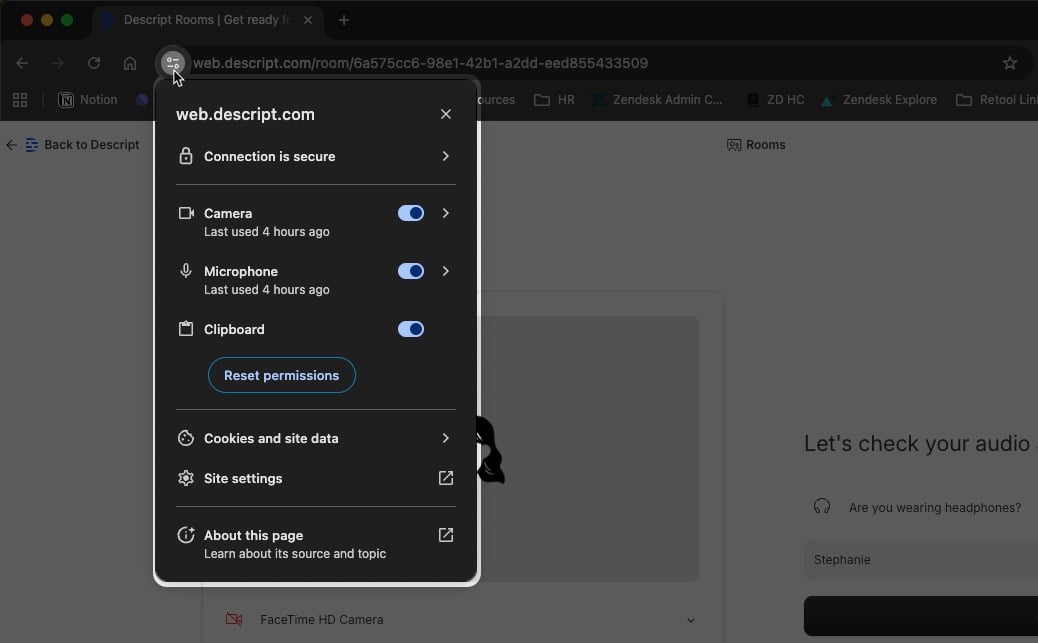
Minimum system requirements
macOS desktop
- Minimum 8GB RAM
- macOS 14 (Sonoma) or later
- A browser is required for authentication. Chrome, Firefox, or Safari are supported. For best results using the Web version of Descript, we recommend a Chromium-based browser, with Chrome, Edge, and Opera being officially supported.
Windows desktop
- Minimum 8GB RAM
- Windows 11 or later
- A browser is required for authentication. Chrome, Firefox, or Safari are supported. For best results using the Web version of Descript, we recommend a Chromium-based browser, with Chrome, Edge, and Opera being officially supported.