Invite editors or commenters to a single project without adding them to your Drive
Need to add someone to a specific project without giving them access to the rest of your drive? Invite them as a project collaborator, and they’ll get scoped access to specific projects.Descript has three layers of access: drives, workspaces, and individual projects. This article covers the project layer — inviting collaborators to specific projects. Adding someone as a project collaborator doesn’t add them to your drive or give them access to any workspace.For more info about drive-level members, see Drive membership roles: how to invite and manage team members.
Legacy and Sunset project editorsAny feature that consumes AI credits or Media Minutes is available only to Drive-level Editors, not project-level collaborators.On Legacy and Sunset plans, project editors can upload files, but can’t initiate transcription. They’re also unable to upload certain media formats (such as Apple ProRes or QuickTime RLE). Full feature access requires Drive-level membership.
From the drive view, click the options icon (three vertical dots) to the right of a project row and select Project access from the list of options.
From the editor, click the +Project access icon (a circular button with a plus icon) in the top-right corner.
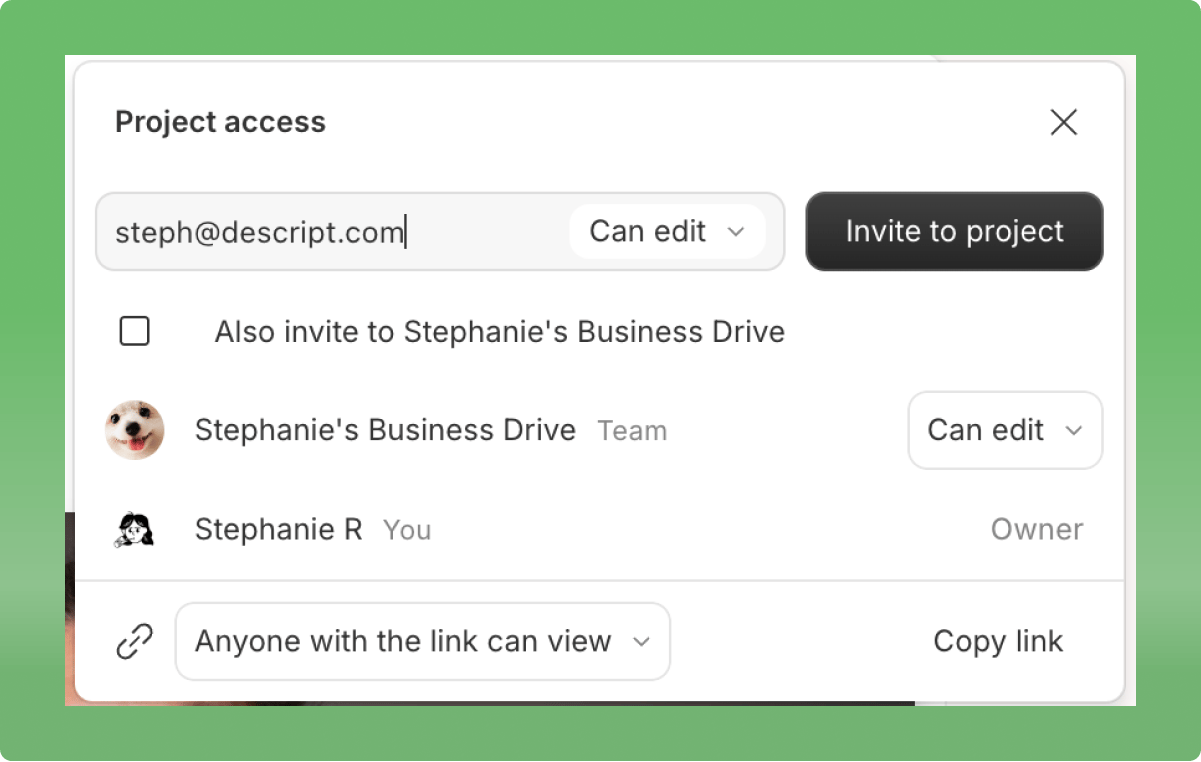
With the project access panel open, enter your collaborator’s email, choose their project permissions (can edit or can comment), then click invite to project.
Project collaborators are unpaid — drive members need a paid seatAdding collaborators to a specific project is different from adding members to your drive. If you check the box for “Also invite to drive”, you’re adding that person to your drive — not just the project. This will trigger a charge for an additional Editor seat and count toward your plan’s seat limits.To avoid charges, leave the box unchecked to share access only to the project. Learn more about how billing works in Descript.
Project access modal with options to invite collaborators and set permissions. Click the image to view at full size.
Double-check your link settingsEven if you’ve removed a collaborator, they may still have access to your project if the link is set to Can view or Can comment. Be sure to update the link sharing settings if you want to fully restrict access.
You can set the level of project access you want all Drive members to have for individual projects. From the project access panel, set the project-wide access level at the bottom of the panel.
Assistant
Responses are generated using AI and may contain mistakes.