

Before you translate
Translation is a finishing step! Unlike features you can toggle on and off, translating creates a new composition with new audio (and video, if you use lip sync). If you make changes to your project after translating, you’ll need to re-translate and use more AI credits. For best results, complete your composition before you translate. We recommend:- Finalize your scenes, layout, and visuals
- Add and style captions to your original content
- Correct any necessary script changes
Usage noteOn current plans, this feature uses AI Credits. Learn more about tracking your Media Minutes and AI Credits.Legacy and Sunset plans track usage differently. See our Understanding your Legacy and Sunset plan guide for details.
Translate features
Translate supports three distinct features, which you can use together or separately. See full feature availability by plan.- Translate captions: Select a language to Translate to and Descript creates translated captions and transcripts from your original content.
- Dub speech: Create a full voiceover of your content in another language, not just subtitles. Replaces your original audio with a translated AI voice.
- Lip sync: Part of the dub speech workflow, lip sync adjusts the speaker’s mouth movements to match the translated audio. This makes dubbed videos look more natural and authentic.
Underlord can translate, dub, and lip syncPrefer to let Underlord do the work? Use a prompt like: “Add German captions to this video, and also create a version where you dub it in French with lip sync.” Learn more about Underlord.
Translation style options
Auto (default): Text-only translations with no dubbing use direct translation; dubbed translations use timing match; retranslations reuse whichever method was used on the previous translation, unless you manually override it. Match timing: Optimizes translation to match the original speech timing. The translation may use additional descriptive words or different phrasing to achieve the right duration, which aims to keep the dubbed audio at a more “natural” speaking pace. This option takes longer to process. Direct translation: More literal translation that closely follows the original wording. Because the translated text may be shorter or longer than the original, sections of the dubbed audio might be slightly sped up or slowed down to match your video’s timing. To change the preferred default style, set your preference in Descript’s App Settings in the Advanced section.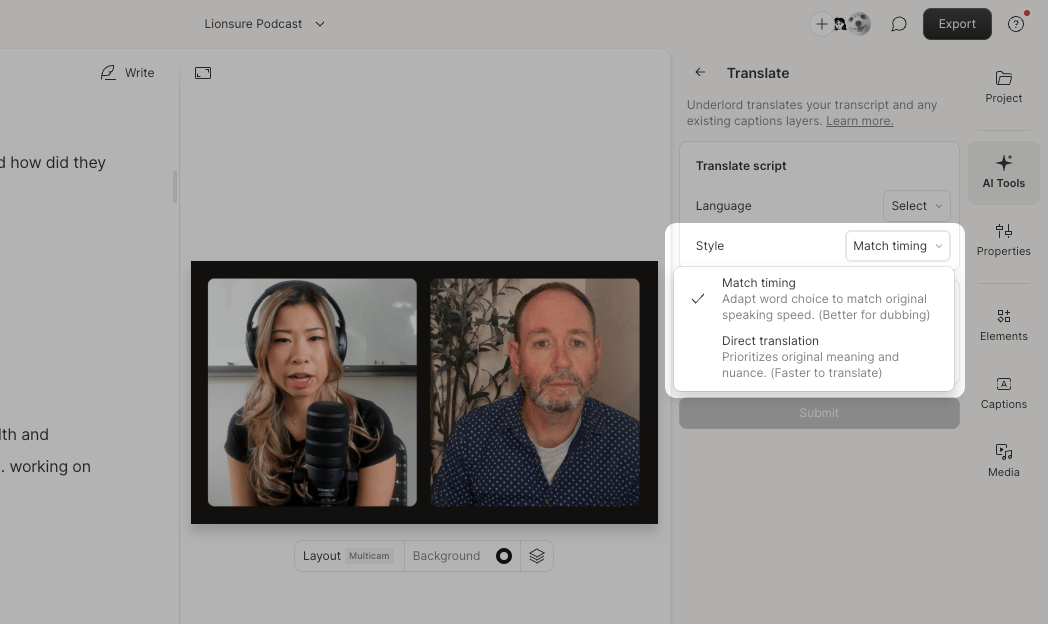
Feature availability by plan
*Lip-sync is only available on Descript’s current subscription plans. Users on Legacy or Sunset plans cannot access this feature.