> ## Documentation Index
> Fetch the complete documentation index at: https://help.descript.com/llms.txt
> Use this file to discover all available pages before exploring further.
# Deleting a Project
> Projects can be deleted from the drive by the project owner .
Once a project is deleted, it cannot be recovered.
**Deleted projects cannot be recovered!**
Any files, transcriptions, or other media contained within the project that are not being used in any other projects will be forever removed from your account and cannot be recovered.
## How to delete a project
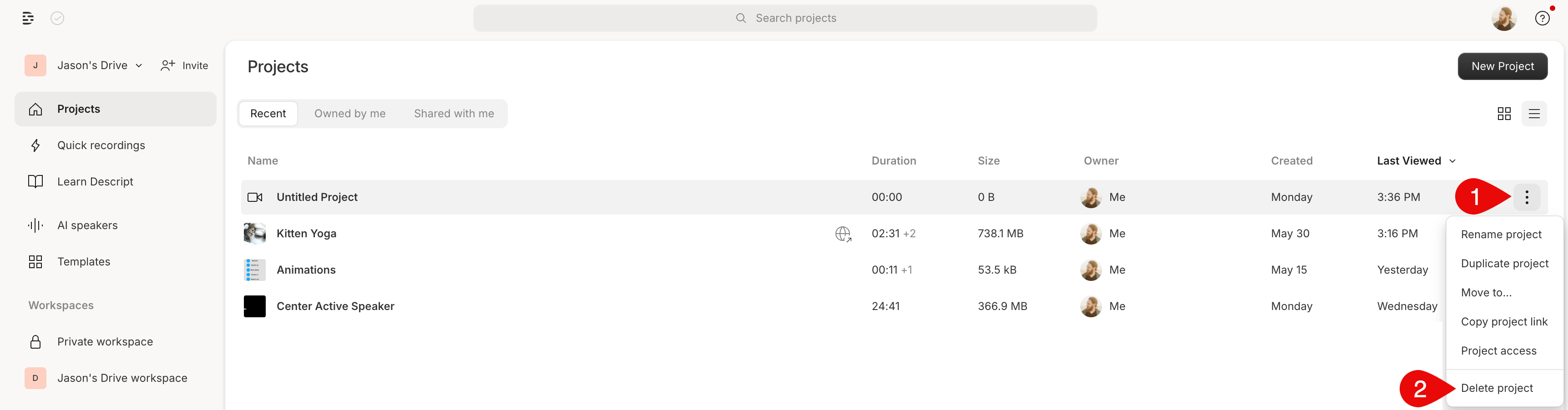
1. Click the ` ` ellipsis to the far right of the project's name.
2. Select **Delete project** from the menu.\\
` ellipsis to the far right of the project's name.
2. Select **Delete project** from the menu.\\
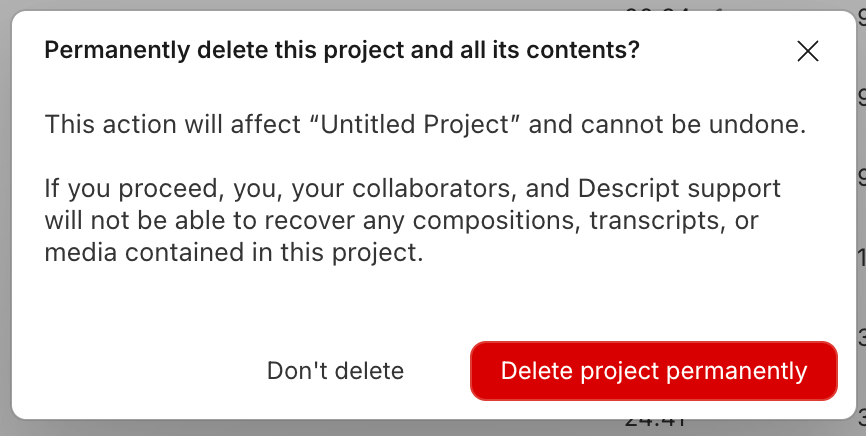
 3. You'll see a panel reminding you that deleting a project cannot be undone. If you are sure you want to continue, click **Delete project permanently**.\\
 **Deleting a project from the editor**
If you are actively working on a project in the editor and want to delete it, select the menu option in the top left, then choose **File > Delete > Delete project permanently**.
**Deleting a project from the editor**
If you are actively working on a project in the editor and want to delete it, select the menu option in the top left, then choose **File > Delete > Delete project permanently**.