> ## Documentation Index
> Fetch the complete documentation index at: https://help.descript.com/llms.txt
> Use this file to discover all available pages before exploring further.
# Scene Editor Tools
> Manage visuals in the scene editor using a set of contextual tools.
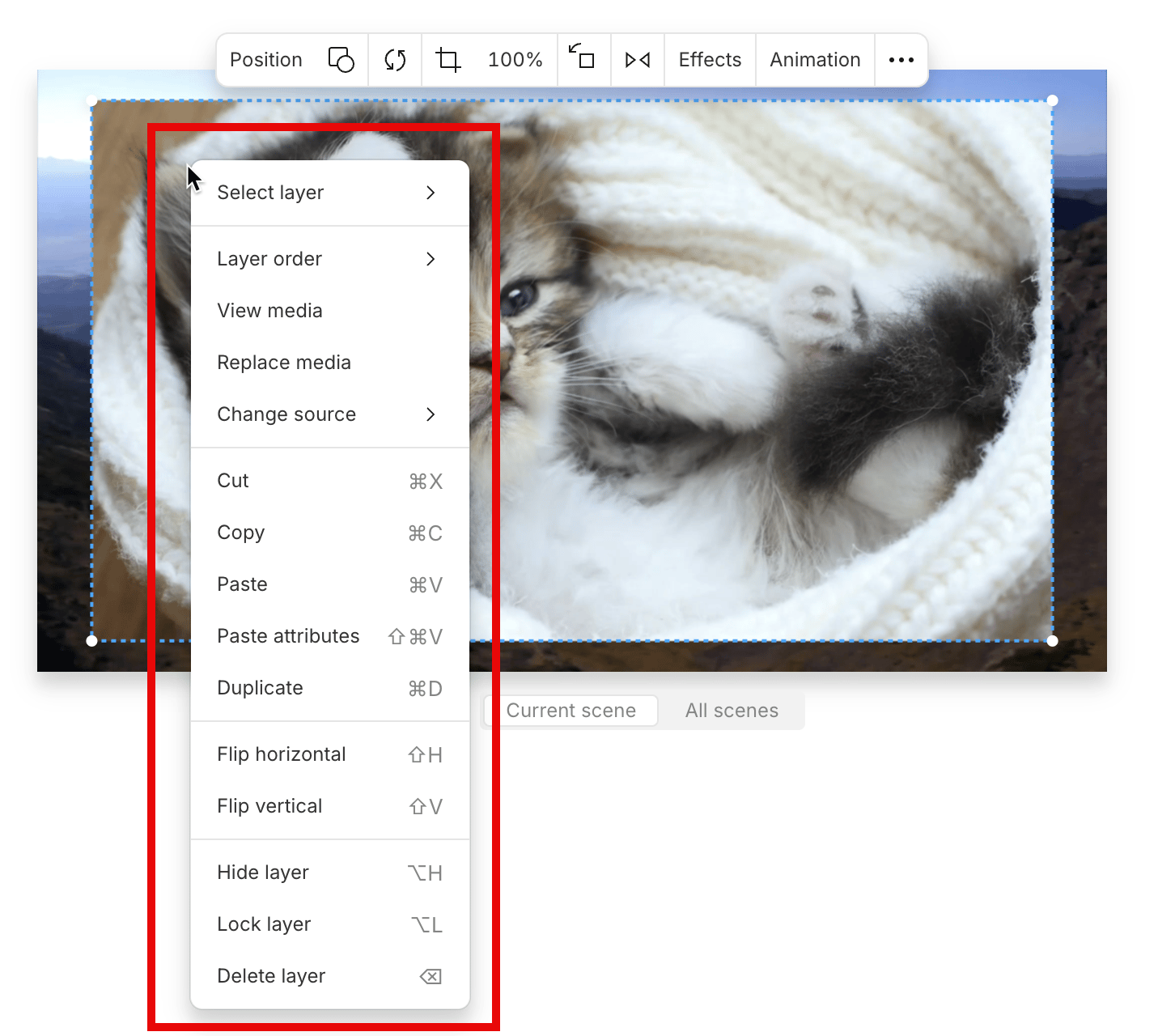
Right-click any visual in the [scene editor](/visuals/scene-editor-overview) to bring up its tools. The menu is contextual, so the options you see depend on the type of visual you clicked.
 | Tool | Description |
| -------------------- | ------------------------------------------------------------------------------------------------------------------------------------------------------------------------------------------------------------------------------ |
| **Select layer** | Quickly select a layer in the scene from the list of visuals. |
| **Layer order** | Move a visual layer forward, backward, or send it to the front or back. |
| **View media** | Open the selected media in your project files and preview it. |
| **Replace media** | Replace a visual layer with new media or **Generate video** using AI. For [sequences](/script-editing/multi-track-sequences-overview), Descript hides the existing sequence visual and adds the new media as a separate layer. |
| **Change source** | Show or hide a specific layer when multiple visual layers are stacked. |
| **Cut** | Remove the media from the scene editor and copy it to your clipboard. |
| **Copy** | Copy the selected media layer. |
| **Paste** | Paste a copied media layer into the scene editor. |
| **Paste attributes** | Apply the visual properties from one layer to another. |
| **Duplicate** | Create a copy of the selected layer. You can also hold **Option** (Mac) or **Alt** (Windows) while dragging a layer to duplicate it. |
| **Flip horizontal** | Flip the visual horizontally across its Y-axis. |
| **Flip vertical** | Flip the visual vertically across its X-axis. |
| **Hide layer** | Hide the selected layer from the scene. |
| **Lock layer** | Prevent changes to a layer by locking it. [Learn more about locking layers.](/visuals/lock-layers) |
| **Delete layer** | Remove the visual from the scene entirely. |
## Scene editor toolbar
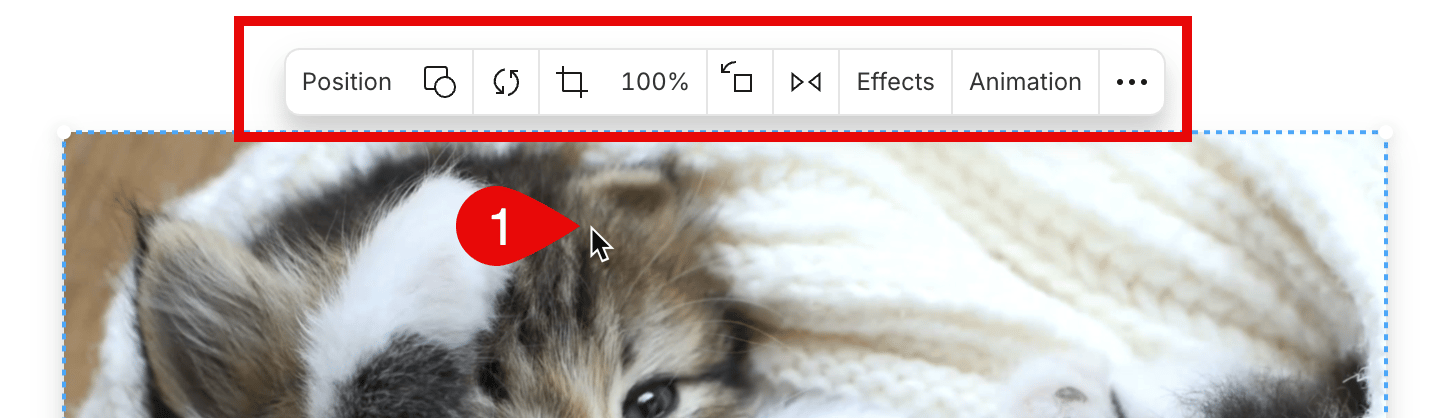
When you select a visual layer, a floating toolbar appears above it. You can use this toolbar to replace media, reposition visuals, crop, scale, rotate, flip, or apply effects and animations.
| Tool | Description |
| -------------------- | ------------------------------------------------------------------------------------------------------------------------------------------------------------------------------------------------------------------------------ |
| **Select layer** | Quickly select a layer in the scene from the list of visuals. |
| **Layer order** | Move a visual layer forward, backward, or send it to the front or back. |
| **View media** | Open the selected media in your project files and preview it. |
| **Replace media** | Replace a visual layer with new media or **Generate video** using AI. For [sequences](/script-editing/multi-track-sequences-overview), Descript hides the existing sequence visual and adds the new media as a separate layer. |
| **Change source** | Show or hide a specific layer when multiple visual layers are stacked. |
| **Cut** | Remove the media from the scene editor and copy it to your clipboard. |
| **Copy** | Copy the selected media layer. |
| **Paste** | Paste a copied media layer into the scene editor. |
| **Paste attributes** | Apply the visual properties from one layer to another. |
| **Duplicate** | Create a copy of the selected layer. You can also hold **Option** (Mac) or **Alt** (Windows) while dragging a layer to duplicate it. |
| **Flip horizontal** | Flip the visual horizontally across its Y-axis. |
| **Flip vertical** | Flip the visual vertically across its X-axis. |
| **Hide layer** | Hide the selected layer from the scene. |
| **Lock layer** | Prevent changes to a layer by locking it. [Learn more about locking layers.](/visuals/lock-layers) |
| **Delete layer** | Remove the visual from the scene entirely. |
## Scene editor toolbar
When you select a visual layer, a floating toolbar appears above it. You can use this toolbar to replace media, reposition visuals, crop, scale, rotate, flip, or apply effects and animations.
 ## Scene toolbar
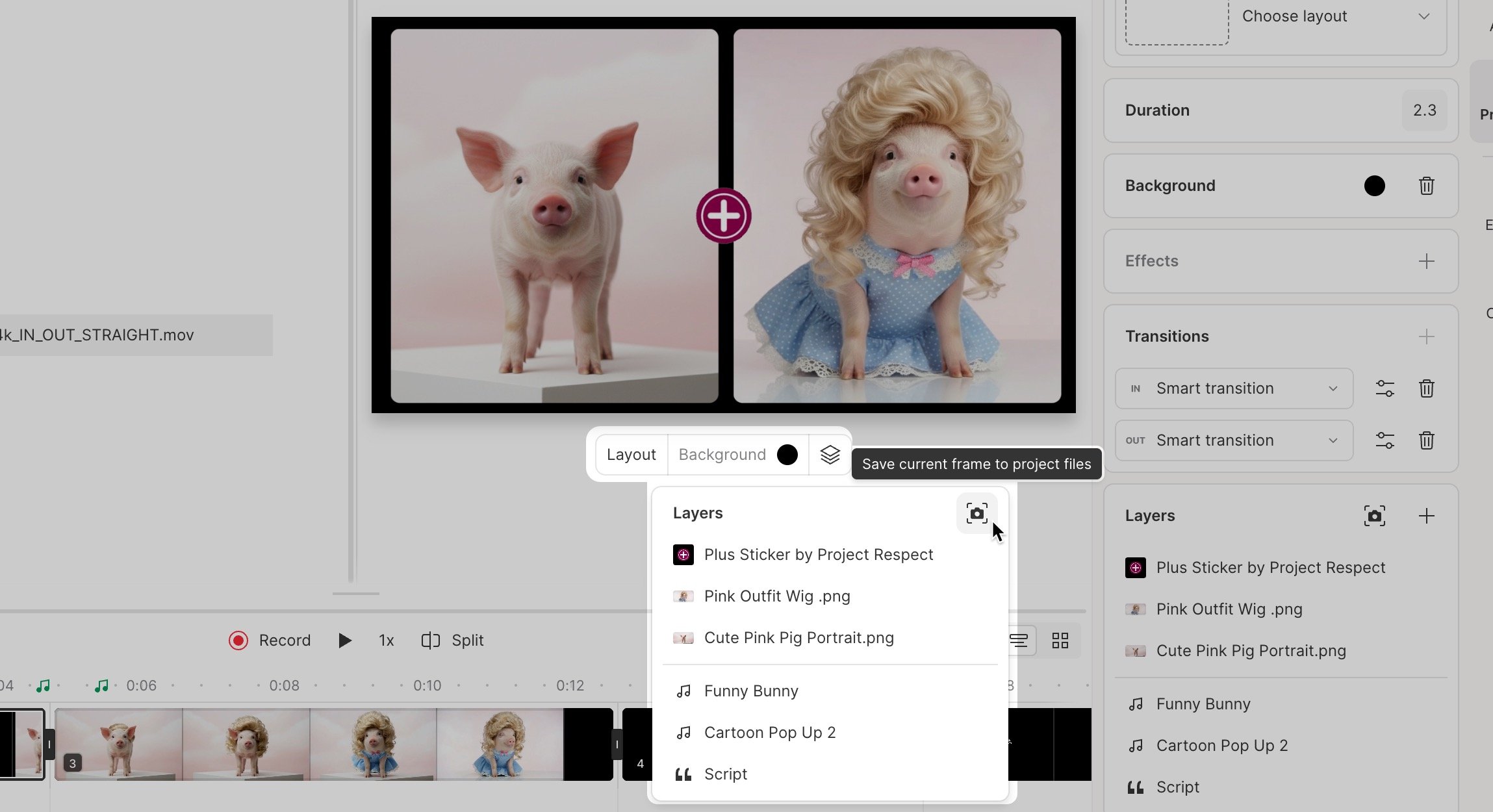
The scene toolbar appears when nothing is selected. It provides quick access to scene-wide tools and settings. The **Layout** button includes a pop-out menu for added convenience.
## Scene toolbar
The scene toolbar appears when nothing is selected. It provides quick access to scene-wide tools and settings. The **Layout** button includes a pop-out menu for added convenience.
 | Tool | Description |
| -------------- | ---------------------------------------------------------------------------------------------------------------------------------- |
| **Layout** | Choose from preset layout options to organize visuals in your scene. |
| **Background** | Change the background color or image of your scene. |
| Layers | View all layers in the scene, or [export the current frame as a PNG to your Project Files.](/visuals/save-a-frame-from-your-video) |
| Tool | Description |
| -------------- | ---------------------------------------------------------------------------------------------------------------------------------- |
| **Layout** | Choose from preset layout options to organize visuals in your scene. |
| **Background** | Change the background color or image of your scene. |
| Layers | View all layers in the scene, or [export the current frame as a PNG to your Project Files.](/visuals/save-a-frame-from-your-video) |