> ## Documentation Index
> Fetch the complete documentation index at: https://help.descript.com/llms.txt
> Use this file to discover all available pages before exploring further.
# Replace Media (B-roll, Images, Audio) in Your Composition
> The Replace Media option lets you swap out media without losing edits, captions, or other adjustments.
Replace Media swaps a B-roll, image, or audio clip for a different one while keeping the edits, captions, and adjustments already on it. It works from [the timeline](/timeline/timeline-overview), [Scene Editor](/visuals/scene-editor-overview), and [Properties panel](/descript-tour/properties-panel), but not on script tracks. To swap a source file everywhere it's used, use [Replace File](/add-and-manage-media/replace-file) instead.
**Looking for Replace File?**
**Replace Media** swaps clips inside a composition — like b-roll, images, or audio — while keeping your edits and adjustments intact.
**Replace File** updates the source file in your project and applies everywhere that file is used. It’s typically used to fix file errors, swap in higher-quality files, update placeholder tracks, or resolve stalled uploads.
[Learn more about Replace File →](/add-and-manage-media/replace-file)
## Replace media from the Scene Editor
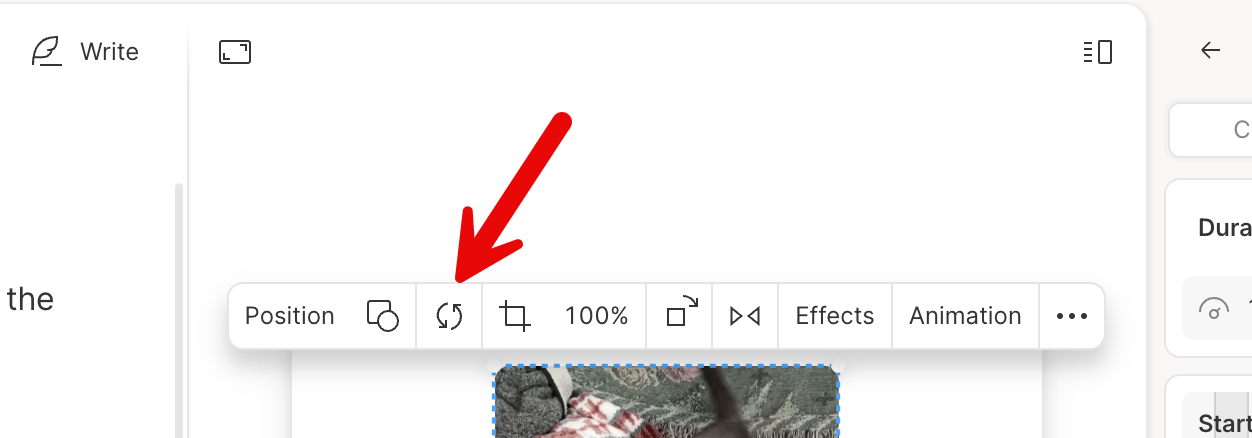
The Scene Editor toolbar includes a Replace option for swapping media in your scene.
1. Select the media layer you want to replace in the Scene Editor.
2. In the toolbar that appear, click the **Replace** option.
3. Select the new media to swap in.
 ### Other ways to replace media
You can also access the **Replace Media** option from:
* **The** **right-click menu**: Right-click a clip or layer in the timeline or Scene Editor, then choose Replace Media.
* The **Properties Panel**: Open the panel, click the three-dot menu next to the layer name, and select Replace Media.
### Other ways to replace media
You can also access the **Replace Media** option from:
* **The** **right-click menu**: Right-click a clip or layer in the timeline or Scene Editor, then choose Replace Media.
* The **Properties Panel**: Open the panel, click the three-dot menu next to the layer name, and select Replace Media.