> ## Documentation Index
> Fetch the complete documentation index at: https://help.descript.com/llms.txt
> Use this file to discover all available pages before exploring further.
# Scene Properties
> Each scene in Descript has its own properties, which you can view and adjust from the Properties panel in the right sidebar.
The [Properties panel](/descript-tour/properties-panel) shows settings for whatever you've selected — a scene, a layer, or a clip. With a scene selected, that's the scene's layout, background, effects, and more.
**New to scenes?**
Scenes are the building blocks of your video. If you're not familiar with how scenes work in Descript, check out the [Scenes overview guide](/getting-started/scenes) first.
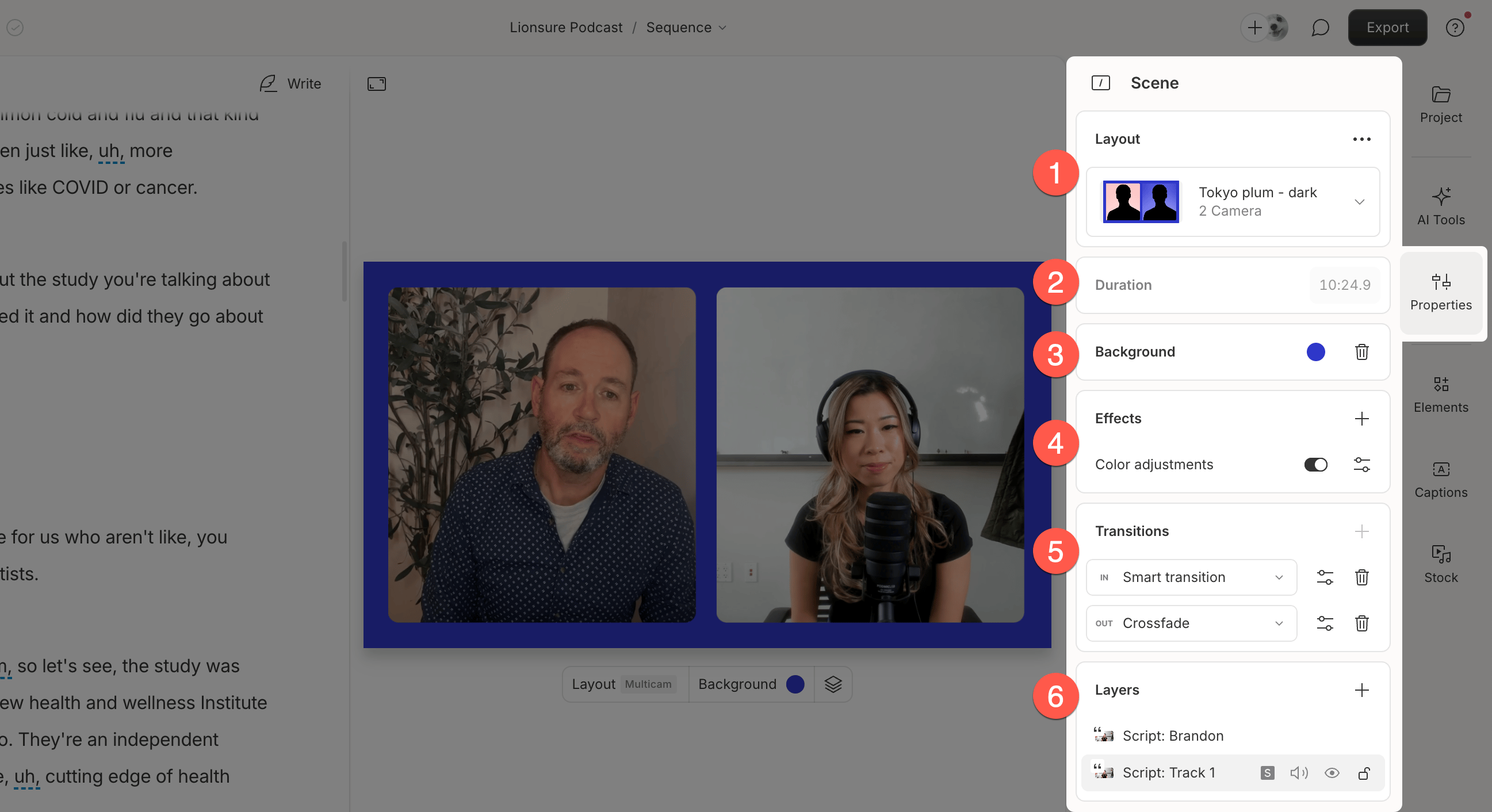 Each scene includes the following editable properties:
1. **Choose layout pack:** Apply a layout pack and a specific layout to the current scene.
2. **Duration:** The scene's length, based on its boundaries.
3. **Background:** Set the base color for the scene.
4. **Effects:** Add [visual or audio effects](/effects-animations-transitions/overview) that apply to all visuals within the scene.
5. **Transitions:** Add [scene transitions](https://help.descript.com/hc/en-us/articles/10255974053773) between visual moments.
6. **Layers:** View and manage [layers](/visuals/working-with-layers-and-clips-overview) in the scene. Their order reflects how they stack visually.
**Applying a change to all scenes**
When editing a layer that appears in multiple scenes, you’ll see a toggle to apply your changes to either all scenes or just the current one. [Learn more about the "Apply to all scenes" feature](/visuals/layer-properties).
Each scene includes the following editable properties:
1. **Choose layout pack:** Apply a layout pack and a specific layout to the current scene.
2. **Duration:** The scene's length, based on its boundaries.
3. **Background:** Set the base color for the scene.
4. **Effects:** Add [visual or audio effects](/effects-animations-transitions/overview) that apply to all visuals within the scene.
5. **Transitions:** Add [scene transitions](https://help.descript.com/hc/en-us/articles/10255974053773) between visual moments.
6. **Layers:** View and manage [layers](/visuals/working-with-layers-and-clips-overview) in the scene. Their order reflects how they stack visually.
**Applying a change to all scenes**
When editing a layer that appears in multiple scenes, you’ll see a toggle to apply your changes to either all scenes or just the current one. [Learn more about the "Apply to all scenes" feature](/visuals/layer-properties).