> ## Documentation Index
> Fetch the complete documentation index at: https://help.descript.com/llms.txt
> Use this file to discover all available pages before exploring further.
# Layer Visibility and Order
> Control which layers show in front, which stay hidden, and how to reorder the stack in your scene.
Layers stack on top of one another, and their order decides what's visible and what's hidden behind. Reorder the stack, or hide and show individual layers, so each element lands exactly where it should.
## How layer order works
Think of each element—like a video, image, or text—as a book in a stack. The one on top is what your audience sees first; anything underneath might be hidden unless you move it or make the upper layers transparent.
You can manage and rearrange layers from the timeline, [Properties panel,](/descript-tour/properties-panel) or [scene editor](/visuals/scene-editor-overview) to control what appears where.
For example, place a text layer above a video clip to keep the text visible, or move a background image to the back so other visuals appear on top.
For [visual layers that span multiple scenes](/visuals/scenes-layers), layer order is determined by the first scene where the layer appears. That order carries over unless you change it manually in the scene editor.
## Hide and show layers
Use the Properties panel to hide or unhide individual layers in each scene. Some tools— like [Automatic Multicam](/descript-tour/look-good-tools) and [AI Tools](/descript-tour/ai-tools-overview)—may automatically hide or show layers depending on the context. If something disappears unexpectedly, check the Properties panel—it might just be hidden.
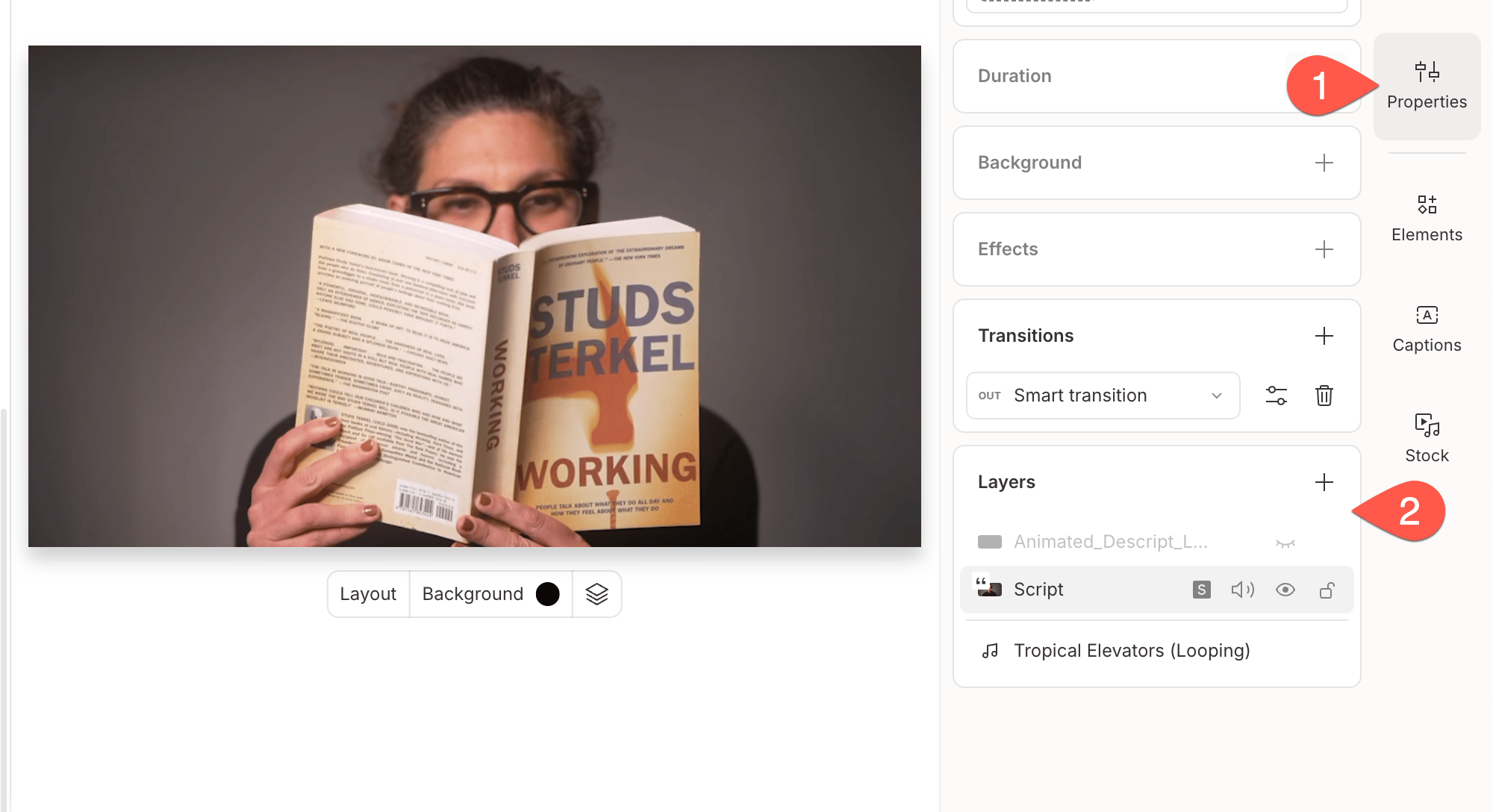 ### Can't see all your speaker videos or visual layers?
It's likely because the layers are stacked on top of each other. Descript displays the topmost layer first—anything underneath might be hidden unless you adjust the layer order or hide the top layer.
If something looks to be missing, check the layer stack first—it’s may just be behind another element.
## Adjusting layer order
You can change the order of visual layers in two ways:
* Right-click a layer in the **timeline** and choose an option from the **Layer order** menu.
* Drag and reposition layers directly in the **scene editor**.
### Can't see all your speaker videos or visual layers?
It's likely because the layers are stacked on top of each other. Descript displays the topmost layer first—anything underneath might be hidden unless you adjust the layer order or hide the top layer.
If something looks to be missing, check the layer stack first—it’s may just be behind another element.
## Adjusting layer order
You can change the order of visual layers in two ways:
* Right-click a layer in the **timeline** and choose an option from the **Layer order** menu.
* Drag and reposition layers directly in the **scene editor**.