> ## Documentation Index
> Fetch the complete documentation index at: https://help.descript.com/llms.txt
> Use this file to discover all available pages before exploring further.
# Change a Drive's Default Layout Pack
> Set the layout pack Descript applies by default across your Drive, from Brand Studio.
A default layout pack decides which layouts Descript offers first across every project on your Drive. Set one in Brand Studio so your team starts from your own layouts instead of Descript’s built-in ones.
**Plan restriction**
This feature is available through [Brand Studio](/branding/brand-studio), which is only included with Business and Enterprise Drives.
## Set a default layout pack
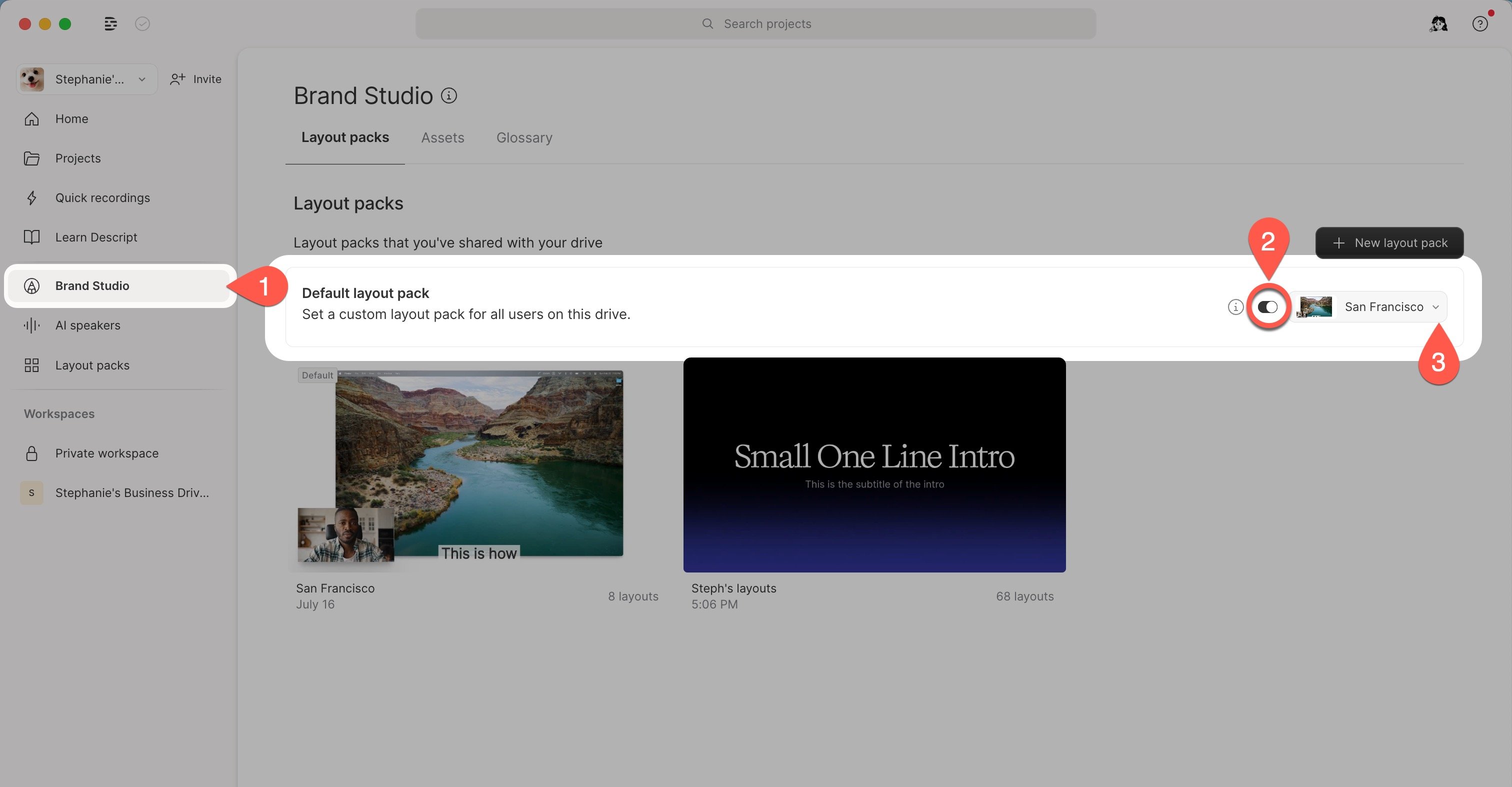
1. From the Home tab in your [Drive view](/descript-tour/drive-view), select [the Brand Studio](/branding/brand-studio) tab in the left-hand pane.
2. In Brand Studio, open the **Layout packs** tab.
3. Toggle **Default layout pack** on, then choose your preferred custom layout pack.