> ## Documentation Index
> Fetch the complete documentation index at: https://help.descript.com/llms.txt
> Use this file to discover all available pages before exploring further.
# Create a New SquadCast Webhook
> Create a webhook to send SquadCast event data to trusted apps.
A webhook pushes data from your SquadCast account to a trusted app the moment an event happens, like a recording finishing, so you can trigger actions elsewhere automatically.
## How to create a new Webhook
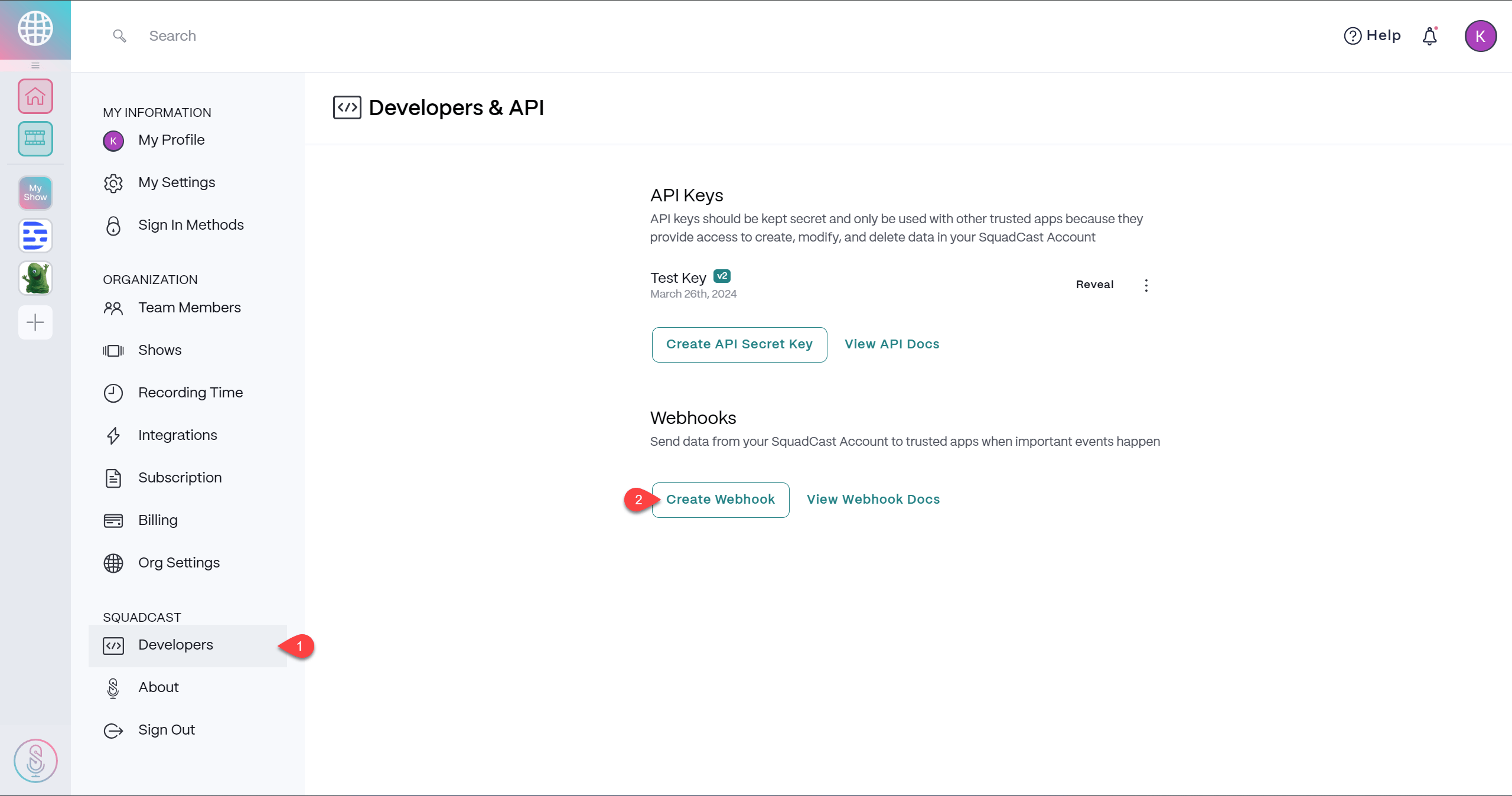
1. Navigate to your [account settings](https://app.squadcast.fm/account/developers) and select the **Developers** tab within the left side navigation.
2. Click the **Create Webhook** button.
[ ](/images/external/descript-25350819550221-de0795b703.png)
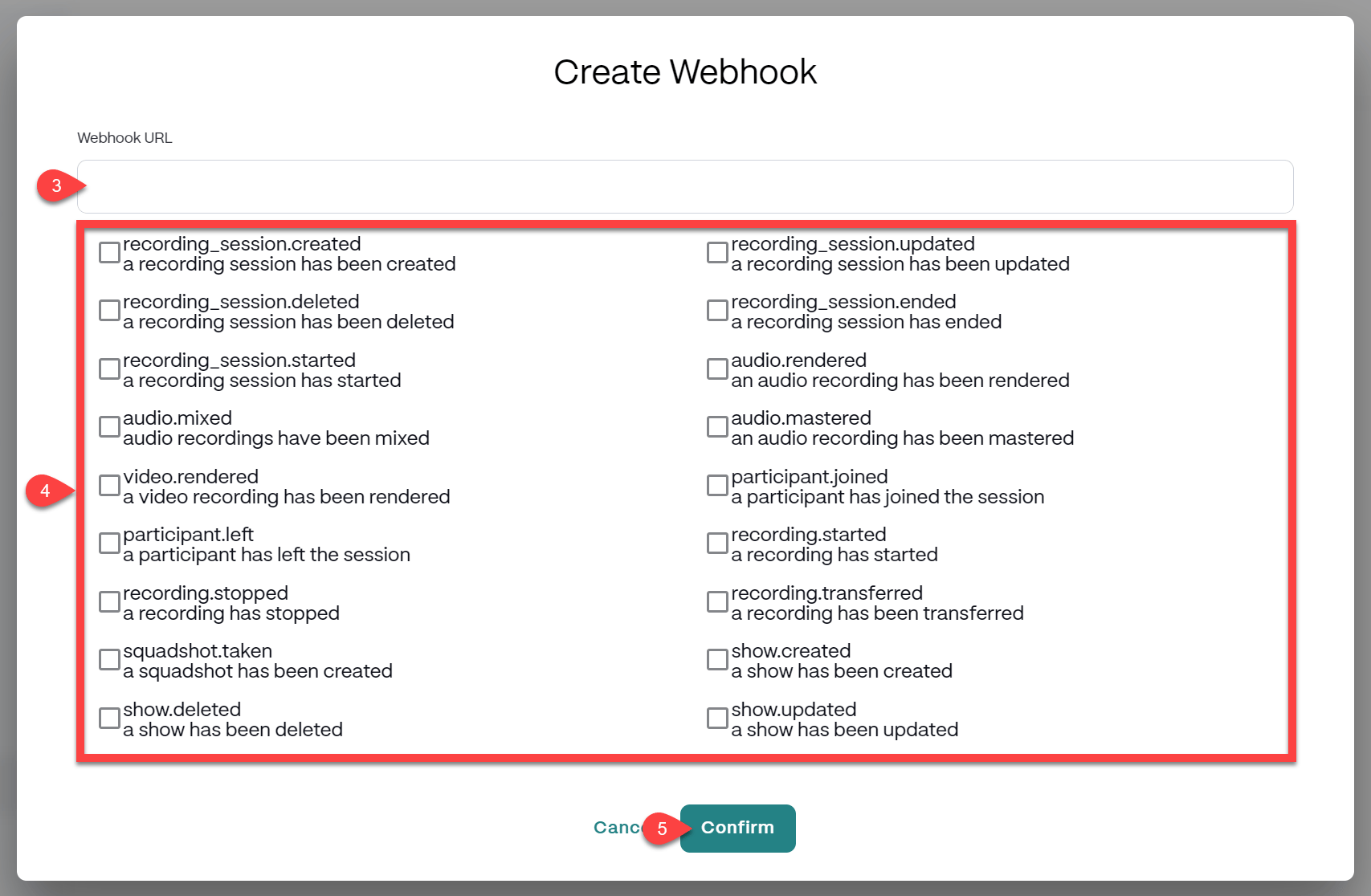
3. Input the Webhook URL that you would like to send your data to, keeping the following in mind:
* The URL must be accessible over HTTPS.
* The URL cannot be served from localhost. We recommend [Localtunnel](https://localtunnel.github.io/www/) for testing purposes.
4. Check the box to the left of one or more Webhook Events that you would like to send your data.
5. Click the **Confirm** button to save your Webhook.
[
](/images/external/descript-25350819550221-de0795b703.png)
3. Input the Webhook URL that you would like to send your data to, keeping the following in mind:
* The URL must be accessible over HTTPS.
* The URL cannot be served from localhost. We recommend [Localtunnel](https://localtunnel.github.io/www/) for testing purposes.
4. Check the box to the left of one or more Webhook Events that you would like to send your data.
5. Click the **Confirm** button to save your Webhook.
[ ](/images/external/descript-25350843228941-b2fcf9472d.png)
## Webhook options
Here are the options available to you within the Webhooks section of your account settings:
* Click the
](/images/external/descript-25350843228941-b2fcf9472d.png)
## Webhook options
Here are the options available to you within the Webhooks section of your account settings:
* Click the  **Manage Webhook** button and select:
* **Edit Webhook**to make changes to any existing Webhook.
* **Delete Webhook**to permanently remove any existing Webhook from your account.
## How Webhook delivery works with SquadCast
If Webhook URLs do not respond with HTTP status code 200 or the request times out, we will retry the request. We will continue to retry the request for a few minutes with an exponential backoff strategy.
**Manage Webhook** button and select:
* **Edit Webhook**to make changes to any existing Webhook.
* **Delete Webhook**to permanently remove any existing Webhook from your account.
## How Webhook delivery works with SquadCast
If Webhook URLs do not respond with HTTP status code 200 or the request times out, we will retry the request. We will continue to retry the request for a few minutes with an exponential backoff strategy.