> ## Documentation Index
> Fetch the complete documentation index at: https://help.descript.com/llms.txt
> Use this file to discover all available pages before exploring further.
# Create a New Recording Session in SquadCast
> Schedule or start a Squadcast recording session and invite guests.
**Meet and record directly in Descript**
Now you can record high-quality audio and video sessions directly inside Descript using **Rooms**. Rooms give you a flexible, collaborative space to meet, record, and create—no separate setup required. [Learn how to get started with Rooms](/record/rooms-overview).
# Create a Session on the Dashboard
You can create a SquadCast recording session instantly or schedule one for later using the Dashboard.
1. Click the **New Session** button in the upper-right corner.
2. Choose whether you want to **Start Session Now** (to jump directly into the [Green Room](/squadcast/green-room)) or **Schedule a Session** for a future time.
3. Use the dropdown at the top of the page to select the show for the session (if applicable)
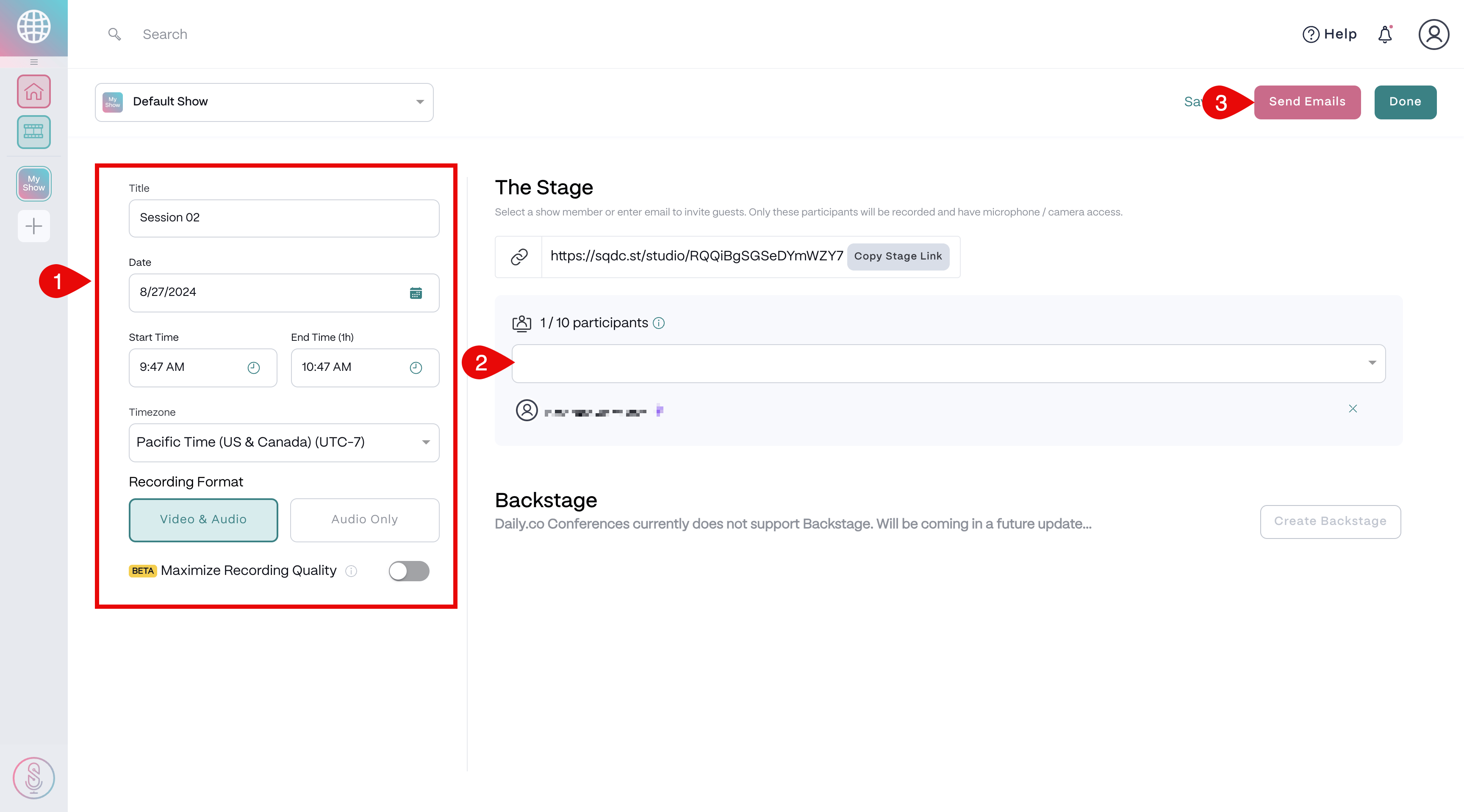
4. In the left panel, enter a title for the session. Note, your Stage Link won't generate until a title is entered.
5. Set the date, start time, and your timezone.
6. Select your preferred recording format: Audio and Video or Audio Only.
7. Add Co-Hosts and Guests in the right panel.
8. Click **Send Emails** to invite participants.
9. Click Done to save and create the session.
 ## After creating your session
When you create a session in SquadCast, the platform generates unique invitation links for each participant. These links:
* Inform guests about session details
* Add the recording session to their calendar
* Provide a one-click way for guests to join the SquadCast session
## After creating your session
When you create a session in SquadCast, the platform generates unique invitation links for each participant. These links:
* Inform guests about session details
* Add the recording session to their calendar
* Provide a one-click way for guests to join the SquadCast session