> ## Documentation Index
> Fetch the complete documentation index at: https://help.descript.com/llms.txt
> Use this file to discover all available pages before exploring further.
# Delete a Recording Session
> Permanently delete a recording session from the Squadcast Dashboard.
**Deleted sessions cannot be recovered**
Please note that deleting sessions is a permanent action that cannot be reversed. Deleted sessions will be removed from our servers and cannot be recovered. Deleting a session will also delete all recorded content within the session.
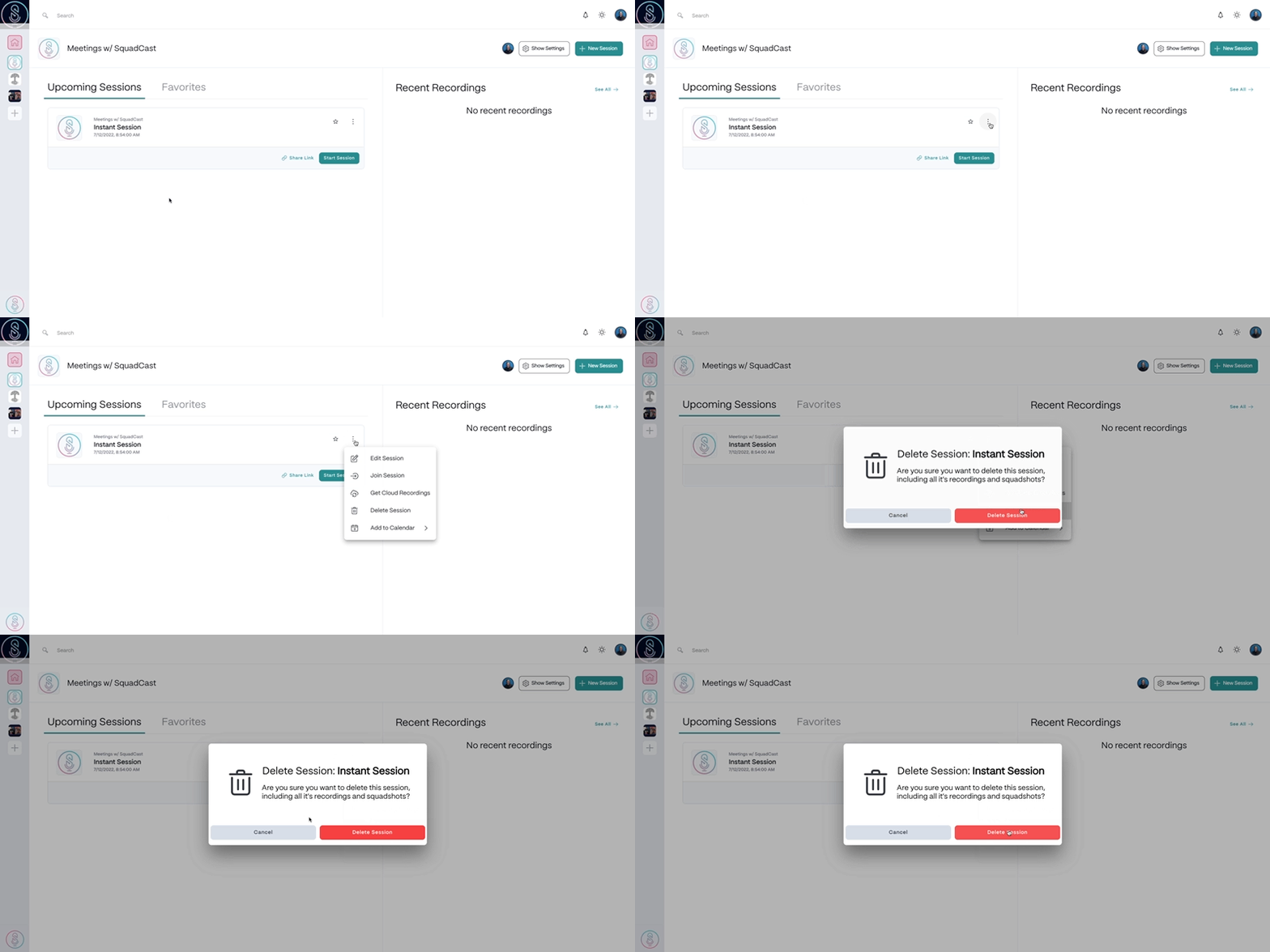
You can delete an upcoming recording session from the Dashboard by following the steps below:
1. Select the  **Ellipsis**button to the right of the recording session you want to delete.
2. Select **Delete Session**.
3. In the confirmation window, select **Delete Session** again to confirm deletion. The session will now be permanently deleted.
[
**Ellipsis**button to the right of the recording session you want to delete.
2. Select **Delete Session**.
3. In the confirmation window, select **Delete Session** again to confirm deletion. The session will now be permanently deleted.
[ ](/images/external/descript-23106245163789-60c84a1fc0.gif)