> ## Documentation Index
> Fetch the complete documentation index at: https://help.descript.com/llms.txt
> Use this file to discover all available pages before exploring further.
# Access SquadCast Cloud Audio + Video Recordings
> Recover a failed or missing session from SquadCast's cloud backup.
If a SquadCast recording is missing, cut short, or didn't save, you can often recover it from a cloud backup. SquadCast captures one automatically during every session, so a network drop, early disconnect, or closed tab doesn't have to mean lost content.
## Primary vs cloud recordings
SquadCast creates two types of recordings for every session:
* **Primary recordings** are captured locally in each participant's browser and progressively uploaded to SquadCast during the session. They're higher quality but more sensitive to network issues, browser throttling, or early disconnects.
* **Cloud backup recordings** are saved to SquadCast's servers during the session from a separate network source. They're more resilient but may have slightly reduced video quality due to compression in poor network conditions.
Cloud backups include both conference-style and isolated track video — all participants' video feeds may appear combined into one continuous recording.
For more on how uploading works, see [Progressive Uploads in SquadCast](/squadcast/progressive-upload). For tips on preventing recording issues, see [Best practices for recording in SquadCast](/squadcast/tips).
**If both recordings are incomplete, full recovery may not be possible**
Make sure all participants stay in the session until they see the "uploads complete" confirmation.
## Download cloud backup recordings
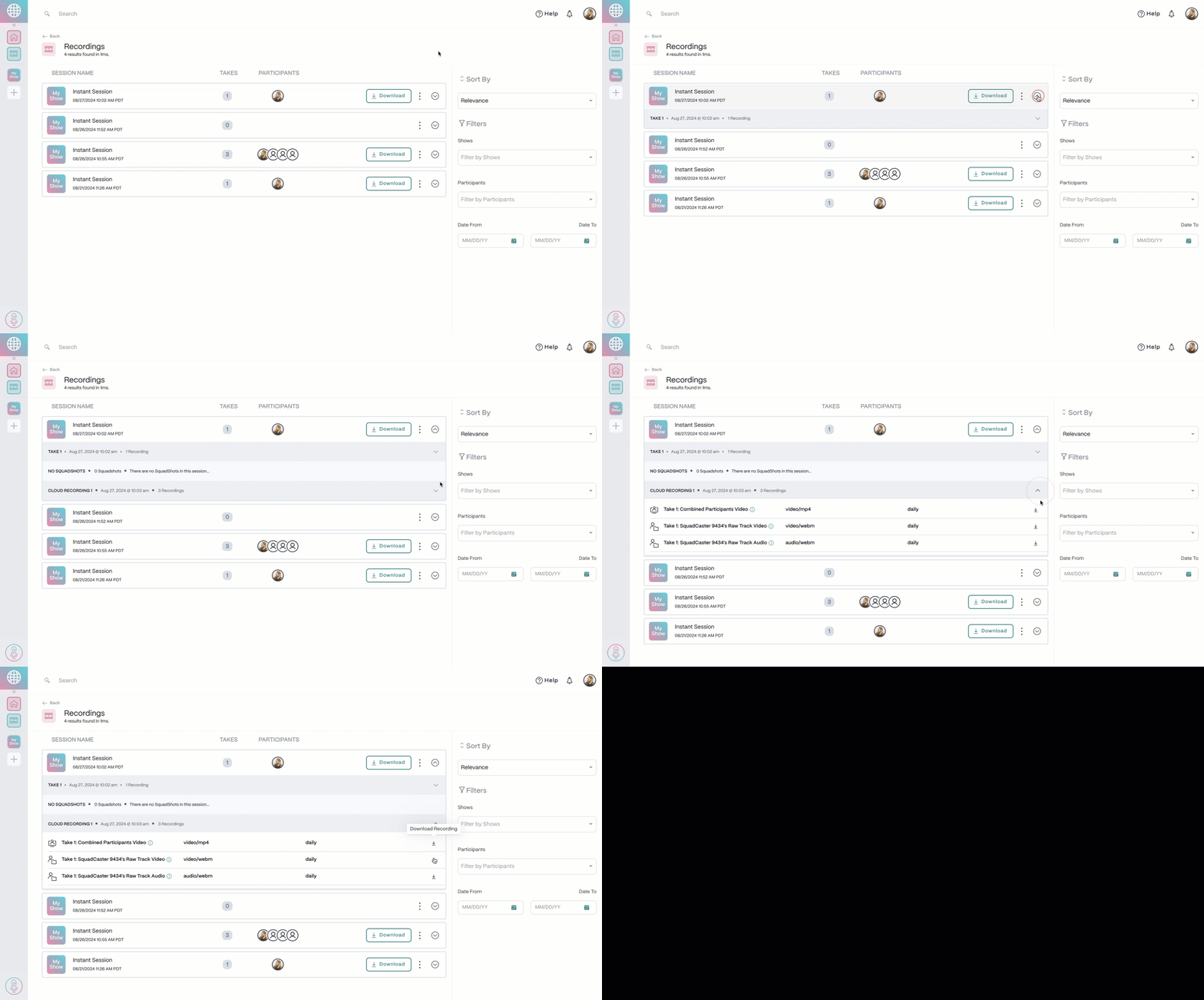
1. Go to the **Recordings** tab in the top-left corner of the Dashboard.
2. Find the session you need, then select the **arrow** icon on the right to expand the session drawer.
3. In the session drawer, expand the **Cloud Recording** section.
4. Select **Download Recording** next to the cloud recording you want to save.