> ## Documentation Index
> Fetch the complete documentation index at: https://help.descript.com/llms.txt
> Use this file to discover all available pages before exploring further.
# Supported Transcription Languages
> Descript automatically transcribes audio and video in 26 languages.
Descript can [auto-detect the language](/script-editing/automatic-transcription) or let you set it before transcribing. Every supported language is written in the Latin alphabet.
Currently, supported transcription languages are limited to those using the Latin alphabet. Languages such as Chinese, Japanese, or Russian are not yet supported, but it's certainly something we’d like to add in the future.
| Available transcription languages | | | |
| ----------------------------------------------------------------------------------------------------------------------------- | ----------------------------------------- | ---------- | ------------------------------------------- |
| Brazilian Portuguese | English (US) | Italian | Slovak |
| Catalan | Finnish | Latvian | Slovenian |
| Croatian | French (FR) | Lithuanian | Spanish (US) |
| Czech | German | Malay | Swedish |
| Danish | Greek ([Beta](/app-troubleshooting/beta)) | Norwegian | Turkish |
| Dutch | Hindi ([Beta](/app-troubleshooting/beta)) | Polish | Welsh\* ([Beta](/app-troubleshooting/beta)) |
| English (UK)\* | Hungarian | Romanian | |
| **must be* [*manually selected when transcribing*](#set-language-preferences)*, not compatible with auto language detection\* | | | |
## Set language preferences
If you work with multiple languages, you can set a preferred transcription language and/or enable **Always ask before transcribing** in your [App settings](/account-and-app-settings/app-settings). When enabled, Descript will prompt you to select a language before each transcription.
## Re-transcribe in a different language
If the wrong language was selected during your initial transcription, you can re-transcribe the file:
1. Click **Project** in the right-hand sidebar and open the **Files** section.
2. Click the  next to your file name.
3. Select **Re-transcribe**.
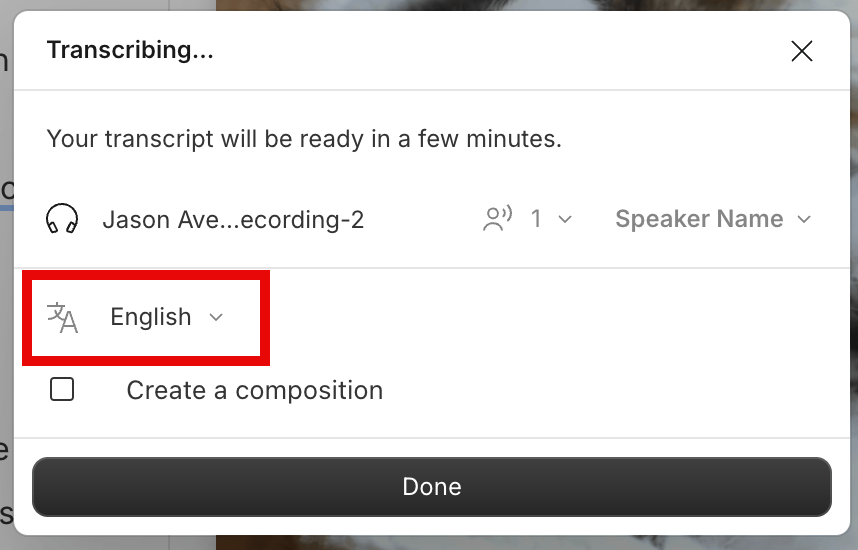
4. Choose the correct transcription language.
5. Click **Done** to re-transcribe your file.\\
next to your file name.
3. Select **Re-transcribe**.
4. Choose the correct transcription language.
5. Click **Done** to re-transcribe your file.\\
 ## Language support for editing and AI tools
Some Descript features currently support only English transcripts. If you’re using another language, note the following tools are English-only:
* [Filler word detection](/script-editing/filler-words)
* [Import transcript](/script-editing/import-transcript)
* [Replace transcript](https://help.descript.com/hc/en-us/articles/10165786610061)
* [Transcription glossary](/script-editing/transcription-glossary)
**Inverse Text Normalization (ITN)**
ITN automatically formats spoken numbers and dates (e.g., “Nineteen Forty-Five” → “1945”). Currently supported in English, French, and Spanish.
## Translation and multi-language files
* Descript supports transcription in only one language per file. Files with multiple spoken languages are not currently supported.
* To translate your transcript into another language, see our [Translate and dub speech feature suite](/repurpose/overview)
## Language support for editing and AI tools
Some Descript features currently support only English transcripts. If you’re using another language, note the following tools are English-only:
* [Filler word detection](/script-editing/filler-words)
* [Import transcript](/script-editing/import-transcript)
* [Replace transcript](https://help.descript.com/hc/en-us/articles/10165786610061)
* [Transcription glossary](/script-editing/transcription-glossary)
**Inverse Text Normalization (ITN)**
ITN automatically formats spoken numbers and dates (e.g., “Nineteen Forty-Five” → “1945”). Currently supported in English, French, and Spanish.
## Translation and multi-language files
* Descript supports transcription in only one language per file. Files with multiple spoken languages are not currently supported.
* To translate your transcript into another language, see our [Translate and dub speech feature suite](/repurpose/overview)