> ## Documentation Index
> Fetch the complete documentation index at: https://help.descript.com/llms.txt
> Use this file to discover all available pages before exploring further.
# Search in Script Tool
> Use the find in script tool to search word gaps, filler words, and highlights across your composition or project.
Search the transcript, locate every [word gap](/script-editing/shorten-word-gaps) or [highlight](/script-editing/highlights), and identify [filler words](/script-editing/filler-words) to review and action on.
This article walks through how to use the search in script tool, apply bulk actions, and filter results to speed up your workflow.
## Access and navigate search
1. Press `Command + F` (macOS) or `Control + F` (Windows) to open the search panel. You can also use the [AI Tools panel](/descript-tour/ai-tools-overview) in the sidebar to access search.
2. Enter a search term.
3. Click a search result in the sidebar to jump to it in the script.
## Search in script options
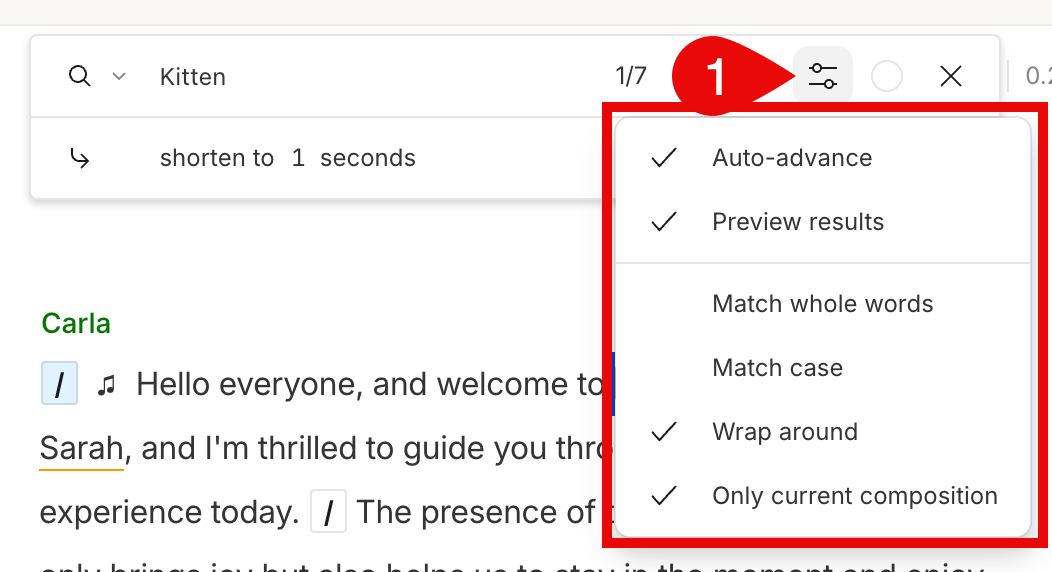
Use **the search in script options** to control how results are filtered and navigated. Click the settings icon  to open these controls.
 | Option | Description |
| ---------------------------- | --------------------------------------------------------------------------------------- |
| **Auto-advance** | Moves to the next result automatically after applying an action like correct or remove. |
| **Preview results** | Plays back the section of your composition for the selected result. |
| **Match whole words** | Returns only results that exactly match your search term. |
| **Match case** | Makes the search case sensitive. |
| **Wrap around** | Returns to the top of the results list after reaching the end (requires Auto-advance). |
| **Only current composition** | Limits the search to your current composition instead of the full project. |
## Find and… menu
Use the **Find and…** dropdown to search for and act on specific types of script content.
| Option | Description |
| ---------------------------- | --------------------------------------------------------------------------------------- |
| **Auto-advance** | Moves to the next result automatically after applying an action like correct or remove. |
| **Preview results** | Plays back the section of your composition for the selected result. |
| **Match whole words** | Returns only results that exactly match your search term. |
| **Match case** | Makes the search case sensitive. |
| **Wrap around** | Returns to the top of the results list after reaching the end (requires Auto-advance). |
| **Only current composition** | Limits the search to your current composition instead of the full project. |
## Find and… menu
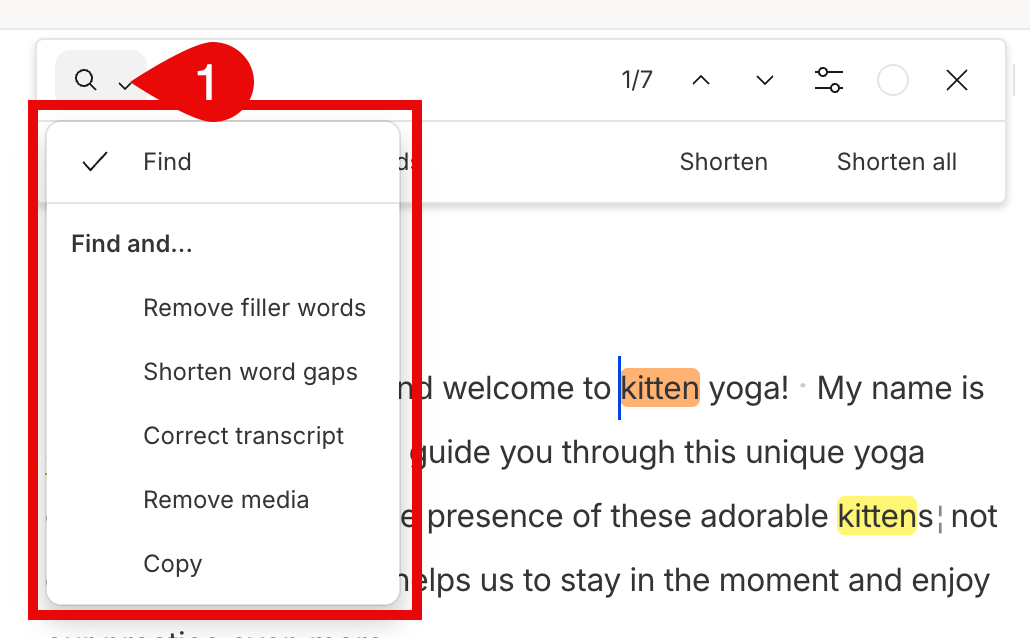
Use the **Find and…** dropdown to search for and act on specific types of script content.
 | Option | What it does |
| ----------------------- | -------------------------------------------------------------------------------------------------------------------------------------- |
| **Find** | Search for specific words or phrases in your script. Apply actions like delete, replace, or insert gap clips. |
| **Remove filler words** | Find and clean up filler words. [Learn more about filler words.](/script-editing/filler-words) |
| **Shorten word gaps** | Find long pauses and shorten them to improve pacing. [Learn more about the shorten word gaps tool.](/script-editing/shorten-word-gaps) |
| **Correct transcript** | Fix misspelled or incorrect transcript words without affecting the media. |
| **Remove media** | Find text and remove the associated audio or video. |
| **Copy** | Copy content and send it to a new or existing composition, folder, or clipboard. |
## Available actions
Actions let you apply edits to your search results. Use them individually or apply them to all results using the toolbar above the search panel.
| Action | Description |
| -------------------------------- | -------------------------------------------------------------------------------------------------- |
| **Delete** | Removes both the text and associated media from the script and timeline. |
| **Delete and replace with gap** | Replaces deleted content with a gap clip in the timeline. [Learn more](/timeline/using-gap-clips). |
| **Ignore** | Strikes through the text and removes media without deleting the text from your script. |
| **Remove from transcript** | Removes text from the script but keeps the audio or video in your timeline. |
| **Duplicate to new composition** | Copies the content into a new composition in your project. |
| **Duplicate to composition** | Copies the content into an existing composition. |
| **Duplicate to folder** | Creates a new composition in a folder you specify. |
| **Copy** | Copies the content to your clipboard for use in another composition or project. |
## Highlighter
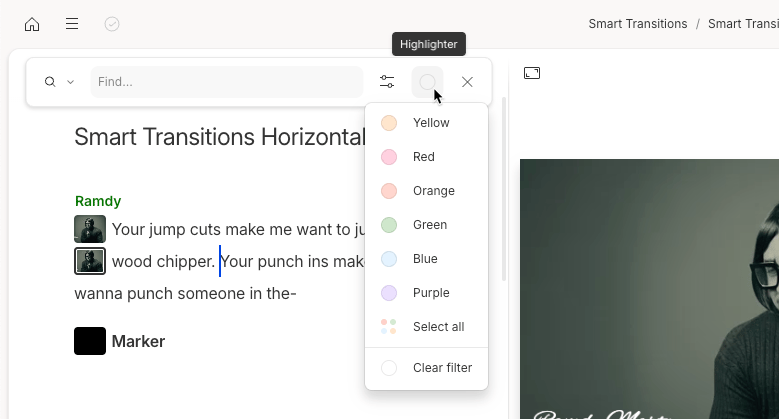
Filter your script by highlight color to review key moments—standout quotes, edit notes, or clips to reuse. [Learn how to copy highlights into a new composition](/script-editing/highlights).
| Option | What it does |
| ----------------------- | -------------------------------------------------------------------------------------------------------------------------------------- |
| **Find** | Search for specific words or phrases in your script. Apply actions like delete, replace, or insert gap clips. |
| **Remove filler words** | Find and clean up filler words. [Learn more about filler words.](/script-editing/filler-words) |
| **Shorten word gaps** | Find long pauses and shorten them to improve pacing. [Learn more about the shorten word gaps tool.](/script-editing/shorten-word-gaps) |
| **Correct transcript** | Fix misspelled or incorrect transcript words without affecting the media. |
| **Remove media** | Find text and remove the associated audio or video. |
| **Copy** | Copy content and send it to a new or existing composition, folder, or clipboard. |
## Available actions
Actions let you apply edits to your search results. Use them individually or apply them to all results using the toolbar above the search panel.
| Action | Description |
| -------------------------------- | -------------------------------------------------------------------------------------------------- |
| **Delete** | Removes both the text and associated media from the script and timeline. |
| **Delete and replace with gap** | Replaces deleted content with a gap clip in the timeline. [Learn more](/timeline/using-gap-clips). |
| **Ignore** | Strikes through the text and removes media without deleting the text from your script. |
| **Remove from transcript** | Removes text from the script but keeps the audio or video in your timeline. |
| **Duplicate to new composition** | Copies the content into a new composition in your project. |
| **Duplicate to composition** | Copies the content into an existing composition. |
| **Duplicate to folder** | Creates a new composition in a folder you specify. |
| **Copy** | Copies the content to your clipboard for use in another composition or project. |
## Highlighter
Filter your script by highlight color to review key moments—standout quotes, edit notes, or clips to reuse. [Learn how to copy highlights into a new composition](/script-editing/highlights).