> ## Documentation Index
> Fetch the complete documentation index at: https://help.descript.com/llms.txt
> Use this file to discover all available pages before exploring further.
# Uninstalling Descript
> Remove the Descript app from your Mac or Windows computer, with steps for a full uninstall of files and preferences.
Uninstalling Descript removes the app from your computer. You can do a basic removal, or a full uninstall that also clears out saved files and preferences.
**Having trouble with Descript?**
Please [reach out to our support team](https://help.descript.com/hc/en-us/requests/new) who are happy to assist you.
## How to delete Descript from your computer
Deleting Descript from your computer removes the application file from your computer. Please choose from the Mac or Windows instructions below.
Please follow the instructions below to remove the Descript application from the macOS operating system.
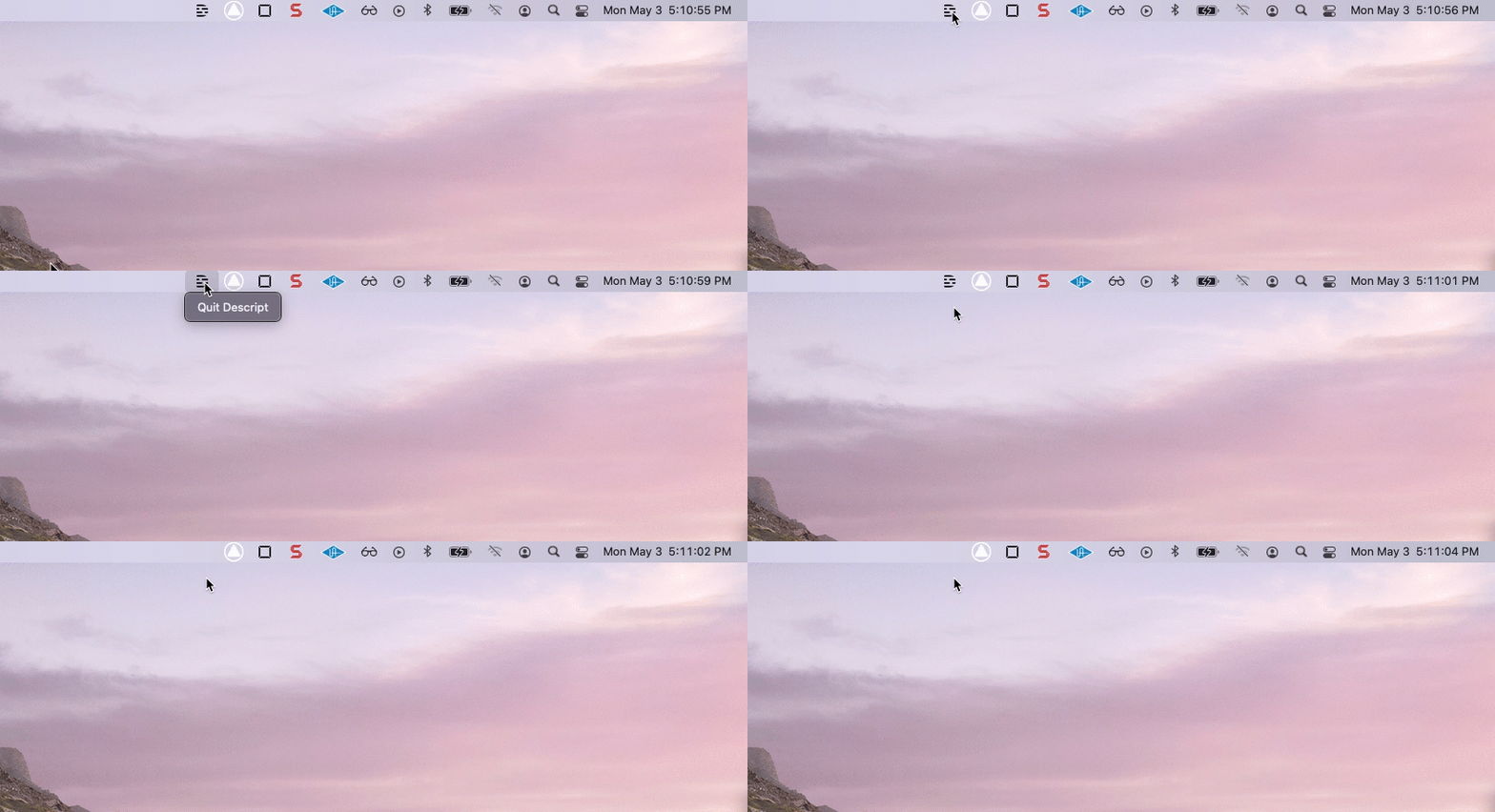
1. Quit the Descript application fully by pressing **Option + click** on the Descript **D** icon in the menubar at the top of the screen ([Screen Recorder](/record/screen-recorder)) and selecting **Quit**. If. If you don't see this icon, you can quit Descript as you would [typically with any application on MacOS](https://support.apple.com/guide/mac-help/quit-apps-mchl834d18c2/mac).
[ ](/images/external/descript-10616465132941-58f4cdd7c5.gif)
2. Open a new Finder window and click on the Applications folder in the left-hand sidebar.
3. Locate Descript in the list, and then drag it to the Trash. Alternatively, you can select the app and then click **File > Move to Trash.**
[
](/images/external/descript-10616465132941-58f4cdd7c5.gif)
2. Open a new Finder window and click on the Applications folder in the left-hand sidebar.
3. Locate Descript in the list, and then drag it to the Trash. Alternatively, you can select the app and then click **File > Move to Trash.**
[  ](/images/external/descript-10616488342029-41ecb89425.jpg)
### Removing macOS Files and Preferences (full uninstall)
If you would like to perform a full uninstallation of your Descript files and preferences, please follow the instructions below.
1. Close Descript if it is still open
2. Open a new Finder window
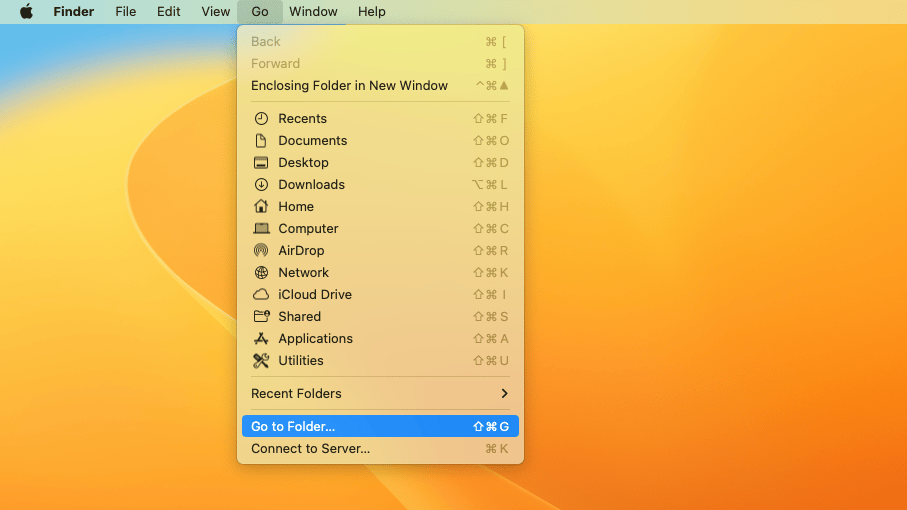
3. In the Finder menu at the top of your screen, click **Go > Go to Folder**
4. Enter "\~/Library/Application Support" then click **Go**
5. Locate and **control-click** on the "Descript" folder in the list, then select **Move to Trash**
**Don't forget the tilde character!**
Locating the Descript folder in /Application Support can be a challenge if you accidentally forget to include the tilde (\~) character at the beginning of the file path above. macOS will still open a different Application Support folder if it has been omitted, but no Descript folder will be present. Make sure to double-check that the full file path between the quote marks has been pasted into the Go window and you should be all set.
(Optional) If you have installed the Computer Audio driver for macOS, you will also need to:
1. Navigate to \*\*Go > Go to Folder
](/images/external/descript-10616488342029-41ecb89425.jpg)
### Removing macOS Files and Preferences (full uninstall)
If you would like to perform a full uninstallation of your Descript files and preferences, please follow the instructions below.
1. Close Descript if it is still open
2. Open a new Finder window
3. In the Finder menu at the top of your screen, click **Go > Go to Folder**
4. Enter "\~/Library/Application Support" then click **Go**
5. Locate and **control-click** on the "Descript" folder in the list, then select **Move to Trash**
**Don't forget the tilde character!**
Locating the Descript folder in /Application Support can be a challenge if you accidentally forget to include the tilde (\~) character at the beginning of the file path above. macOS will still open a different Application Support folder if it has been omitted, but no Descript folder will be present. Make sure to double-check that the full file path between the quote marks has been pasted into the Go window and you should be all set.
(Optional) If you have installed the Computer Audio driver for macOS, you will also need to:
1. Navigate to \*\*Go > Go to Folder
 \*\*
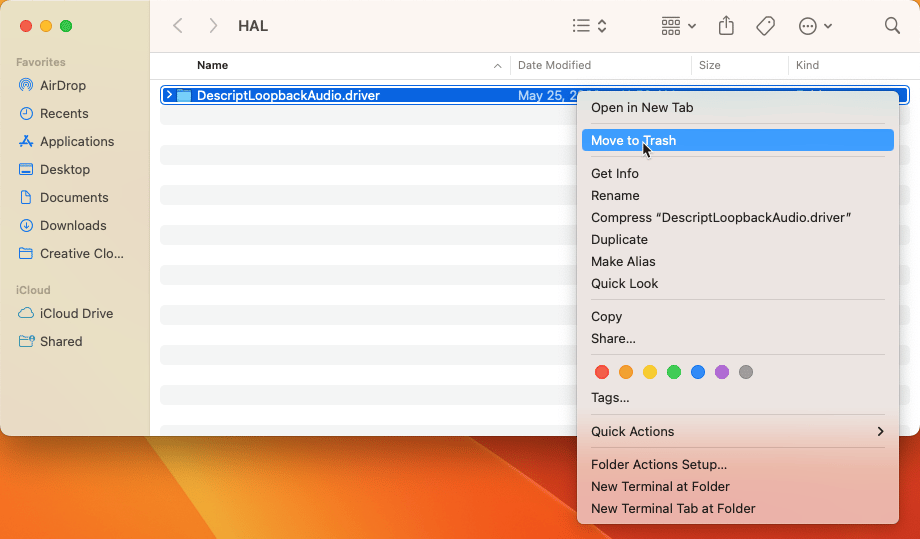
2. Enter "/Library/Audio/Plug-Ins/HAL" then click hit **Enter**
3. Locate and **control-click** on the "DescriptLoopbackAudio.driver" folder in the list, then select \*\*Move to Trash
\*\*
2. Enter "/Library/Audio/Plug-Ins/HAL" then click hit **Enter**
3. Locate and **control-click** on the "DescriptLoopbackAudio.driver" folder in the list, then select \*\*Move to Trash
 \*\*
Here are some instructions on how to uninstall Descript based on your version of Windows. Before doing so, you will want to close Descript completely by clicking on the Notification Area icon in the taskbar at the bottom of the screen, right-clicking on the **D** icon, and selecting **Quit Descript**.
| | | |
| ----------------------------------------------------------------------------------------------------------------------------------------------------------------------------------------------------------------- | --------------------------------------------------------------------------------------------------------------------------------------------------------------- | ----------------------------------------------------------------------------------------------------------------------------------------------------------------------- |
| **Windows 10 or 11** | **Windows 8.1 or 8** | **Windows 7** |
| 1. Locate the search box and type "Control Panel" - then select the **Control Panel**. 2. Click on \*\*Programs > Programs and Features.\*\*Locate and select Descript in the list and then choose **Uninstall**. | 1. Right-click on the **Start** button and click **Control Panel**. 2. Select **Programs and Features**, then right-click on Descript and choose **Uninstall**. | 1. Click on the **Start** menu and select **Control Panel.** 2. Click on **Programs > Programs and Features**. 3. Right-click on Descript and then click **Uninstall**. |
Once complete, follow the prompts to finish the uninstallation.
### Removing Windows Files and Preferences on Windows 11, 10, 8.1, and 8.0 (full uninstall)
1. Close Descript if it is still open
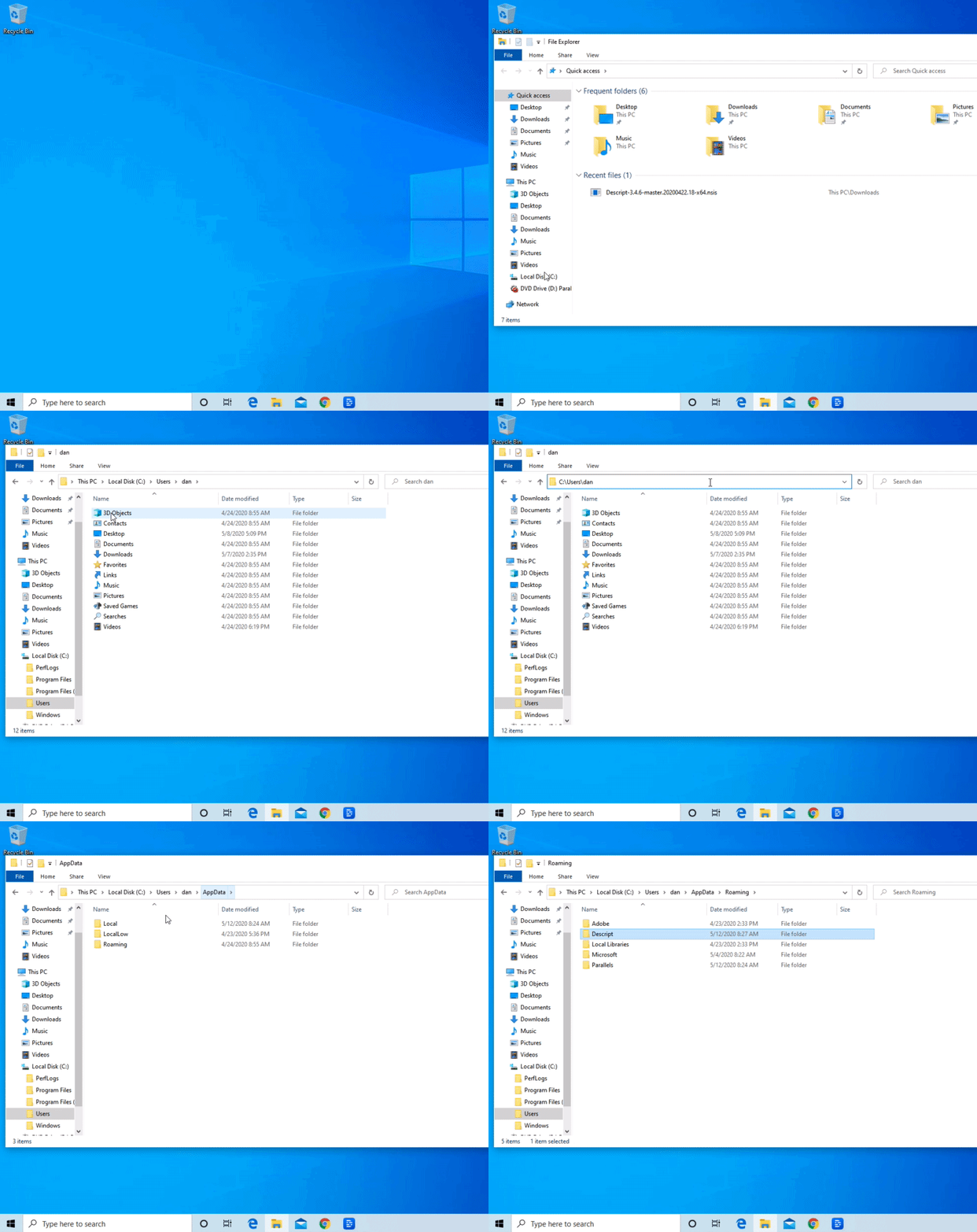
2. Open a new File Explorer window
3. Click on **Local Disk (C:) > Users > (Your user name)**
4. Click in the navigation bar at the top of the window to enter edit mode
5. Add "\AppData" to the end of the drive path and click **Enter**
6. Click on **Roaming**
7. Locate and right-click on the Descript folder in the list, then select **Delete**
[
\*\*
Here are some instructions on how to uninstall Descript based on your version of Windows. Before doing so, you will want to close Descript completely by clicking on the Notification Area icon in the taskbar at the bottom of the screen, right-clicking on the **D** icon, and selecting **Quit Descript**.
| | | |
| ----------------------------------------------------------------------------------------------------------------------------------------------------------------------------------------------------------------- | --------------------------------------------------------------------------------------------------------------------------------------------------------------- | ----------------------------------------------------------------------------------------------------------------------------------------------------------------------- |
| **Windows 10 or 11** | **Windows 8.1 or 8** | **Windows 7** |
| 1. Locate the search box and type "Control Panel" - then select the **Control Panel**. 2. Click on \*\*Programs > Programs and Features.\*\*Locate and select Descript in the list and then choose **Uninstall**. | 1. Right-click on the **Start** button and click **Control Panel**. 2. Select **Programs and Features**, then right-click on Descript and choose **Uninstall**. | 1. Click on the **Start** menu and select **Control Panel.** 2. Click on **Programs > Programs and Features**. 3. Right-click on Descript and then click **Uninstall**. |
Once complete, follow the prompts to finish the uninstallation.
### Removing Windows Files and Preferences on Windows 11, 10, 8.1, and 8.0 (full uninstall)
1. Close Descript if it is still open
2. Open a new File Explorer window
3. Click on **Local Disk (C:) > Users > (Your user name)**
4. Click in the navigation bar at the top of the window to enter edit mode
5. Add "\AppData" to the end of the drive path and click **Enter**
6. Click on **Roaming**
7. Locate and right-click on the Descript folder in the list, then select **Delete**
[  ](/images/external/descript-10616489707149-a389a97a39.gif)
## Reinstalling the app?
If you're reinstalling the app, consider emptying your computer's recycling bin after uninstalling Descript. This will prevent any potential storage issues affecting your fresh install. [Learn how to install the app here](/getting-started/install).
](/images/external/descript-10616489707149-a389a97a39.gif)
## Reinstalling the app?
If you're reinstalling the app, consider emptying your computer's recycling bin after uninstalling Descript. This will prevent any potential storage issues affecting your fresh install. [Learn how to install the app here](/getting-started/install).