> ## Documentation Index
> Fetch the complete documentation index at: https://help.descript.com/llms.txt
> Use this file to discover all available pages before exploring further.
# Export a Video or GIF Locally
> Export video from Descript to your computer as an MP4 or GIF.
Local export saves a finished video straight to your device instead of to a share page. Pick MP4 for a standard video file, or GIF for a short, silent, looping clip.
Are you only seeing audio export options? Be sure to check that you are not working in an [audio-only composition](/working-in-projects/audio) if you want to export video.
## Export video (MP4)
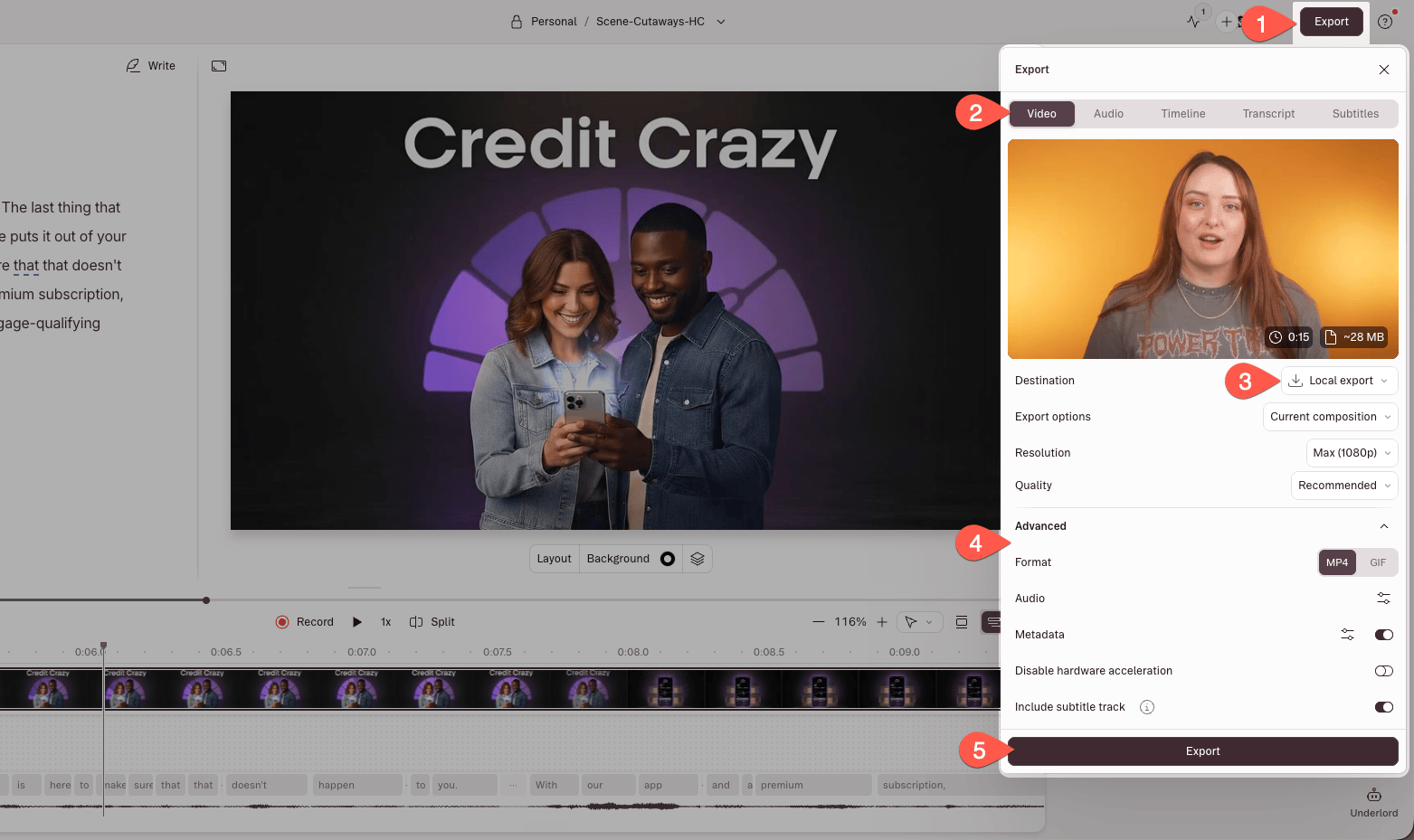
1. In the editor, click **Export** in the upper-right corner.
2. Select the **Video** tab.
3. Choose **Local export** as the destination.
4. Adjust your export settings (see [Export settings](#export-settings) below).
5. Click **Export**.
Your video will be saved to your computer as an MP4 file.
 ## Export a GIF
Previously, exporting GIFs was its own tab in the export panel. Now you’ll find GIF export as a **Format** option under **Local Export → Video**.
## Export settings
When exporting video or GIFs, you can configure the following settings. Some options are format-specific.
| Setting | Description |
| ----------------------- | --------------------------------------------------------------------------------------------------------------------------------------------------------------------------------------------------------------------- |
| **Destination** | Choose what/where to export |
| **Current composition** | Exports the selected [composition](https://help.descript.com/hc/en-us/articles/10164608563597) (default) |
| **Current selection** | Exports only the selected text range as a video |
| **Current scene** | Exports the selected [scene](/getting-started/scenes) |
| **Scenes** | Exports all [scenes](/getting-started/scenes) in the current composition as individual files |
| **Markers** | Exports individual files for each [Marker](/script-editing/markers-chapters) in the composition |
| **Line breaks** | Exports individual files for each section of text separated by line breaks |
| **All compositions** | Batch exports one file per composition in the project |
| **Resolution**\* | Export at 480p, 720p, 1080p, or 4K. \**Free plan users are limited to 720p export. These resolutions are also restricted by your plan and your [aspect ratio and video settings](/working-in-projects/aspect-ratio).* |
| **Quality (video)** | Choose from Low, Medium, or High |
| **Quality (audio)** | Adjust audio quality manually |
| **Channels** | Select mono (1) or stereo (2) |
| **Sample rate** | Choose 44.1 kHz or 48 kHz |
| **Audio bitrate** | Set between 32–256 kbps |
| **Normalize volume** | Choose from Off, Peak, or target levels: -14 / -16 / -18 / -23 / -24 LUFS |
| **Add metadata** | Include show title, episode title, description, and markers as chapters |
## Video watermark
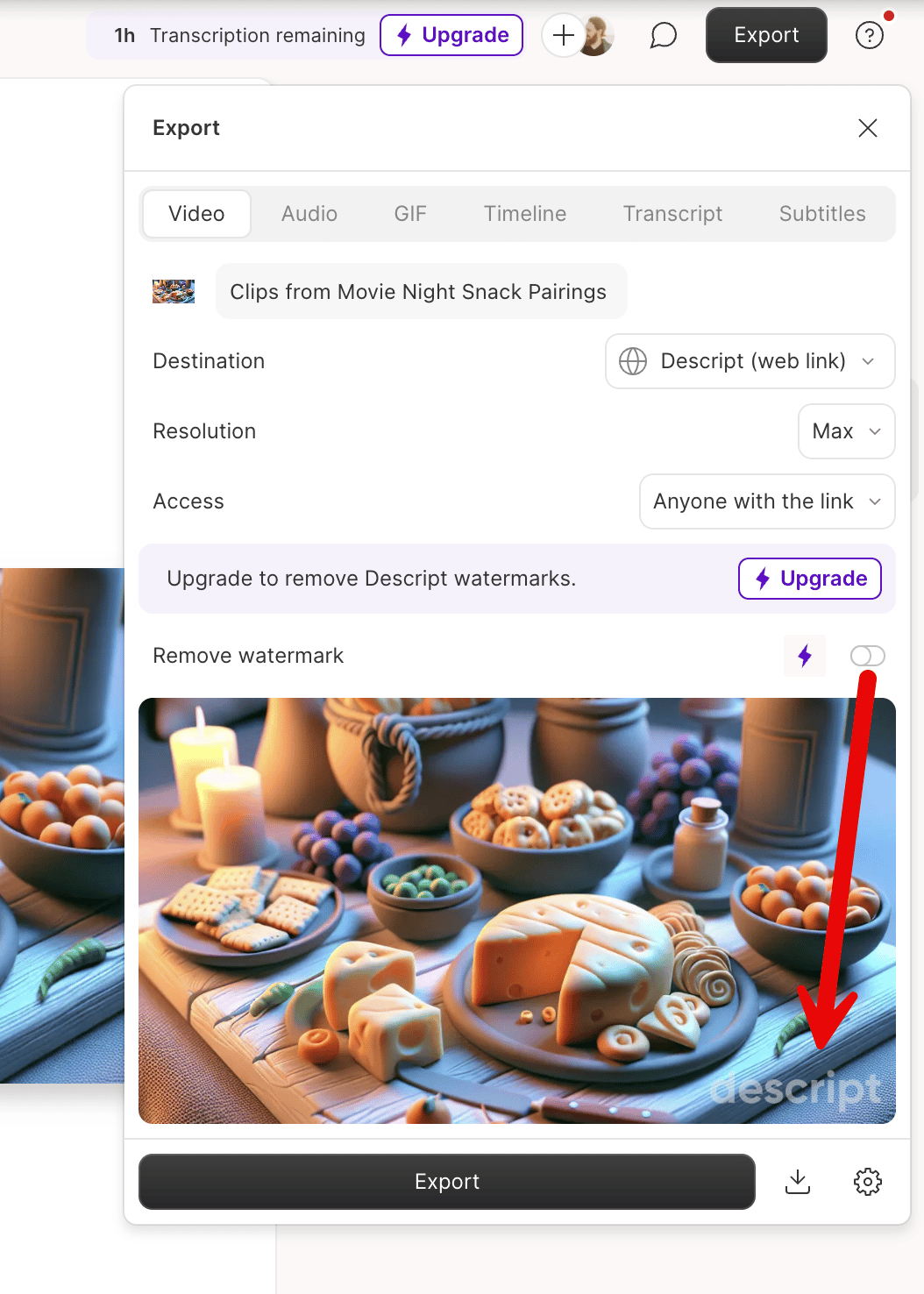
Exports from a Free drive will include a Descript watermark in the bottom-right corner. Upgrading to a paid **Hobbyist, Creator, or Business** plan removes the watermark from all **future** exports. Existing exports must be republished or exported again after upgrading.
## Export a GIF
Previously, exporting GIFs was its own tab in the export panel. Now you’ll find GIF export as a **Format** option under **Local Export → Video**.
## Export settings
When exporting video or GIFs, you can configure the following settings. Some options are format-specific.
| Setting | Description |
| ----------------------- | --------------------------------------------------------------------------------------------------------------------------------------------------------------------------------------------------------------------- |
| **Destination** | Choose what/where to export |
| **Current composition** | Exports the selected [composition](https://help.descript.com/hc/en-us/articles/10164608563597) (default) |
| **Current selection** | Exports only the selected text range as a video |
| **Current scene** | Exports the selected [scene](/getting-started/scenes) |
| **Scenes** | Exports all [scenes](/getting-started/scenes) in the current composition as individual files |
| **Markers** | Exports individual files for each [Marker](/script-editing/markers-chapters) in the composition |
| **Line breaks** | Exports individual files for each section of text separated by line breaks |
| **All compositions** | Batch exports one file per composition in the project |
| **Resolution**\* | Export at 480p, 720p, 1080p, or 4K. \**Free plan users are limited to 720p export. These resolutions are also restricted by your plan and your [aspect ratio and video settings](/working-in-projects/aspect-ratio).* |
| **Quality (video)** | Choose from Low, Medium, or High |
| **Quality (audio)** | Adjust audio quality manually |
| **Channels** | Select mono (1) or stereo (2) |
| **Sample rate** | Choose 44.1 kHz or 48 kHz |
| **Audio bitrate** | Set between 32–256 kbps |
| **Normalize volume** | Choose from Off, Peak, or target levels: -14 / -16 / -18 / -23 / -24 LUFS |
| **Add metadata** | Include show title, episode title, description, and markers as chapters |
## Video watermark
Exports from a Free drive will include a Descript watermark in the bottom-right corner. Upgrading to a paid **Hobbyist, Creator, or Business** plan removes the watermark from all **future** exports. Existing exports must be republished or exported again after upgrading.
 ## Embedded subtitles
Subtitle tracks are automatically embedded in exported video files. Platforms that support embedded subtitles allow viewers to toggle captions on or off.
Descript’s embedded subtitles are **not** burned in. To burn captions directly into your video, see [add custom captions](/visuals/text-layers).
### How do I format embedded subtitles?
Embedded subtitles only contain text and timestamp data. Once you import the video into a destination app (Final Cut Pro, Adobe Premiere, or a hosting platform), you can change how they look — font, size, color, and position.
## Embedded subtitles
Subtitle tracks are automatically embedded in exported video files. Platforms that support embedded subtitles allow viewers to toggle captions on or off.
Descript’s embedded subtitles are **not** burned in. To burn captions directly into your video, see [add custom captions](/visuals/text-layers).
### How do I format embedded subtitles?
Embedded subtitles only contain text and timestamp data. Once you import the video into a destination app (Final Cut Pro, Adobe Premiere, or a hosting platform), you can change how they look — font, size, color, and position.