> ## Documentation Index
> Fetch the complete documentation index at: https://help.descript.com/llms.txt
> Use this file to discover all available pages before exploring further.
# Export and Publish Content with Descript Web Links
> Exporting to a Descript web link (sometimes called "publishing" to a share page) creates a standalone page on share.descript.com with its own unique URL.
Use web links to share a finished video or podcast with people outside Descript. Anyone you send the link to can watch or listen in their browser, no account or download required.
**Plan limits**
Your plan determines the maximum length of videos you can export to a web link. Videos exceeding this limit will be converted to audio-only. Check your plan’s details on our [pricing page](https://www.descript.com/pricing).
If you’re on a legacy plan, see the limits in our [Understanding your Legacy Plan](/billing-payments-plans/legacy-sunset) guide.
## Export to Descript (web link)
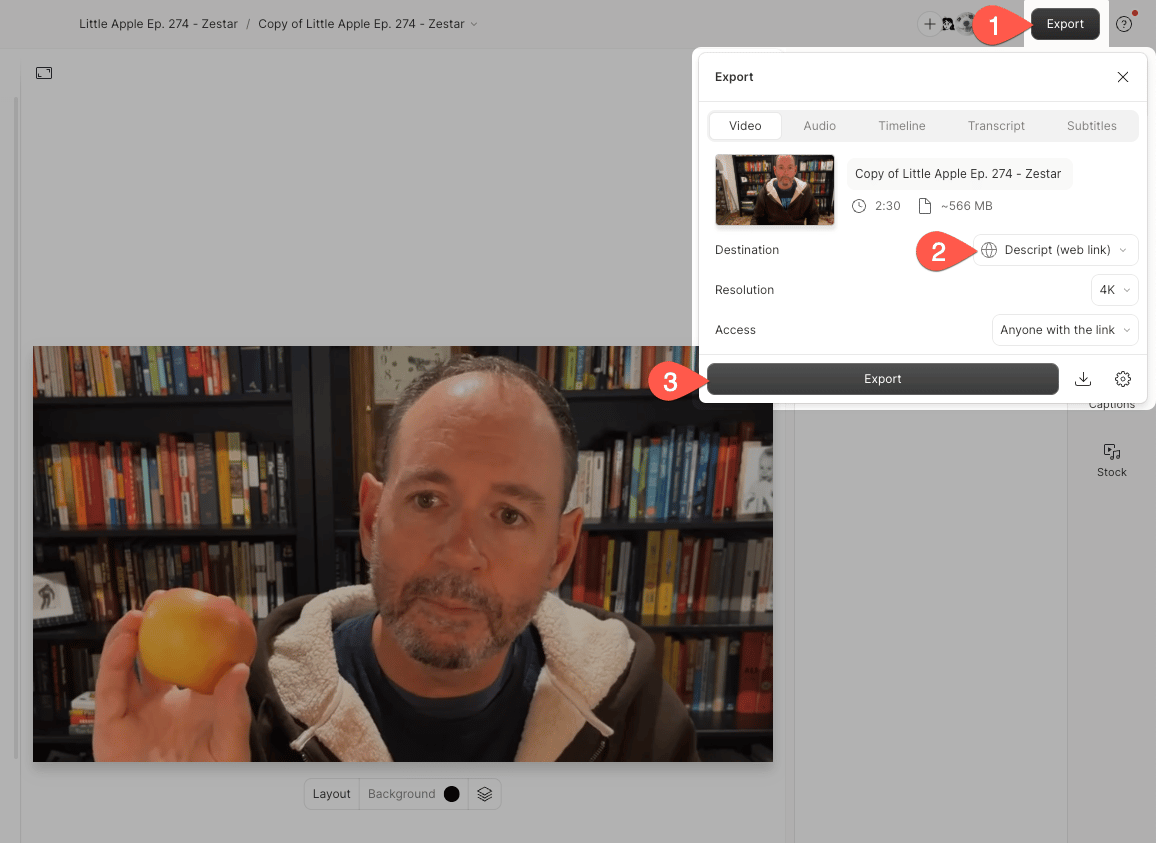
1. Click the **Export** button at the top-right corner of the editor.
2. Select **Descript (web link)** as the export destination.
3. Click **Export** to publish to your web link.
 ## Update your web link / share page
You can update your content while maintaining the original URL. Follow [the same steps as exporting](#export-to-descript-web-link) — you’ll see an **Update** button instead of **Export**.
If you've made edits since your last web link export, you must click **Update** to publish these changes to your share.descript.com URL. Without updating, both downloads and the web link URL will display the previous version of your project.
**Comments will be removed**
Updating or removing a share page permanently deletes all comments on that page (but not comments in the Descript editor). Project comments are private to collaborators, while share page comments appear publicly on content exported with Descript (web link). [Learn more about commenting directly in projects](/collaboration/project-comments).
## Download your content from the share page
The **Download** button saves the version of your project from the last time it was exported to a web link. If you've made any changes since then, you'll need to [update first](/export-and-share/share-page) to sync the changes to your share page, and then download. If you use the download button without updating, you'll be saving a previous version of your project to your device.
## Update your web link / share page
You can update your content while maintaining the original URL. Follow [the same steps as exporting](#export-to-descript-web-link) — you’ll see an **Update** button instead of **Export**.
If you've made edits since your last web link export, you must click **Update** to publish these changes to your share.descript.com URL. Without updating, both downloads and the web link URL will display the previous version of your project.
**Comments will be removed**
Updating or removing a share page permanently deletes all comments on that page (but not comments in the Descript editor). Project comments are private to collaborators, while share page comments appear publicly on content exported with Descript (web link). [Learn more about commenting directly in projects](/collaboration/project-comments).
## Download your content from the share page
The **Download** button saves the version of your project from the last time it was exported to a web link. If you've made any changes since then, you'll need to [update first](/export-and-share/share-page) to sync the changes to your share page, and then download. If you use the download button without updating, you'll be saving a previous version of your project to your device.
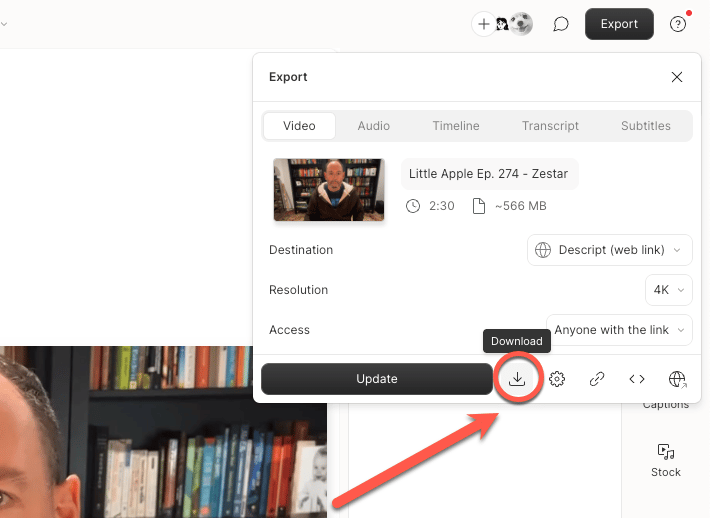 You can also download your content directly from the share.descript.com URL. Some browsers may open the file in a new tab instead — if this happens, right-click the video and select *Save as* to save it to your device.
**Need the latest version without updating?**
Use a **local export** to save your current composition to your device without updating the web link. See our [Export a video or GIF locally](/export-and-share/video-gif) guide for those steps.
## Remove a share page
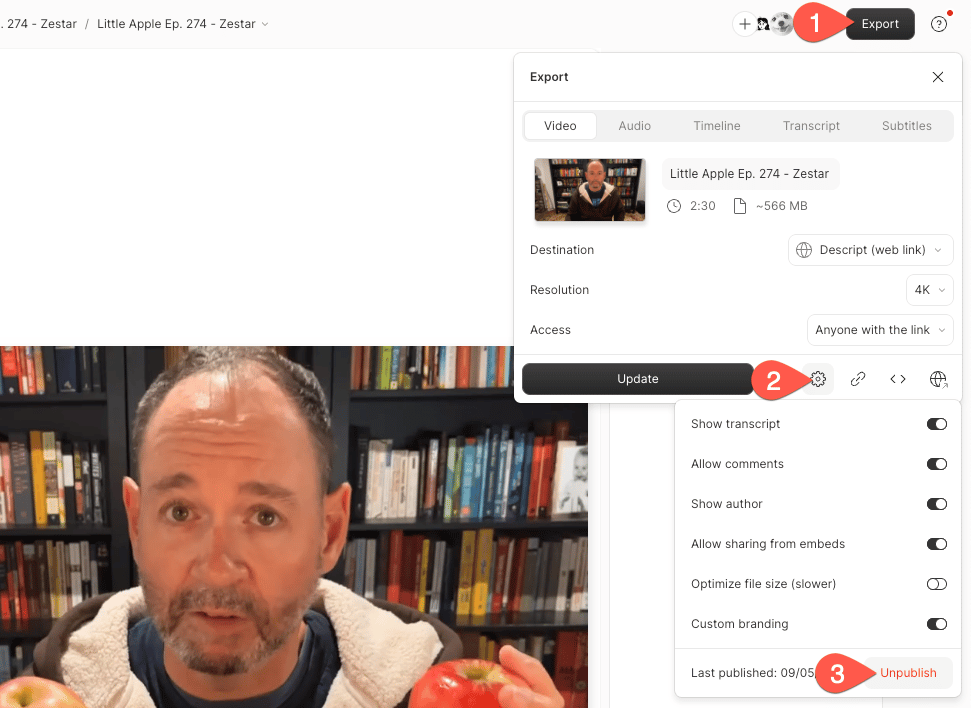
To unpublish a page, click the **gear icon** in the Export menu, then select **Unpublish**.
You can also download your content directly from the share.descript.com URL. Some browsers may open the file in a new tab instead — if this happens, right-click the video and select *Save as* to save it to your device.
**Need the latest version without updating?**
Use a **local export** to save your current composition to your device without updating the web link. See our [Export a video or GIF locally](/export-and-share/video-gif) guide for those steps.
## Remove a share page
To unpublish a page, click the **gear icon** in the Export menu, then select **Unpublish**.
 ## Export settings and permissions
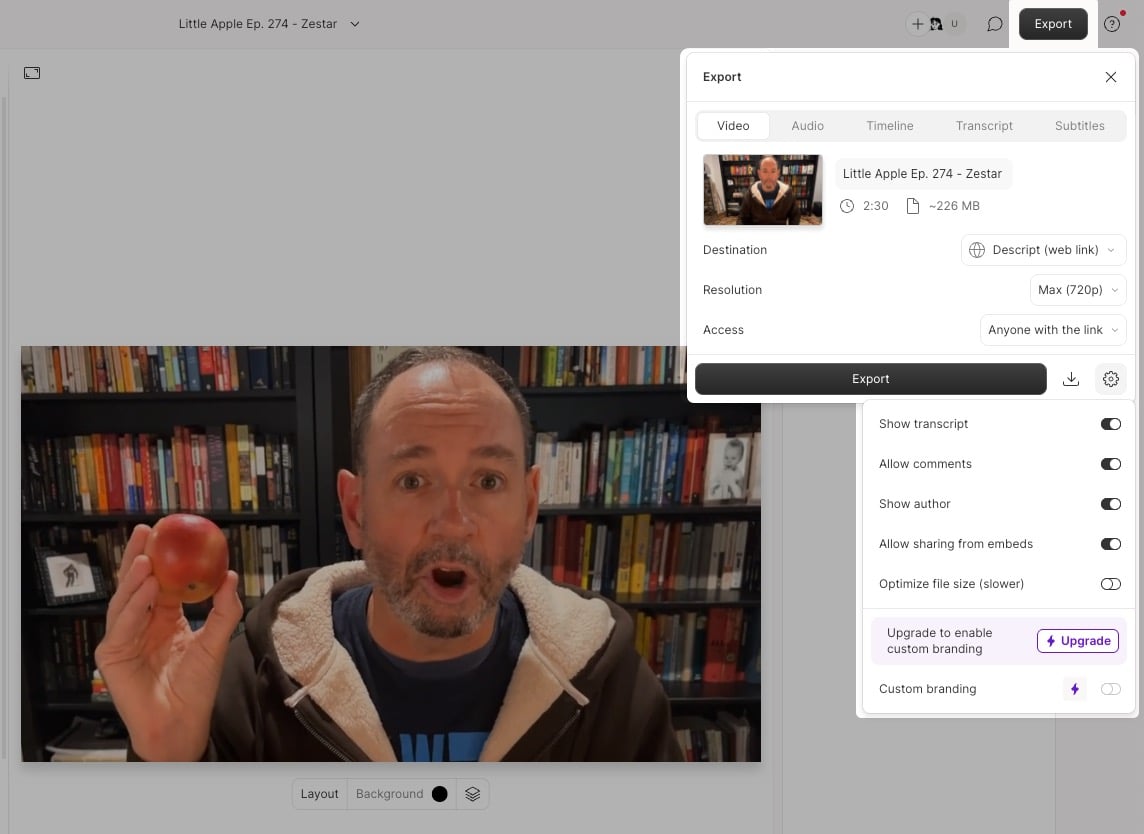 The following settings control resolution, access, and branding for share pages:
\*\* Free plan users are limited to 720p export. These resolutions are also restricted by your plan and\* [*scene editor size*](/working-in-projects/aspect-ratio)*.*
## Customize share page thumbnails
By default, the thumbnail is the first frame of your video. For steps to change your thumbnail, see [Set and customize thumbnails](/export-and-share/set-and-customize-thumbnails).
## Video watermark
Users on a Free drive will see a Descript watermark in the bottom-right of exported videos. Upgrading to a paid plan removes the watermark. To remove it from previously published content, re-export after upgrading.
| Setting | Description |
| ------------------------------- | ------------------------------------------------------------------------------------------------------------------------------------------------------------------------------------------------------------------------------------------------------------------------------------------------------------------------------------------------------------------------------------------------------------------------------------------------------------------------------------------------------------------------------------------- |
| **Resolution**\* | Set video resolution to 480p, 720p, 1080p, or 4K. |
| **Access** | Choose who can view your share page: - **Public** — Pages can appear in search engines. - **Anyone with the link** — Not indexed; no login required. - **Project access required** — Viewers must log in and be authorized. [Learn more](/working-in-projects/access). Drive owners can also set the default privacy for all share pages from the [**Preferences** tab in App Settings](https://web.descript.com/view/settings/account?active=preferences). Learn more in our [App Settings guide](/account-and-app-settings/app-settings). |
| **Additional settings** | |
| **Show transcript** | Displays the transcript on the share page. |
| **Allow comments** | Enables commenting on the published page. |
| **Show author** | Displays the project owner's name. |
| **Allow sharing from embeds** | Adds a share button to embedded players. |
| **Optimize file size (slower)** | Re-encodes the exported video to reduce file size. |
| **Custom branding** | Controls whether the Drive icon appears on the page. |
The following settings control resolution, access, and branding for share pages:
\*\* Free plan users are limited to 720p export. These resolutions are also restricted by your plan and\* [*scene editor size*](/working-in-projects/aspect-ratio)*.*
## Customize share page thumbnails
By default, the thumbnail is the first frame of your video. For steps to change your thumbnail, see [Set and customize thumbnails](/export-and-share/set-and-customize-thumbnails).
## Video watermark
Users on a Free drive will see a Descript watermark in the bottom-right of exported videos. Upgrading to a paid plan removes the watermark. To remove it from previously published content, re-export after upgrading.
| Setting | Description |
| ------------------------------- | ------------------------------------------------------------------------------------------------------------------------------------------------------------------------------------------------------------------------------------------------------------------------------------------------------------------------------------------------------------------------------------------------------------------------------------------------------------------------------------------------------------------------------------------- |
| **Resolution**\* | Set video resolution to 480p, 720p, 1080p, or 4K. |
| **Access** | Choose who can view your share page: - **Public** — Pages can appear in search engines. - **Anyone with the link** — Not indexed; no login required. - **Project access required** — Viewers must log in and be authorized. [Learn more](/working-in-projects/access). Drive owners can also set the default privacy for all share pages from the [**Preferences** tab in App Settings](https://web.descript.com/view/settings/account?active=preferences). Learn more in our [App Settings guide](/account-and-app-settings/app-settings). |
| **Additional settings** | |
| **Show transcript** | Displays the transcript on the share page. |
| **Allow comments** | Enables commenting on the published page. |
| **Show author** | Displays the project owner's name. |
| **Allow sharing from embeds** | Adds a share button to embedded players. |
| **Optimize file size (slower)** | Re-encodes the exported video to reduce file size. |
| **Custom branding** | Controls whether the Drive icon appears on the page. |