> ## Documentation Index
> Fetch the complete documentation index at: https://help.descript.com/llms.txt
> Use this file to discover all available pages before exploring further.
# Export and Publishing Overview
> Export or publish Descript content as video, audio, text, or to hosting platforms.
Descript gives you comprehensive exporting and publishing options tailored to different workflows:
* Export your content as a [video](/export-and-share/video-gif), [audio](/export-and-share/audio), [GIF](/export-and-share/video-gif), [text](/export-and-share/transcript), or [subtitle](/export-and-share/subtitles) file.
* [Export your Timeline](/export-and-share/timeline-exports) non-destructively to continue editing in most major audio and video editing tools.
* [Export and publish a standalone web page](/export-and-share/share-page) with a shareable link and embeddable web player.
* Export and publish directly to any of our integrated publishing and distribution platforms — including [YouTube](/export-and-share/youtube) and many [podcast-hosting services](/export-and-share/others).
Are you only seeing audio export options? Be sure to check that you are not working in an [audio-only composition](/working-in-projects/audio) if you want to export video.
## Exporting your content
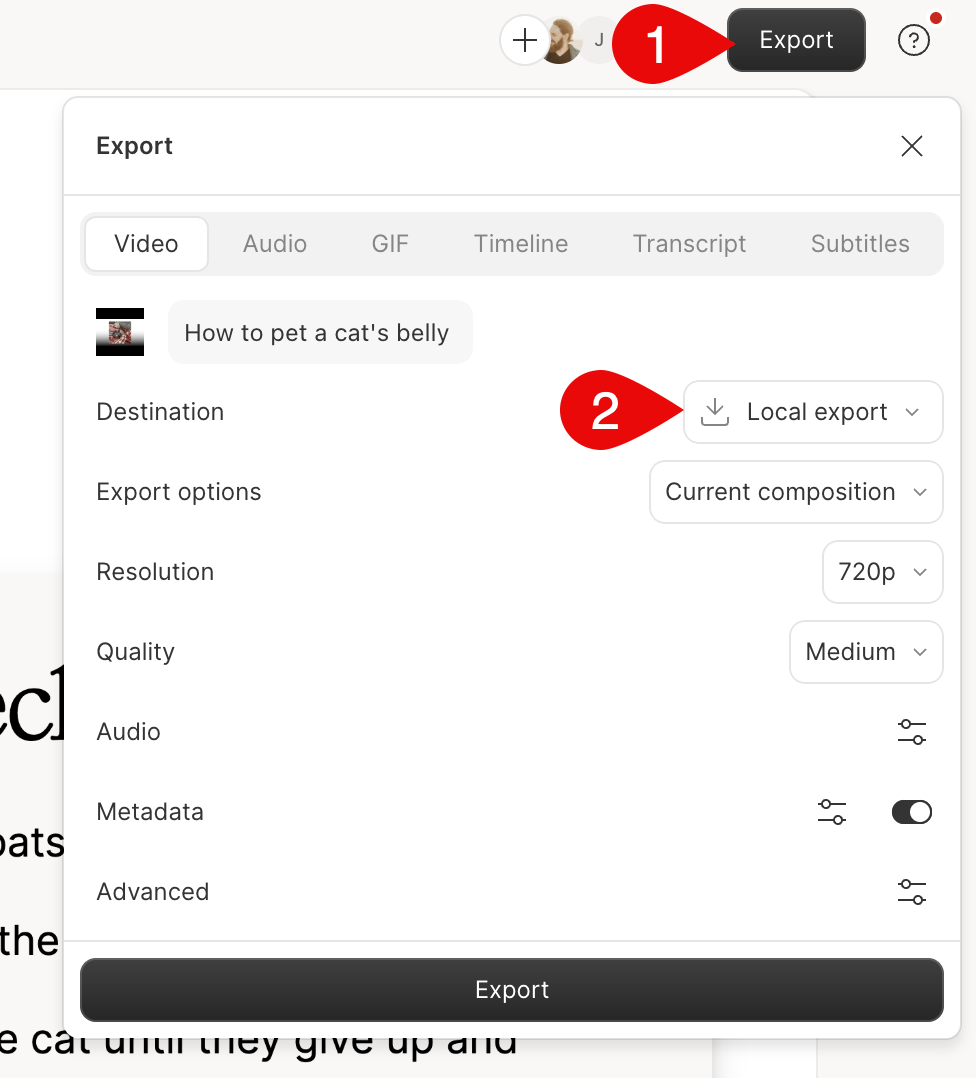
You export a composition by selecting **Export** in the top right corner of the main editor. There are two tabs in the menu you can choose from:
* Setting the **Destination** offers more options for publishing your composition online to various hosting platforms.
* Setting the **Destination** to **Local export** offers the ability to export a file to your computer.\\