> ## Documentation Index
> Fetch the complete documentation index at: https://help.descript.com/llms.txt
> Use this file to discover all available pages before exploring further.
# Animate text and captions
> Add animations to caption and text layers in Descript.
Customize how [text layers](/visuals/text-layers) and [captions](/visuals/captions) animate into and out of your scene.
## Add a text animation
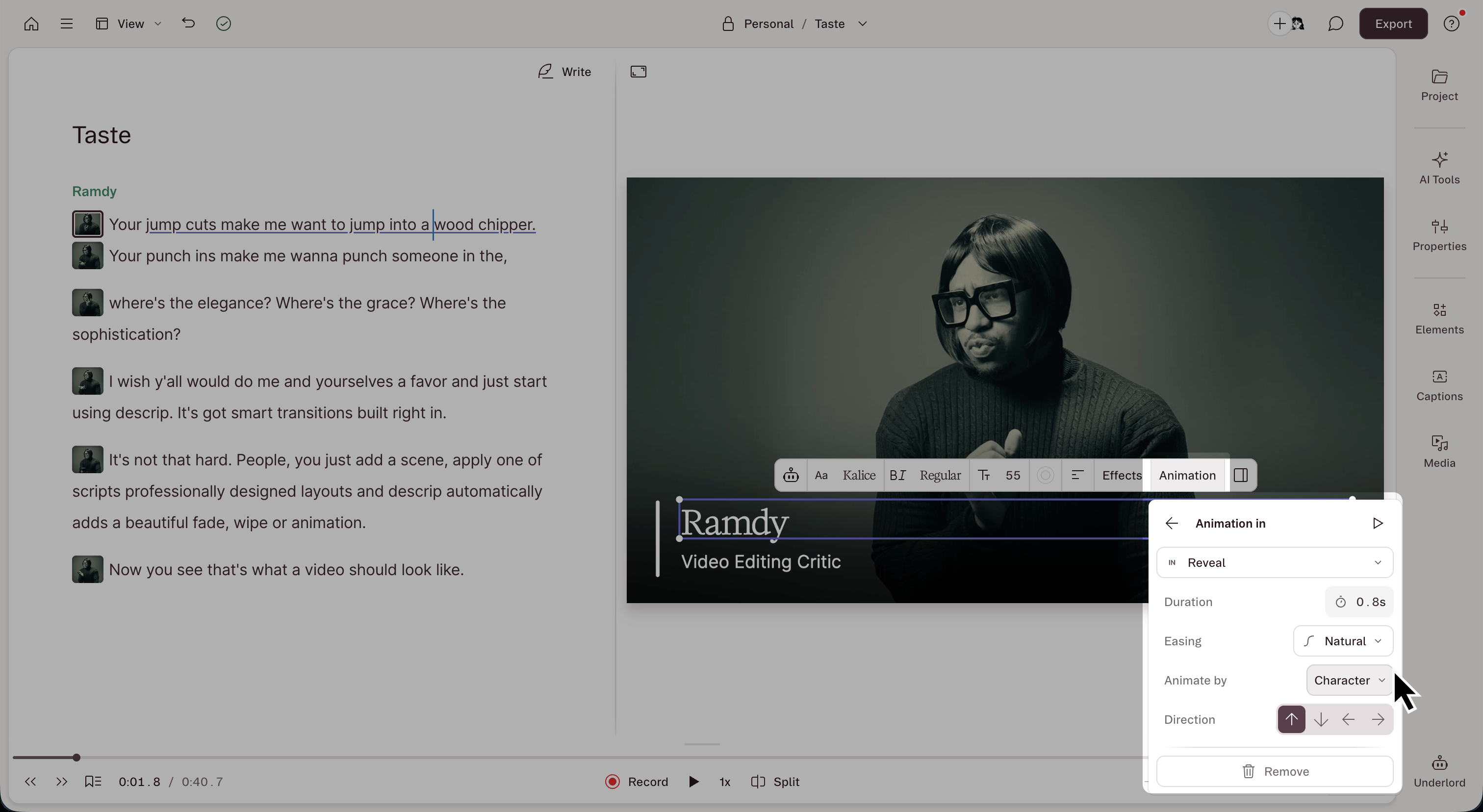
1. Select a caption or text layer in the [Scene Editor](/visuals/scene-editor-overview).
2. Click the **Animation** button in the scene editor menu that appears.
3. Choose **In** (as the layer arrives), **Out** (as the layer leaves), or **Custom**.
4. For **In** and **Out** animations, select a preset, then adjust the available parameters.
 ## Available text animations
Text and caption layers use the same [in/out presets shared with visual layers](/effects-animations-transitions/animate-visual-layers): Blur, Fade, Scale, Slide, Spin, and Wipe *plus* text-only animations that move the text itself: **Appear**, **Reveal**, **Pop**, **Bounce**, **Pulse**, **Glitch**, **Flicker**, **Wave**, and **Wiggle**.
## Animate by word, line, or paragraph
Apply text animations to different units of text.
* **By character:** each letter animates separately. Only available for [text layers](/visuals/text-layers), not captions.
* **By word:** each word animates separately
* **By line:** each line animates as a unit
* **By paragraph:** the whole block animates together
## Adjust timing
Set an animation's **duration** (how long it plays) and **easing** (how it speeds up and slows down) in the [Properties panel](/descript-tour/properties-panel). See [animation curves](/effects-animations-transitions/animate-visual-layers#animation-curves) for how each easing option behaves.
## Related topics
- [Animate visual layers](/effects-animations-transitions/animate-visual-layers.md)
- [Captions](/visuals/captions.md)
- [Waveforms](/visuals/waveforms.md)
- [Add and customize text layers](/visuals/text-layers.md)
- [Create a custom avatar](/generative-media/custom-avatars.md)
## Available text animations
Text and caption layers use the same [in/out presets shared with visual layers](/effects-animations-transitions/animate-visual-layers): Blur, Fade, Scale, Slide, Spin, and Wipe *plus* text-only animations that move the text itself: **Appear**, **Reveal**, **Pop**, **Bounce**, **Pulse**, **Glitch**, **Flicker**, **Wave**, and **Wiggle**.
## Animate by word, line, or paragraph
Apply text animations to different units of text.
* **By character:** each letter animates separately. Only available for [text layers](/visuals/text-layers), not captions.
* **By word:** each word animates separately
* **By line:** each line animates as a unit
* **By paragraph:** the whole block animates together
## Adjust timing
Set an animation's **duration** (how long it plays) and **easing** (how it speeds up and slows down) in the [Properties panel](/descript-tour/properties-panel). See [animation curves](/effects-animations-transitions/animate-visual-layers#animation-curves) for how each easing option behaves.
## Related topics
- [Animate visual layers](/effects-animations-transitions/animate-visual-layers.md)
- [Captions](/visuals/captions.md)
- [Waveforms](/visuals/waveforms.md)
- [Add and customize text layers](/visuals/text-layers.md)
- [Create a custom avatar](/generative-media/custom-avatars.md)