> ## Documentation Index
> Fetch the complete documentation index at: https://help.descript.com/llms.txt
> Use this file to discover all available pages before exploring further.
# Using the CLI
> Drive the Descript API from your terminal with the platform CLI.
The CLI wraps the API into a simple to use command line tool with interactive flows for setting up authentication, importing, and prompting the agent. It also has built-in polling for job completion.
## Requirements
Before installing the CLI, you'll need **Node.js 24 or higher**. Visit [nodejs.org](https://nodejs.org/) to download and install the latest LTS version for your operating system.
## Install and set up
First, install the latest version of the CLI using npm.
```bash theme={null}
npm install -g @descript/platform-cli@latest
```
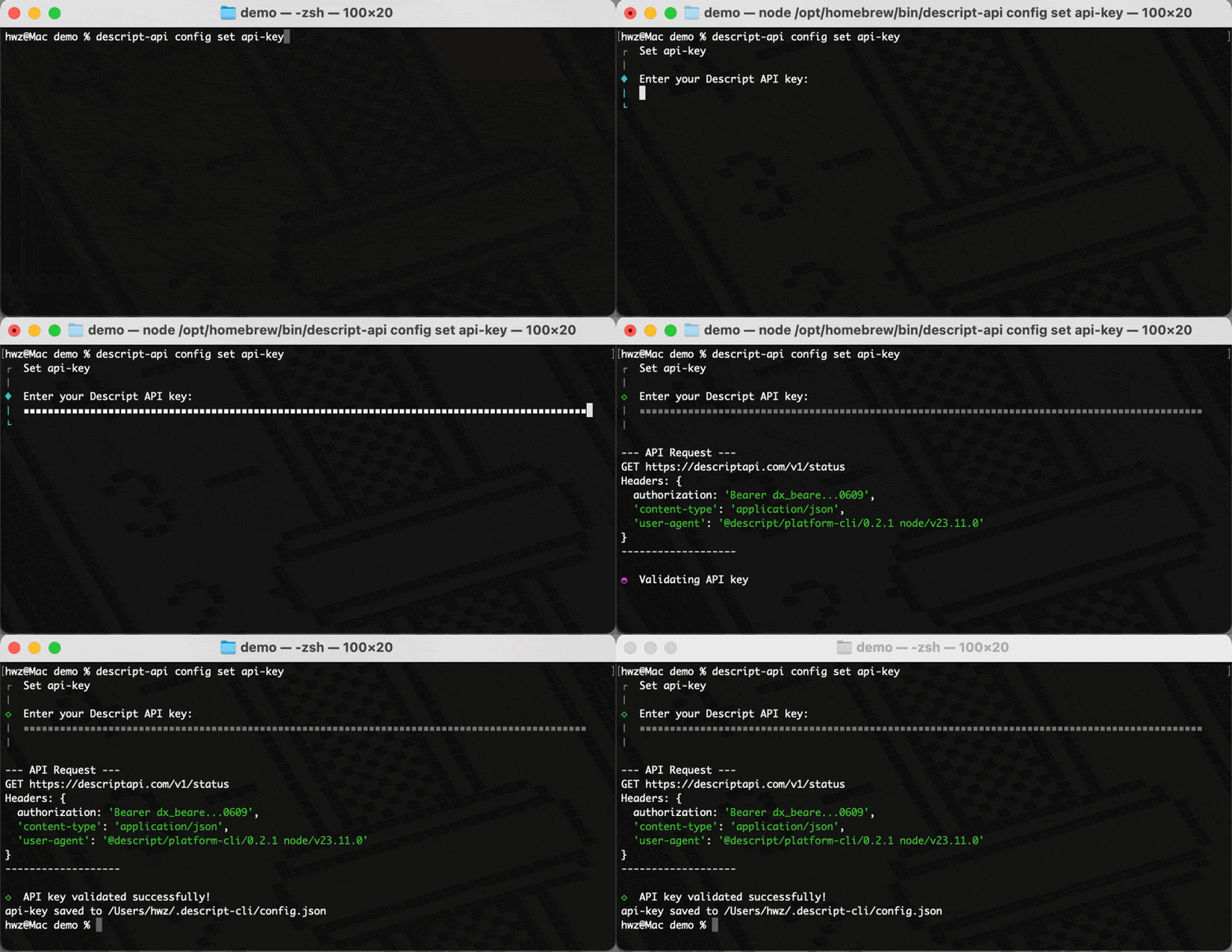
Next, configure the CLI with your API key.
```bash theme={null}
descript-api config set api-key
```
 ## Import media
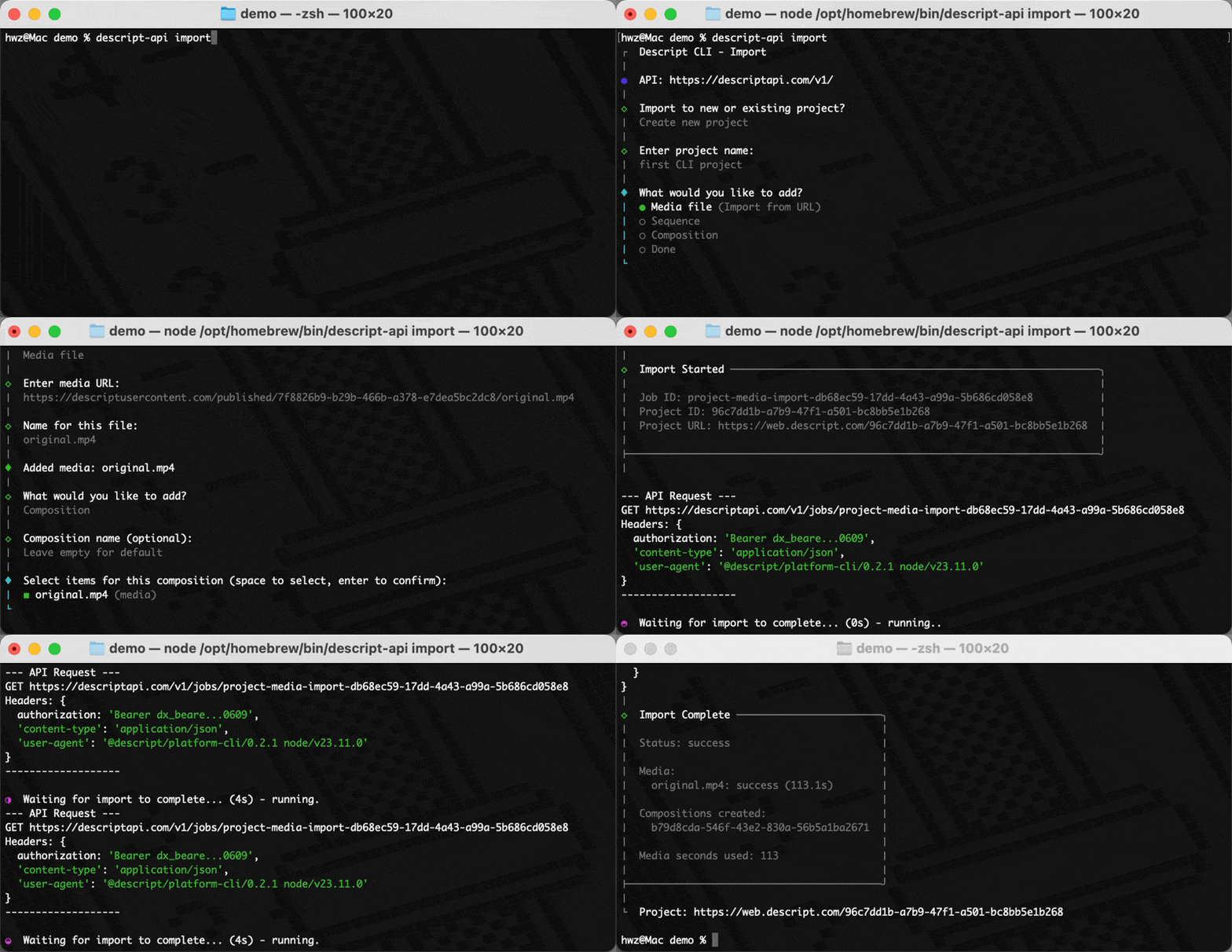
Use the `import` command to create a project by passing a project name and the link to any media you want to upload, or run `descript-api import` for interactive mode. The CLI shows live progress and outputs the project ID when done.
```bash theme={null}
descript-api import \
--name "My First Project" \
--media "https://test-files.descriptapi.com/demo-video.mp4"
```
## Import media
Use the `import` command to create a project by passing a project name and the link to any media you want to upload, or run `descript-api import` for interactive mode. The CLI shows live progress and outputs the project ID when done.
```bash theme={null}
descript-api import \
--name "My First Project" \
--media "https://test-files.descriptapi.com/demo-video.mp4"
```
 ## Use the agent
Use the `agent` command to edit a project by passing in the project id and an Underlord prompt.
```bash theme={null}
descript-api agent \
--project-id YOUR_PROJECT_ID \
--prompt "Remove filler words and add Studio Sound to all clips"
```
You can also ask Underlord create a new project from a prompt alone by writing the script for you!
```bash theme={null}
descript-api edit --new \
--prompt "Write a script about how to make great coffee"
```
## All commands
Run `descript-api help` to see the full list of available commands and options.
## Related topics
- [Using gap clips](/timeline/using-gap-clips.md)
- [Troubleshooting and using AI Speakers](/ai-speech/troubleshooting.md)
- [Layer and clip overview](/visuals/working-with-layers-and-clips-overview.md)
- [Adjust layer properties](/visuals/layer-properties.md)
- [Placeholder layers](/visuals/placeholder-layers.md)
## Use the agent
Use the `agent` command to edit a project by passing in the project id and an Underlord prompt.
```bash theme={null}
descript-api agent \
--project-id YOUR_PROJECT_ID \
--prompt "Remove filler words and add Studio Sound to all clips"
```
You can also ask Underlord create a new project from a prompt alone by writing the script for you!
```bash theme={null}
descript-api edit --new \
--prompt "Write a script about how to make great coffee"
```
## All commands
Run `descript-api help` to see the full list of available commands and options.
## Related topics
- [Using gap clips](/timeline/using-gap-clips.md)
- [Troubleshooting and using AI Speakers](/ai-speech/troubleshooting.md)
- [Layer and clip overview](/visuals/working-with-layers-and-clips-overview.md)
- [Adjust layer properties](/visuals/layer-properties.md)
- [Placeholder layers](/visuals/placeholder-layers.md)