> ## Documentation Index
> Fetch the complete documentation index at: https://help.descript.com/llms.txt
> Use this file to discover all available pages before exploring further.
# The Editor Interface
> An introduction to Descript project editor spaces: the script, canvas, timeline, and sidebar panels.
The project editor is the workspace where you'll edit your audio and video.
## Key areas in the editor
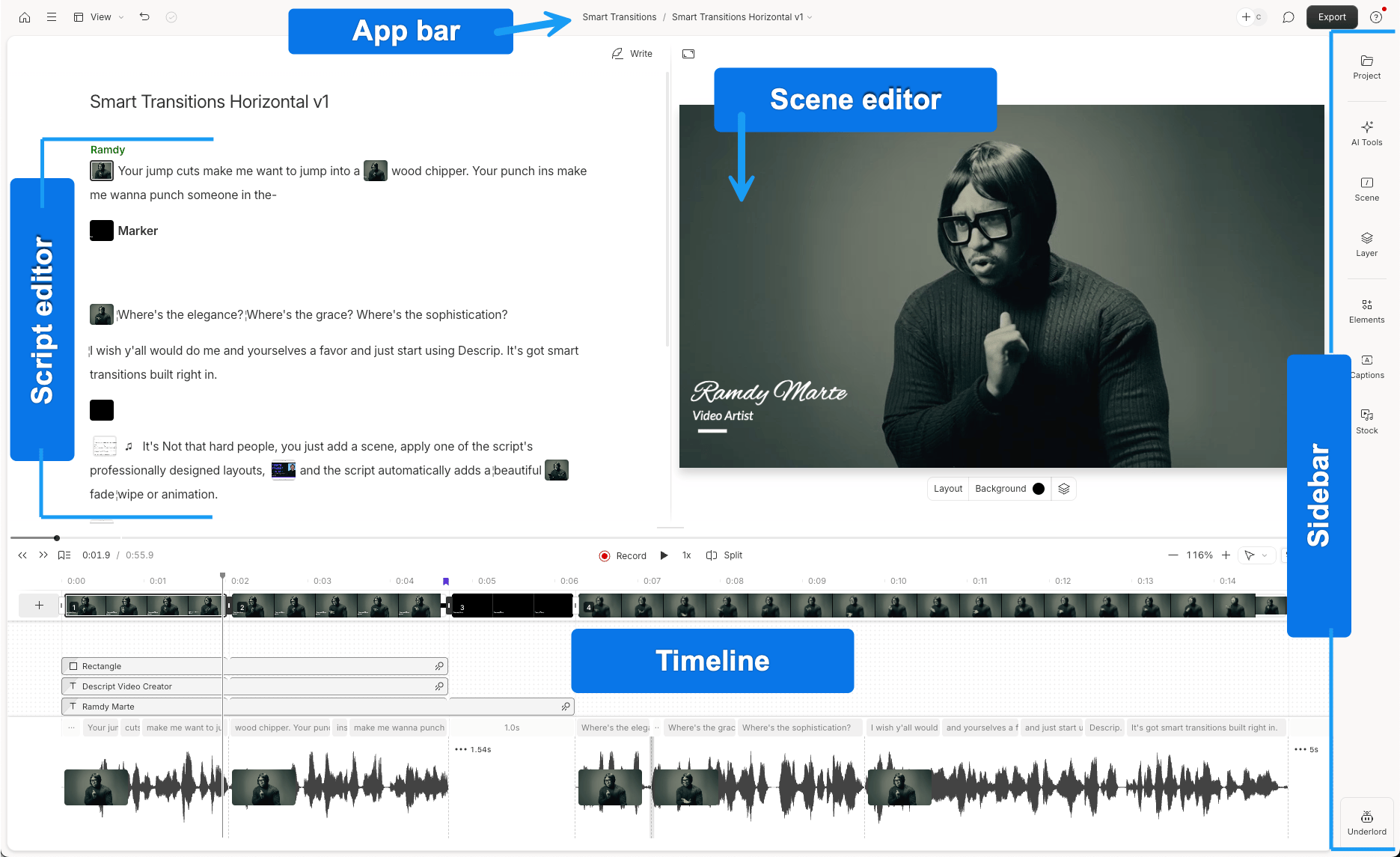
Here’s a quick map of the key areas you’ll see when working in a composition within a Descript project:
* **Script editor**: Where you write, edit, and review your transcript. You can [edit your content like a doc](/getting-started/edit-like-a-doc) and use text-based editing for video and audio.
* [**Scene editor**](/visuals/scene-editor-overview): The visual preview area where you can resize, move, or arrange elements in your video across scenes.
* [**Timeline**](/timeline/timeline-overview): A more traditional view with audio waveforms. Trim, split, and move clips here to adjust timing across your script and media layers.
* **Sidebar:** Contains tools and panels for managing files, editing visuals, applying effects, and using AI features:
* [**Project**](/descript-tour/project-panel): Access your files and compositions
* [**Scene**](/getting-started/scenes): Change layout, background, or apply transitions
* [**Layer**](/visuals/layer-properties): Adjust position, size, duration, and effects
* **Elements:** Add shapes, text, GIFs, and other layers. [Learn more about layers.](/visuals/working-with-layers-and-clips-overview)
* [**Media**](/descript-tour/media-panel): Browse assets to add to your project
* [**AI Tools**](/descript-tour/ai-tools-overview): Run automated tools like Studio Sound, remove filler words, or auto-generate social posts
* [**Underlord**](/getting-started/underlord-beta-your-ai-co-editor-in-descript): Descript’s AI powered co-editor.