> ## Documentation Index
> Fetch the complete documentation index at: https://help.descript.com/llms.txt
> Use this file to discover all available pages before exploring further.
# Multi-window Editing
> Open multiple Descript windows or tabs to work simultaneously in two or more projects.
Open a second Descript window to work in two projects at once, handy for copying scenes or media between them. Use the menu in the top-left: **File > New > Window**.
If you're using Descript on the web, you can simply open another browser tab to edit your project in multiple windows.
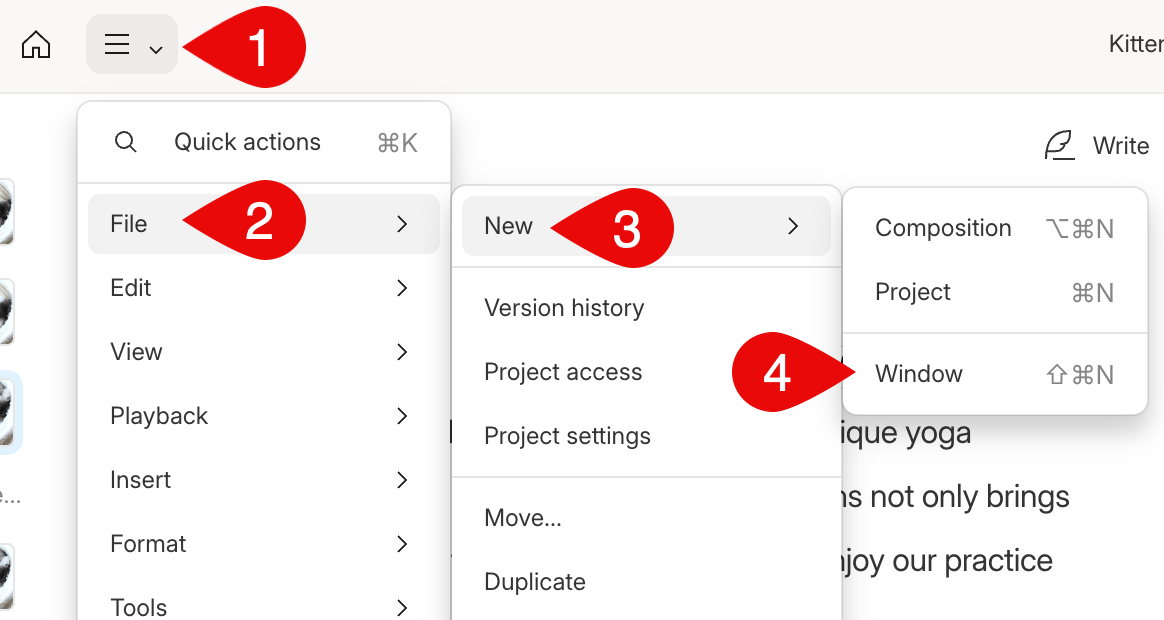 This will open a new [Drive View](/descript-tour/drive-view) window. You can then open additional [projects and compositions](/working-in-projects/overview).
With multi-window editing, you can quickly copy sections of your media and text to another spot in your composition or another project without having to flip back and forth between sections.
This will open a new [Drive View](/descript-tour/drive-view) window. You can then open additional [projects and compositions](/working-in-projects/overview).
With multi-window editing, you can quickly copy sections of your media and text to another spot in your composition or another project without having to flip back and forth between sections.