> ## Documentation Index
> Fetch the complete documentation index at: https://help.descript.com/llms.txt
> Use this file to discover all available pages before exploring further.
# Look Good with AI Tools
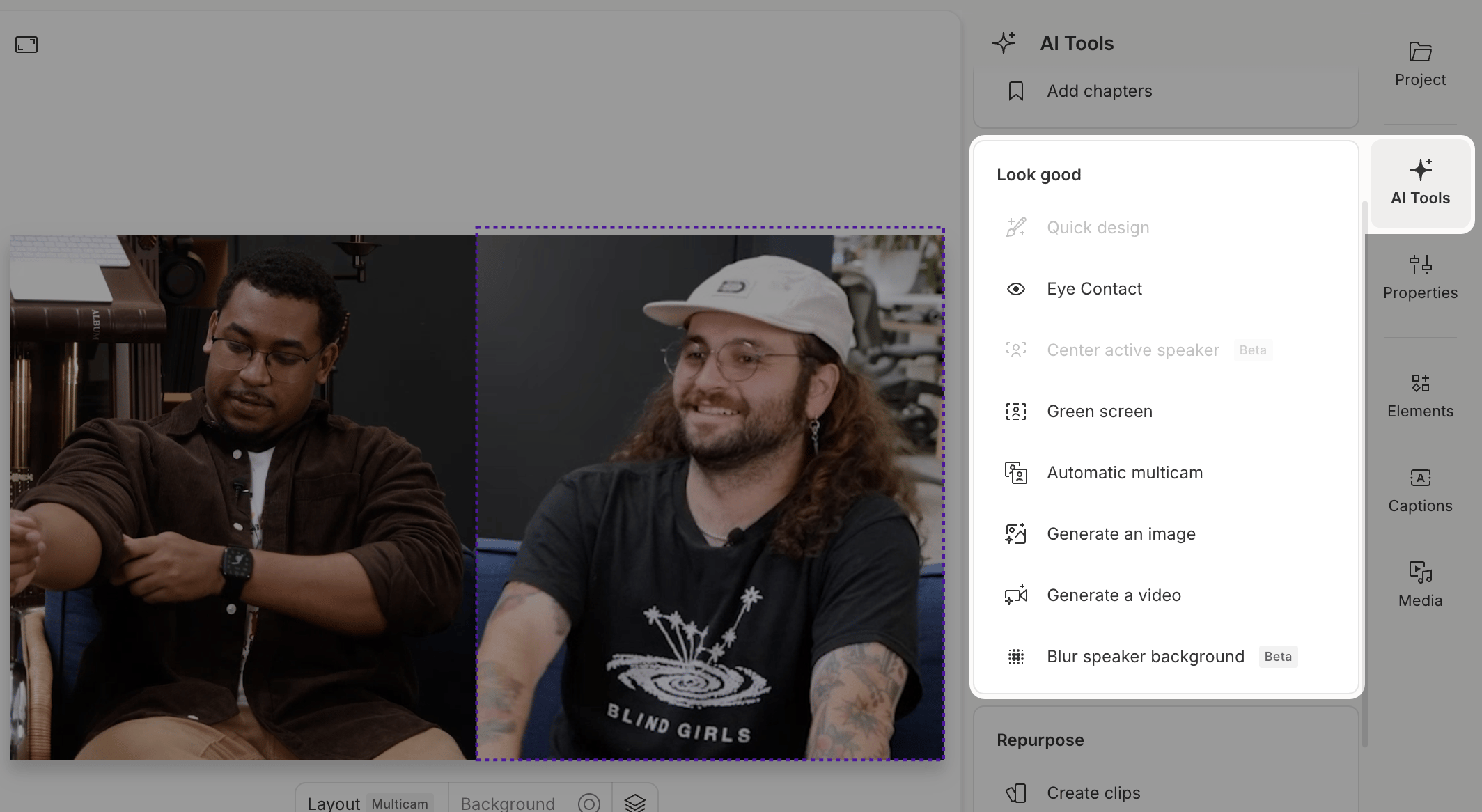
> AI Tools in the Look Good category help improve the visual quality of your composition.
The Look Good tools are about on-camera presence: framing your subject, sharpening your delivery, and adding polish before you publish.
 **Usage note**
On current plans, this feature uses **AI Credits**. Learn more about [tracking your Media Minutes and AI Credits](/billing-payments-plans/track-and-understand-your-media-minutes-and-ai-credits).
Legacy and Sunset plans track usage differently. See our [Understanding your Legacy and Sunset plan](/billing-payments-plans/legacy-sunset) guide for details.
## Quick Design
Quick Design creates a polished first draft of your video. It automatically adds layouts, formatting, and B-roll to your script using your choice of AI-generated visuals or stock media. Best for single speaker, single track, single scene compositions.
[*Learn more about Quick Design*](/ai-assistant/quick-design)
## Eye Contact
Correct your gaze with the Eye Contact effect. It adjusts your eyes to make it appear as if you’re looking directly at the camera — useful if you’re reading offscreen or getting distracted.
[*Learn more about Eye Contact*](/effects-animations-transitions/eye-contact)
## Center Active Speaker ([beta](/app-troubleshooting/beta))
Keep the active speaker centered in the frame automatically. This feature reframes your video in real time based on who’s talking — a great fit for vertical formats and short-form content.
*Note: Works best when video and audio are combined on the same track.*
[*Learn more about Center Active Speaker*](/visuals/center-active-speaker)
## Green Screen
Remove or replace your background with Green Screen. Descript uses AI to detect and remove your background — no actual green screen setup required.
[*Learn more about Green Screen*](/effects-animations-transitions/green-screen)
## Automatic Multicam
Speed up multi-camera edits. Descript detects speaker changes in multi-track sequences, creates individual scenes, and switches focus based on who’s speaking.
[*Learn more about Automatic Multicam*](/visuals/automatic-multicam)
## Generate media
Use AI to create original visuals by describing what you want, and Descript generates multiple options to choose from.
[*Learn how to generate AI images or videos*](/generative-media/generate-media)
**Usage note**
On current plans, this feature uses **AI Credits**. Learn more about [tracking your Media Minutes and AI Credits](/billing-payments-plans/track-and-understand-your-media-minutes-and-ai-credits).
Legacy and Sunset plans track usage differently. See our [Understanding your Legacy and Sunset plan](/billing-payments-plans/legacy-sunset) guide for details.
## Quick Design
Quick Design creates a polished first draft of your video. It automatically adds layouts, formatting, and B-roll to your script using your choice of AI-generated visuals or stock media. Best for single speaker, single track, single scene compositions.
[*Learn more about Quick Design*](/ai-assistant/quick-design)
## Eye Contact
Correct your gaze with the Eye Contact effect. It adjusts your eyes to make it appear as if you’re looking directly at the camera — useful if you’re reading offscreen or getting distracted.
[*Learn more about Eye Contact*](/effects-animations-transitions/eye-contact)
## Center Active Speaker ([beta](/app-troubleshooting/beta))
Keep the active speaker centered in the frame automatically. This feature reframes your video in real time based on who’s talking — a great fit for vertical formats and short-form content.
*Note: Works best when video and audio are combined on the same track.*
[*Learn more about Center Active Speaker*](/visuals/center-active-speaker)
## Green Screen
Remove or replace your background with Green Screen. Descript uses AI to detect and remove your background — no actual green screen setup required.
[*Learn more about Green Screen*](/effects-animations-transitions/green-screen)
## Automatic Multicam
Speed up multi-camera edits. Descript detects speaker changes in multi-track sequences, creates individual scenes, and switches focus based on who’s speaking.
[*Learn more about Automatic Multicam*](/visuals/automatic-multicam)
## Generate media
Use AI to create original visuals by describing what you want, and Descript generates multiple options to choose from.
[*Learn how to generate AI images or videos*](/generative-media/generate-media)