> ## Documentation Index
> Fetch the complete documentation index at: https://help.descript.com/llms.txt
> Use this file to discover all available pages before exploring further.
# Brand Studio: Permissions
> Drive admins control which Brand Studio assets drive members can apply in their projects.
As a Drive owner or admin, you decide which brand assets your team can apply in their work: fonts, colors, layout packs, and media. Members only pull from what's approved.
**Brand Studio permissions are only available to Drives on an Enterprise plan**
Brand Studio permissions require an Enterprise Drive. If you're on a Business plan and want to learn about Brand Studio's other features, [see our Brand Studio article](/branding/brand-studio).
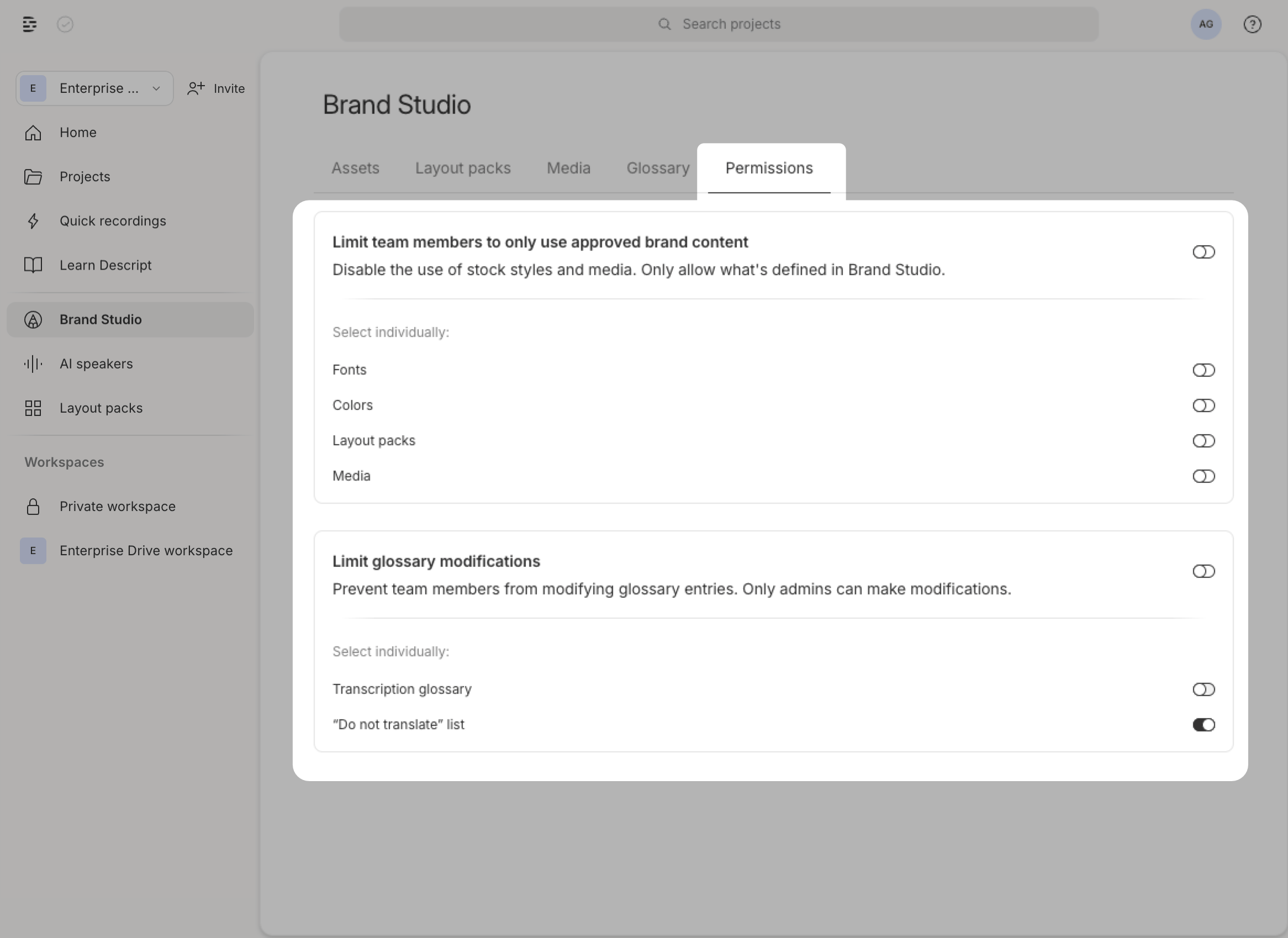 ## How to set permissions for brand assets
1. In the **Drive view**, click **Brand Studio** in the left sidebar.
2. Click the **Permissions** tab.
3. Select the asset type you want to restrict: **Fonts**, **Colors**, **Layout packs**, or **Media**.
4. Click **Save** to apply your changes.
[Clicking this link will also take you directly to the Permissions tab within Brand Studio](https://web.descript.com/brand-studio?tab=brandKitSettings), where you can make adjustments.
## Transcription glossary and do not translate permissions
When toggled on, only Drive owners and admins can modify the [transcription glossary](/script-editing/transcription-glossary) and [do not translate](/repurpose/do-not-translate) lists:
1. In the Drive View, click **Brand Studio** in the left sidebar
2. Click the **Permissions** tab
3. Under **Glossary**, toggle the setting to prevent team members from modifying entries
4. Click **Done** to save
##
**Underlord may not respect permissions**
Even when permissions restrict asset access, [Underlord (Descript’s AI co-editor)](/getting-started/underlord-beta-your-ai-co-editor-in-descript) may create or apply content that doesn’t match your locked brand settings. If you use permissions to enforce strict brand guidelines, review Underlord’s edits before publishing.
## How to set permissions for brand assets
1. In the **Drive view**, click **Brand Studio** in the left sidebar.
2. Click the **Permissions** tab.
3. Select the asset type you want to restrict: **Fonts**, **Colors**, **Layout packs**, or **Media**.
4. Click **Save** to apply your changes.
[Clicking this link will also take you directly to the Permissions tab within Brand Studio](https://web.descript.com/brand-studio?tab=brandKitSettings), where you can make adjustments.
## Transcription glossary and do not translate permissions
When toggled on, only Drive owners and admins can modify the [transcription glossary](/script-editing/transcription-glossary) and [do not translate](/repurpose/do-not-translate) lists:
1. In the Drive View, click **Brand Studio** in the left sidebar
2. Click the **Permissions** tab
3. Under **Glossary**, toggle the setting to prevent team members from modifying entries
4. Click **Done** to save
##
**Underlord may not respect permissions**
Even when permissions restrict asset access, [Underlord (Descript’s AI co-editor)](/getting-started/underlord-beta-your-ai-co-editor-in-descript) may create or apply content that doesn’t match your locked brand settings. If you use permissions to enforce strict brand guidelines, review Underlord’s edits before publishing.