> ## Documentation Index
> Fetch the complete documentation index at: https://help.descript.com/llms.txt
> Use this file to discover all available pages before exploring further.
# Upgrade Your Plan
> Steps to upgrade your Descript plan.
Upgrade your plan to access more monthly **Media Minutes** and **AI Credits**, a larger stock media library, higher-resolution exports, watermark-free exports, and more. See our [pricing page](https://www.descript.com/pricing) for full plan details.
**Bonus AI credits and media minutes with annual plans**
Subscribe to an annual **Creator** or **Business** plan and get one-time bonus top ups added to your account:
* **Creator (annual):** 500 AI credits + 5 media hours
* **Business (annual):** 1,000 AI credits + 10 media hours
One-time bonus credits and minutes are valid for one year and are added automatically when you subscribe.
**Who's eligible:**
* New Creator or Business annual plan subscribers
* Current subscribers switching to annual Creator or Business plans
This offer can’t be combined with other promotions.
## Steps to upgrade your plan
1. Open [App Settings](/account-and-app-settings/app-settings) with `Command/Control + , (comma)`
2. If you have multiple Drives, use the **Drive dropdown** in the left-hand panel to select the Drive you want to upgrade.
3. Go to the **Plan** tab.
4. In the right panel, click **Change plan** next to your current subscription.
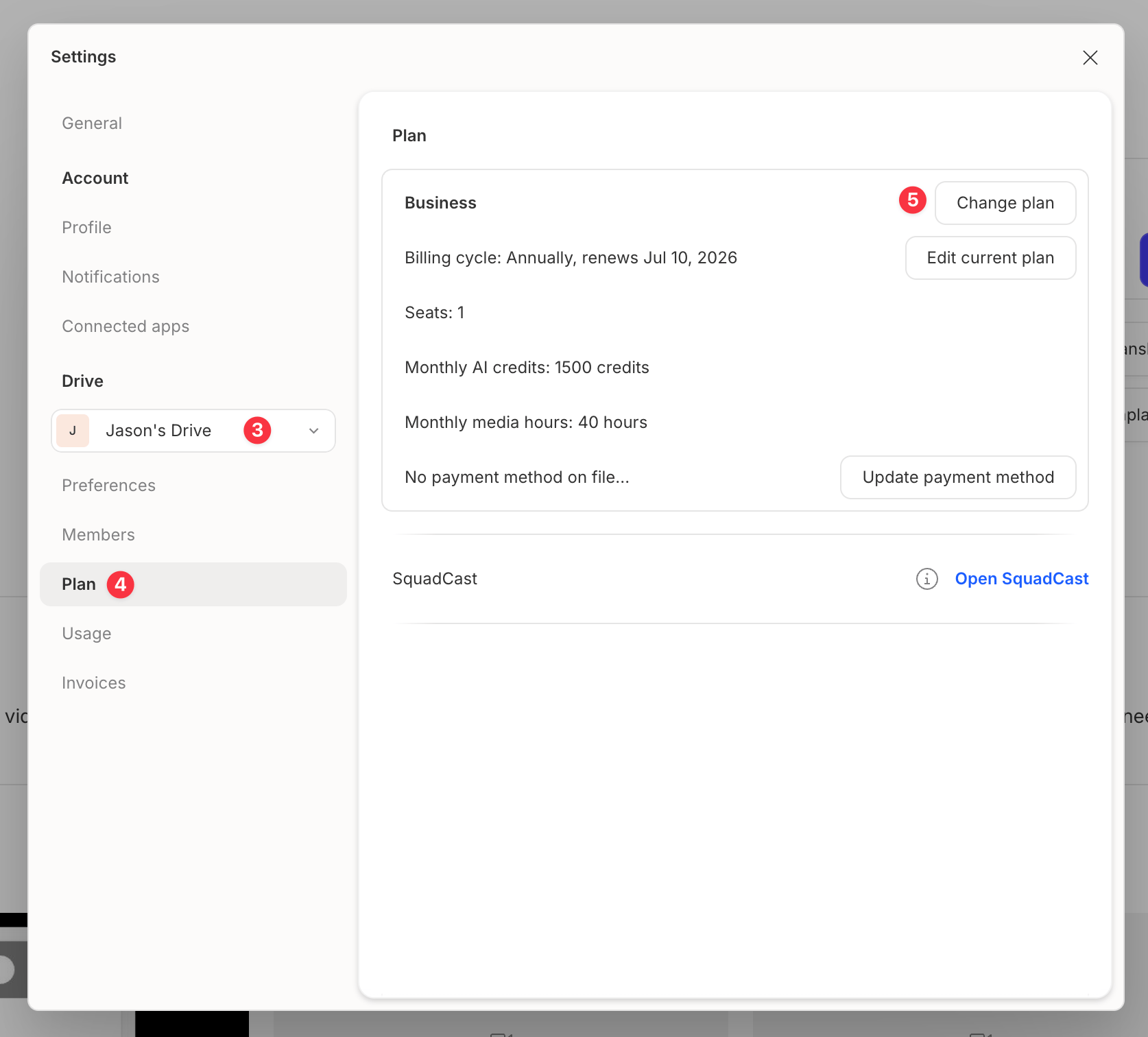 5. A new browser tab will open where you can choose your new plan, select the number of **Editor seats**, and set your billing cycle.
6. Click **Save changes** to complete your upgrade.
## After you upgrade
Your upgraded plan and features become available immediately. You’ll be charged a prorated amount based on the time remaining in your current billing cycle.
For more details, see our guide on [managing your Drive subscription](/billing-payments-plans/manage).
Any usage you’ve already accumulated during your current billing cycle will count toward your new limits. Usage does not reset when you upgrade.
To learn more about usage tracking, see [Understanding Media Minutes and AI Credits](/billing-payments-plans/track-and-understand-your-media-minutes-and-ai-credits).
**Need additional Media minutes or AI Credits?**
If you reach your monthly limit, you can add more Media minutes or AI Credits by purchasing a **Top up** from the **Plan** tab in your App Settings. Top ups are shared across your Drive and are available for one-time use without changing your subscription plan. [Learn more about Top ups](/billing-payments-plans/top-ups).
5. A new browser tab will open where you can choose your new plan, select the number of **Editor seats**, and set your billing cycle.
6. Click **Save changes** to complete your upgrade.
## After you upgrade
Your upgraded plan and features become available immediately. You’ll be charged a prorated amount based on the time remaining in your current billing cycle.
For more details, see our guide on [managing your Drive subscription](/billing-payments-plans/manage).
Any usage you’ve already accumulated during your current billing cycle will count toward your new limits. Usage does not reset when you upgrade.
To learn more about usage tracking, see [Understanding Media Minutes and AI Credits](/billing-payments-plans/track-and-understand-your-media-minutes-and-ai-credits).
**Need additional Media minutes or AI Credits?**
If you reach your monthly limit, you can add more Media minutes or AI Credits by purchasing a **Top up** from the **Plan** tab in your App Settings. Top ups are shared across your Drive and are available for one-time use without changing your subscription plan. [Learn more about Top ups](/billing-payments-plans/top-ups).