> ## Documentation Index
> Fetch the complete documentation index at: https://help.descript.com/llms.txt
> Use this file to discover all available pages before exploring further.
# Other Endpoints
> Call any Descript API endpoint from Zapier or n8n.
Zapier's Descript integration has built-in actions for only Import Media and Edit with AI. To hit any other endpoint from tools like Zapier or n8n, send a direct API request.
**These steps involve third-party tools**
We make an honest effort to provide workflows for using the Descript API with these external tools, but your mileage may vary. If you run into issues using the Descript API with tools like Zapier and n8n, please contact the relevant support team for assistance.
## **Before getting started**
You'll need three things:
1. A Descript API token ([create one here](/api-and-mcp/api#how-to-create-your-api-token))
2. A Zapier account
3. The [Descript API documentation](https://docs.descriptapi.com/) open for reference
## Step 1: Set up the connection
1. In your Zap, add a new action step.
2. Search for **API by Zapier** and select it. *Note: this is a premium feature, and may not be available on all Zapier plans.*
3. Choose **API Request** as the action event.
4. Click **Connect a new account**. A configuration window opens.
5. Fill in the fields in the table below.
6. Click **Yes, Continue to API by Zapier**.
| Field | Value |
| :--------------------------------- | :------------------------------------------------------------------------------------------------------------ |
| **Authentication Type** | None |
| **Connection Name** | Descript API (or whatever you prefer) |
| **Domain Filter** | `descriptapi.com` |
| **Headers** (under Static Headers) | `Authorization: Bearer YOUR_API_TOKEN` on the first line, `Content-Type: application/json` on the second line |
| **Query Parameter** | Leave empty |
| **OAuth2** | Leave empty |
**Use your own API token**
As with the built-in integration, each team member should use their own token. We recommend against sharing the connection with your Zapier organization.
## Step 2: Find the endpoint you need
Open the [API documentation](https://docs.descriptapi.com/) and find the endpoint you want to use. Each endpoint page lists the three things you'll enter in Zapier:
* **The HTTP method** — POST, GET, or DELETE. Look for the label next to the endpoint name (for example, "post Export project transcript").
* **The URL** — shown at each endpoint section, for example `https://descriptapi.com/v1/export/transcript`.
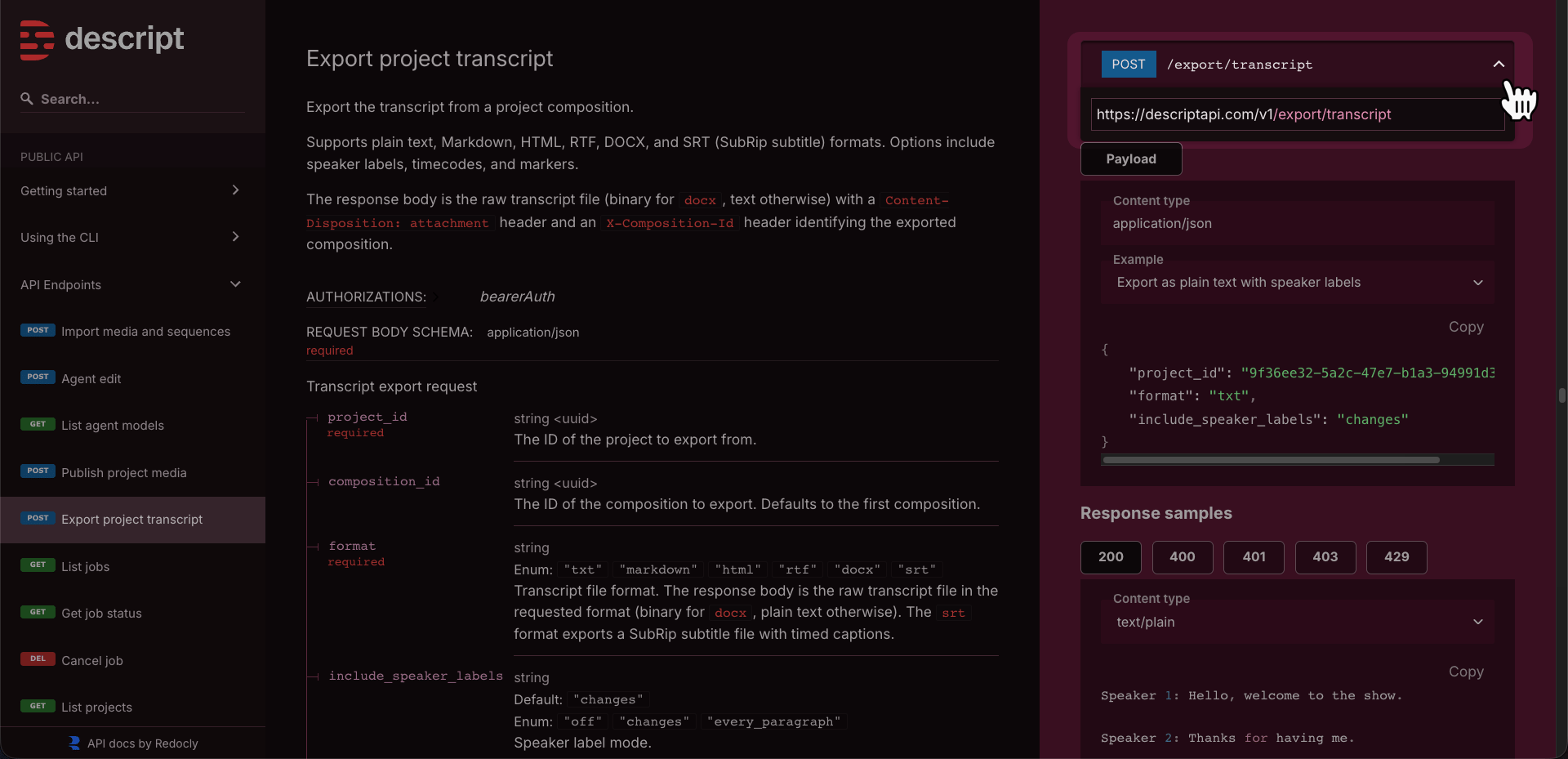 * **The request body** — the JSON payload the endpoint expects. The docs list every field, whether it's required or optional, and what values it accepts.
## Step 3: Configure the API Request action
Depending on the endpoint you're calling, you will need to specify a given set of inputs and values. Back in Zapier, fill in the action fields:
1. Set the **HTTP Method** to match the docs (usually POST).
2. Paste the full **URL** from the docs.
3. In the **Body** fields, enter your JSON payload. Reference data from earlier Zap steps using Zapier's `{{field}}` syntax — for example, passing a project ID from an earlier Import Media step.
You don't need to add authentication headers here. They're included automatically from the connection you set up earlier.
To export a transcript as a text file with speaker labels and paragraph timecodes:
**HTTP Method:** POST
**URL:** `https://descriptapi.com/v1/export/transcript`
**Body:**
`{ "project_id": "{{project_id_from_previous_step}}", "format": "txt", "include_speaker_labels": "changes", "include_markers": true, "timecodes": { "on_paragraphs": true } }`
The `format` field accepts: `txt`, `markdown`, `html`, `rtf`, or `docx`.
## Response formats: sync vs. async
The built-in Descript Zapier actions handle polling and response parsing for you. When calling API Request directly, two patterns matter:
**Async endpoints** (like Publish) return a `job_id` in JSON. You'll need a follow-up step to poll `GET https://descriptapi.com/v1/jobs/{{job_id}}` until the job completes, or pass a `callback_url` in your request body to have Descript notify a Zapier webhook when the job finishes.
**Sync endpoints** (like Transcript Export) return the file content directly — not JSON. Zapier's API Request action expects JSON responses, so these may not parse cleanly. If you run into issues, try using a text-based format (like `txt` or `markdown` for transcripts) instead of binary formats (like `docx`), or handle the request in a **Code by Zapier** step where you have more control over the response.
## Available endpoints and examples
For the full list of endpoints, request schemas, and code samples, see the [API documentation](https://docs.descriptapi.com/). Endpoints not covered by the built-in Zapier integration include:
* **Export transcript** — export a composition's transcript as text, Markdown, HTML, RTF, or DOCX
* **List projects** — search and filter projects in your drive
* **Get project details** — inspect a project's media files and compositions
### **Examples**
One example per endpoint, showing all available parameters with realistic values. All examples use `POST` or `GET`/`DELETE` as appropriate.
**Method:** POST **URL:** `https://descriptapi.com/v1/jobs/import/project_media`
**Body:**
```json theme={null}
{
"project_name": "Q3 Campaign Video",
"team_access": "comment",
"folder_name": "Clients/Videos",
"add_media": {
"Intro/opener.mp4": {
"url": "https://storage.example.com/opener.mp4",
"language": "en"
},
"Main/interview.mp4": {
"url": "https://storage.example.com/interview.mp4",
"language": "en"
},
"Main/broll.mp4": {
"url": "https://storage.example.com/broll.mp4"
},
"Multitrack/session": {
"tracks": [
{ "media": "Main/interview.mp4", "offset": 0 },
{ "media": "Main/broll.mp4", "offset": 12.5 }
]
}
},
"add_compositions": [
{
"name": "Rough Cut",
"fps": 30,
"width": 1920,
"height": 1080,
"clips": [
{ "media": "Intro/opener.mp4" },
{ "media": "Multitrack/session" }
]
}
],
"callback_url": "INSERT ZAPIER CALLBACK URL HERE"
}
```
**Method:** POST **URL:** `https://descriptapi.com/v1/jobs/agent`
**Body:**
```json theme={null}
{
"project_id": "YOUR_PROJECT_ID",
"composition_id": "YOUR_COMPOSITION_ID",
"prompt": "Remove all filler words, apply Studio Sound to every clip, add captions, and create a 60-second highlight reel as a separate composition",
"team_access": "view",
"conversation_id": "d1e2f3a4-b5c6-7890-abcd-ef1234567890",
"callback_url": "INSERT ZAPIER CALLBACK URL HERE"
}
```
`conversation_id` continues a prior agent conversation. Omit it to start fresh. `project_name` can be used instead of `project_id` to create a new project from scratch.
**Method:** POST **URL:** `https://descriptapi.com/v1/jobs/publish`
**Body:**
```json theme={null}
{
"project_id": "YOUR_PROJECT_ID",
"composition_id": "YOUR_COMPOSITION_ID",
"media_type": "Video",
"resolution": "1080p",
"access_level": "unlisted",
"callback_url": "INSERT ZAPIER CALLBACK URL HERE"
}
```
`access_level` options: `public`, `unlisted`, `drive`, `private`. Defaults to the drive setting. `resolution` only applies when `media_type` is `Video`.
**Method:** POST **URL:** `https://descriptapi.com/v1/export/transcript`
**Body:**
```json theme={null}
{
"project_id": "YOUR_PROJECT_ID",
"composition_id": "YOUR_COMPOSITION_ID",
"format": "markdown",
"include_speaker_labels": "every_paragraph",
"include_markers": true,
"timecodes": {
"on_paragraphs": true
}
}
```
`format` options: `txt`, `markdown`, `html`, `rtf`, `docx`. `include_speaker_labels` options: `off`, `changes`, `every_paragraph`. Response is the raw file content, not JSON — see the note on sync endpoints above.
**Method:** GET **URL:** `https://descriptapi.com/v1/jobs?`
Query params: `project_id`, `type` (`import/project_media` or `agent`), `limit` (1–100, default 20), `created_after`, `created_before` (ISO 8601). Use `cursor` from `pagination.next_cursor` to paginate.
**Method:** GET **URL:** `https://descriptapi.com/v1/jobs/6dc3f30a-58c2-4174-96a6-dc18cf3c7776`
No body. Replace the job ID in the path with the `job_id` from any async job response (import, agent, publish).
**Method:** DELETE **URL:** `https://descriptapi.com/v1/jobs/6dc3f30a-58c2-4174-96a6-dc18cf3c7776`
No body. Returns 204 on success. Irreversible — confirm the job ID before calling.
**Method:** GET **URL:** `https://descriptapi.com/v1/projects?`
All params are optional query strings. `created_by` accepts a user UUID or `me`. `sort` options: `name`, `created_at`, `updated_at`, `last_viewed_at`. Use `cursor` from `pagination.next_cursor` to paginate.
**Method:** GET **URL:** `https://descriptapi.com/v1/projects/YOUR_PROJECT_ID`
No body. Returns project metadata, all media files with type and duration, and all compositions with ID, name, duration, and media type. Note: this will only work with projects within the drive your API token is associated with.
**Method:** GET **URL:** `https://descriptapi.com/v1/status`
No body. Returns `{ "status": "ok" }` if the token is valid. Note: this endpoint is marked as work in progress in the current docs and may return an error.
* **The request body** — the JSON payload the endpoint expects. The docs list every field, whether it's required or optional, and what values it accepts.
## Step 3: Configure the API Request action
Depending on the endpoint you're calling, you will need to specify a given set of inputs and values. Back in Zapier, fill in the action fields:
1. Set the **HTTP Method** to match the docs (usually POST).
2. Paste the full **URL** from the docs.
3. In the **Body** fields, enter your JSON payload. Reference data from earlier Zap steps using Zapier's `{{field}}` syntax — for example, passing a project ID from an earlier Import Media step.
You don't need to add authentication headers here. They're included automatically from the connection you set up earlier.
To export a transcript as a text file with speaker labels and paragraph timecodes:
**HTTP Method:** POST
**URL:** `https://descriptapi.com/v1/export/transcript`
**Body:**
`{ "project_id": "{{project_id_from_previous_step}}", "format": "txt", "include_speaker_labels": "changes", "include_markers": true, "timecodes": { "on_paragraphs": true } }`
The `format` field accepts: `txt`, `markdown`, `html`, `rtf`, or `docx`.
## Response formats: sync vs. async
The built-in Descript Zapier actions handle polling and response parsing for you. When calling API Request directly, two patterns matter:
**Async endpoints** (like Publish) return a `job_id` in JSON. You'll need a follow-up step to poll `GET https://descriptapi.com/v1/jobs/{{job_id}}` until the job completes, or pass a `callback_url` in your request body to have Descript notify a Zapier webhook when the job finishes.
**Sync endpoints** (like Transcript Export) return the file content directly — not JSON. Zapier's API Request action expects JSON responses, so these may not parse cleanly. If you run into issues, try using a text-based format (like `txt` or `markdown` for transcripts) instead of binary formats (like `docx`), or handle the request in a **Code by Zapier** step where you have more control over the response.
## Available endpoints and examples
For the full list of endpoints, request schemas, and code samples, see the [API documentation](https://docs.descriptapi.com/). Endpoints not covered by the built-in Zapier integration include:
* **Export transcript** — export a composition's transcript as text, Markdown, HTML, RTF, or DOCX
* **List projects** — search and filter projects in your drive
* **Get project details** — inspect a project's media files and compositions
### **Examples**
One example per endpoint, showing all available parameters with realistic values. All examples use `POST` or `GET`/`DELETE` as appropriate.
**Method:** POST **URL:** `https://descriptapi.com/v1/jobs/import/project_media`
**Body:**
```json theme={null}
{
"project_name": "Q3 Campaign Video",
"team_access": "comment",
"folder_name": "Clients/Videos",
"add_media": {
"Intro/opener.mp4": {
"url": "https://storage.example.com/opener.mp4",
"language": "en"
},
"Main/interview.mp4": {
"url": "https://storage.example.com/interview.mp4",
"language": "en"
},
"Main/broll.mp4": {
"url": "https://storage.example.com/broll.mp4"
},
"Multitrack/session": {
"tracks": [
{ "media": "Main/interview.mp4", "offset": 0 },
{ "media": "Main/broll.mp4", "offset": 12.5 }
]
}
},
"add_compositions": [
{
"name": "Rough Cut",
"fps": 30,
"width": 1920,
"height": 1080,
"clips": [
{ "media": "Intro/opener.mp4" },
{ "media": "Multitrack/session" }
]
}
],
"callback_url": "INSERT ZAPIER CALLBACK URL HERE"
}
```
**Method:** POST **URL:** `https://descriptapi.com/v1/jobs/agent`
**Body:**
```json theme={null}
{
"project_id": "YOUR_PROJECT_ID",
"composition_id": "YOUR_COMPOSITION_ID",
"prompt": "Remove all filler words, apply Studio Sound to every clip, add captions, and create a 60-second highlight reel as a separate composition",
"team_access": "view",
"conversation_id": "d1e2f3a4-b5c6-7890-abcd-ef1234567890",
"callback_url": "INSERT ZAPIER CALLBACK URL HERE"
}
```
`conversation_id` continues a prior agent conversation. Omit it to start fresh. `project_name` can be used instead of `project_id` to create a new project from scratch.
**Method:** POST **URL:** `https://descriptapi.com/v1/jobs/publish`
**Body:**
```json theme={null}
{
"project_id": "YOUR_PROJECT_ID",
"composition_id": "YOUR_COMPOSITION_ID",
"media_type": "Video",
"resolution": "1080p",
"access_level": "unlisted",
"callback_url": "INSERT ZAPIER CALLBACK URL HERE"
}
```
`access_level` options: `public`, `unlisted`, `drive`, `private`. Defaults to the drive setting. `resolution` only applies when `media_type` is `Video`.
**Method:** POST **URL:** `https://descriptapi.com/v1/export/transcript`
**Body:**
```json theme={null}
{
"project_id": "YOUR_PROJECT_ID",
"composition_id": "YOUR_COMPOSITION_ID",
"format": "markdown",
"include_speaker_labels": "every_paragraph",
"include_markers": true,
"timecodes": {
"on_paragraphs": true
}
}
```
`format` options: `txt`, `markdown`, `html`, `rtf`, `docx`. `include_speaker_labels` options: `off`, `changes`, `every_paragraph`. Response is the raw file content, not JSON — see the note on sync endpoints above.
**Method:** GET **URL:** `https://descriptapi.com/v1/jobs?`
Query params: `project_id`, `type` (`import/project_media` or `agent`), `limit` (1–100, default 20), `created_after`, `created_before` (ISO 8601). Use `cursor` from `pagination.next_cursor` to paginate.
**Method:** GET **URL:** `https://descriptapi.com/v1/jobs/6dc3f30a-58c2-4174-96a6-dc18cf3c7776`
No body. Replace the job ID in the path with the `job_id` from any async job response (import, agent, publish).
**Method:** DELETE **URL:** `https://descriptapi.com/v1/jobs/6dc3f30a-58c2-4174-96a6-dc18cf3c7776`
No body. Returns 204 on success. Irreversible — confirm the job ID before calling.
**Method:** GET **URL:** `https://descriptapi.com/v1/projects?`
All params are optional query strings. `created_by` accepts a user UUID or `me`. `sort` options: `name`, `created_at`, `updated_at`, `last_viewed_at`. Use `cursor` from `pagination.next_cursor` to paginate.
**Method:** GET **URL:** `https://descriptapi.com/v1/projects/YOUR_PROJECT_ID`
No body. Returns project metadata, all media files with type and duration, and all compositions with ID, name, duration, and media type. Note: this will only work with projects within the drive your API token is associated with.
**Method:** GET **URL:** `https://descriptapi.com/v1/status`
No body. Returns `{ "status": "ok" }` if the token is valid. Note: this endpoint is marked as work in progress in the current docs and may return an error.