> ## Documentation Index
> Fetch the complete documentation index at: https://help.descript.com/llms.txt
> Use this file to discover all available pages before exploring further.
# Create a custom voice clone
> Enable speech generation by authorizing a custom AI Speaker that speaks in your own voice in Descript.
Clone your own voice into a custom AI Speaker, then generate audio in it just by typing. Use it to [fix a line without re-recording](/script-editing/change-meaning) or to [build a voice-over track from scratch](/ai-speech/tts)..
## Create an AI Speaker
1. Add a speaker label to your composition — click **Add speaker** (usually at the top of your composition).
2. Select **Create speaker** from the dropdown, then name your speaker.
3. Click your new speaker label, find your speaker name in the dropdown, hover over it, click the **…** menu, and choose **Enable speech generation**. This displays the consent and authorization script.
4. **Choose your microphone** and click **Record**. The consent statement must be read in English, even if you’re creating non-English text-to-speech audio. For the best results, speak naturally, with varied tone and expression.
5. Stop the recording, review your submission, and re-record if needed.
6. When you’re satisfied, click **Submit**. You’ll receive a confirmation once your AI Speaker is ready (typically within minutes).
**Also possible from Drive view**
You can also create an AI Speaker from the **AI Speakers** tab in [your Drive view](/descript-tour/drive-view).
### **Create an AI Speaker for a third-party**
If your collaborator can’t record directly in the app, have them send you a recording of the consent statement.
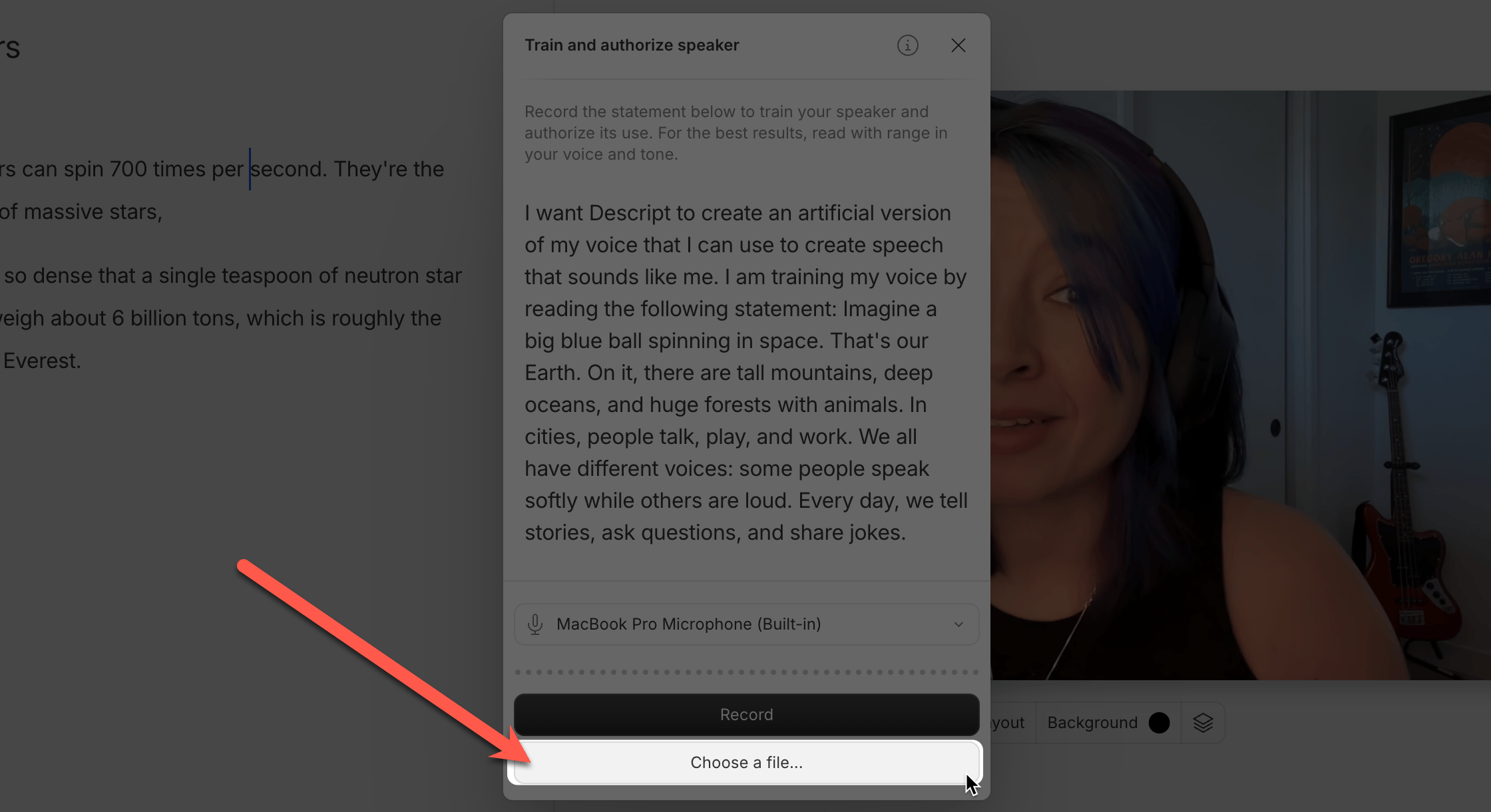 I want Descript to create an artificial version of my voice that I can use to create speech that sounds like me. I am training my voice by reading the following statement. Imagine a big blue ball spinning in space. That’s our Earth. On it, there are tall mountains, deep oceans, and huge forests with animals. In cities, people talk, play, and work.
## Consent and voice authorization
Descript requires explicit recorded authorization from the person whose voice will be used before creating a voice clone. This protects against unauthorized use.
Voice clones can only be created by the person themselves, or by someone acting on their behalf with the person's recorded authorization
**Descript cannot create voice clones for:**
* A deceased individual
* A non-consenting person
* Someone unable to record the consent statement
* Audio from an AI or artificial source
Any attempt to bypass this process is a breach of Descript's Terms of Service.
## Troubleshooting
Create a new voice clone with a fresh recording of the consent statement. You can't add more voice samples or training data to an existing clone, but you can shape the result by:
* Recording the consent statement in a specific tone and style (casual and friendly, formal and authoritative, and so on).
* Speaking clearly and intentionally — your delivery during the consent script directly shapes how your AI Speaker sounds.
* Using your usual microphone and recording setup.
* Changing the voice generation model for your text-to-speech audio in [**App Settings**](/account-and-app-settings/app-settings).
Multiple style variations within a single voice clone aren't currently supported. Instead, create multiple voices, each with a different delivery. For example, you could:
* Create one voice clone with a casual, conversational tone.
* Create another with a more formal, professional delivery.
* Create additional clones with different emotional qualities or speaking styles.
Each voice appears in your speaker dropdown, so you can choose the most appropriate one for different sections of your project.
Voice clones are generated using a model based on US English pronunciation, so accents may not always be preserved accurately. If your clone doesn't sound right, try switching your voice generation model in [**App Settings**](/account-and-app-settings/app-settings).
The [ElevenLabs v2 and v3 models](/ai-speech/tts) can produce different results, so it's worth testing both to see which one better captures your accent.
We're exploring broader accent support in the future.
I want Descript to create an artificial version of my voice that I can use to create speech that sounds like me. I am training my voice by reading the following statement. Imagine a big blue ball spinning in space. That’s our Earth. On it, there are tall mountains, deep oceans, and huge forests with animals. In cities, people talk, play, and work.
## Consent and voice authorization
Descript requires explicit recorded authorization from the person whose voice will be used before creating a voice clone. This protects against unauthorized use.
Voice clones can only be created by the person themselves, or by someone acting on their behalf with the person's recorded authorization
**Descript cannot create voice clones for:**
* A deceased individual
* A non-consenting person
* Someone unable to record the consent statement
* Audio from an AI or artificial source
Any attempt to bypass this process is a breach of Descript's Terms of Service.
## Troubleshooting
Create a new voice clone with a fresh recording of the consent statement. You can't add more voice samples or training data to an existing clone, but you can shape the result by:
* Recording the consent statement in a specific tone and style (casual and friendly, formal and authoritative, and so on).
* Speaking clearly and intentionally — your delivery during the consent script directly shapes how your AI Speaker sounds.
* Using your usual microphone and recording setup.
* Changing the voice generation model for your text-to-speech audio in [**App Settings**](/account-and-app-settings/app-settings).
Multiple style variations within a single voice clone aren't currently supported. Instead, create multiple voices, each with a different delivery. For example, you could:
* Create one voice clone with a casual, conversational tone.
* Create another with a more formal, professional delivery.
* Create additional clones with different emotional qualities or speaking styles.
Each voice appears in your speaker dropdown, so you can choose the most appropriate one for different sections of your project.
Voice clones are generated using a model based on US English pronunciation, so accents may not always be preserved accurately. If your clone doesn't sound right, try switching your voice generation model in [**App Settings**](/account-and-app-settings/app-settings).
The [ElevenLabs v2 and v3 models](/ai-speech/tts) can produce different results, so it's worth testing both to see which one better captures your accent.
We're exploring broader accent support in the future.