> ## Documentation Index
> Fetch the complete documentation index at: https://help.descript.com/llms.txt
> Use this file to discover all available pages before exploring further.
# Find anything in your drive
> Search across projects, media, transcripts, and folders from one bar. Filter by type, sort by date, and jump to the exact moment in any transcript result.
Use the search bar to find any file, project, folder, or asset in your drive. Search matches file names and transcript content. Click a transcript result to jump to that exact moment in the file.
## Search your drive
1. Click the **Search** bar at the top of the app.
2. Type a keyword — part of a file name or a word spoken in a recording.
3. Select a result to open it, or press Enter to see all results on the search page.
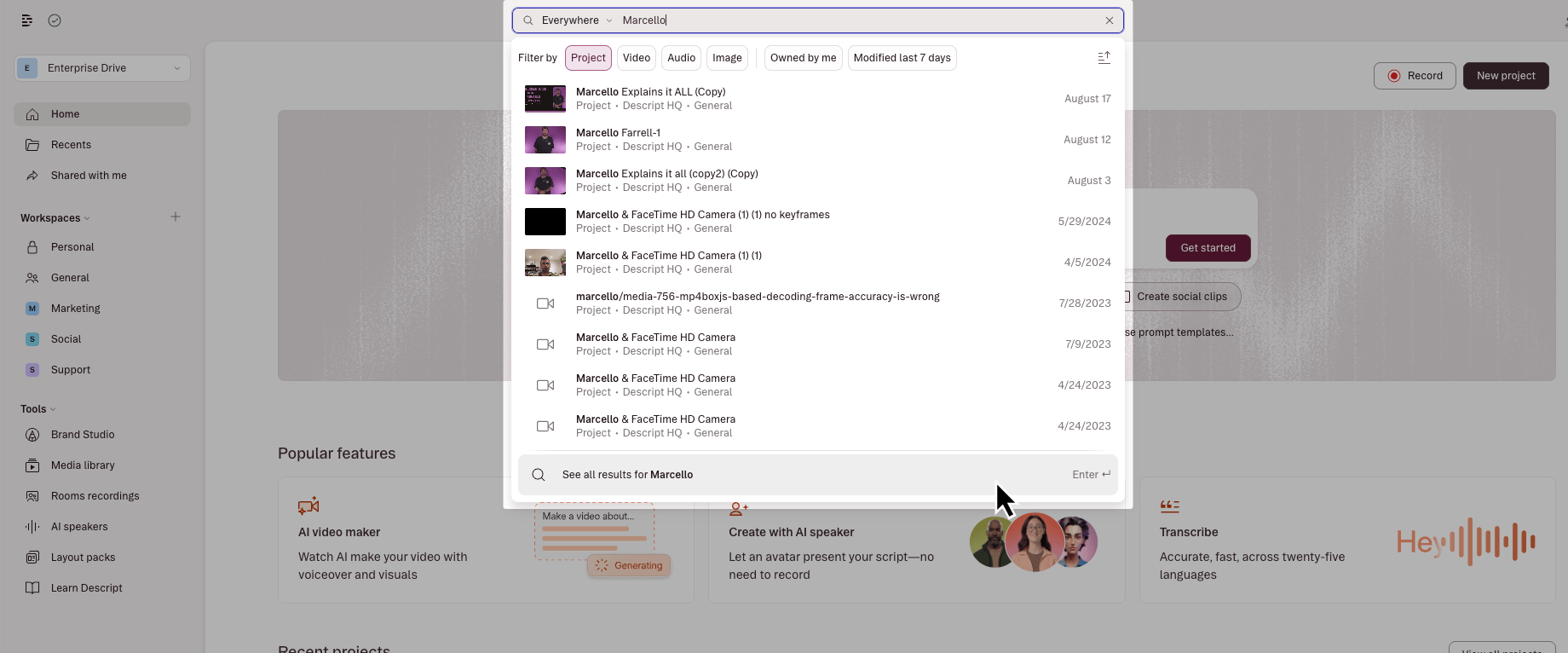 ## What search finds
Search returns results across your entire drive:
* [**Projects**](/working-in-projects/overview): matched by project name or transcript content
* **Media files**: matched by file name
* **Transcripts**: matched by spoken content; results show a snippet of the matching line
* [**Folders**](/working-in-projects/folders): matched by folder name
* [**Layout packs**](/templates-and-presets/overview): matched by pack name
## View all results on the search page
Press Enter after typing to open the full search results page. From there you can:
* **Filter by content type** : show only projects, videos, audio, images, folders, or layout packs
* **Sort results**: order by relevance or date
* **Take actions**: right-click any result to rename, delete, move, duplicate, or download it without leaving search
## What search finds
Search returns results across your entire drive:
* [**Projects**](/working-in-projects/overview): matched by project name or transcript content
* **Media files**: matched by file name
* **Transcripts**: matched by spoken content; results show a snippet of the matching line
* [**Folders**](/working-in-projects/folders): matched by folder name
* [**Layout packs**](/templates-and-presets/overview): matched by pack name
## View all results on the search page
Press Enter after typing to open the full search results page. From there you can:
* **Filter by content type** : show only projects, videos, audio, images, folders, or layout packs
* **Sort results**: order by relevance or date
* **Take actions**: right-click any result to rename, delete, move, duplicate, or download it without leaving search
 ## Known limitations
* Some right-click actions (delete, move, download) are still rolling out for certain file types. If an action doesn't appear on a result, use it from the drive view or project panel instead.
* **Searching within a project** — finding files inside your currently open project — is handled by the [Project panel](/descript-tour/project-panel), not by global search.
## Related topics
- [How to delete your Descript account](/account-and-app-settings/delete-account.md)
- [Descript API](/api-and-mcp/api.md)
- [Media library: Organize and reuse content across projects](/add-and-manage-media/media-library-overview.md)
- [Drive view](/descript-tour/drive-view.md)
- [Smooth jump cuts](/script-editing/smooth-jump-cuts.md)
## Known limitations
* Some right-click actions (delete, move, download) are still rolling out for certain file types. If an action doesn't appear on a result, use it from the drive view or project panel instead.
* **Searching within a project** — finding files inside your currently open project — is handled by the [Project panel](/descript-tour/project-panel), not by global search.
## Related topics
- [How to delete your Descript account](/account-and-app-settings/delete-account.md)
- [Descript API](/api-and-mcp/api.md)
- [Media library: Organize and reuse content across projects](/add-and-manage-media/media-library-overview.md)
- [Drive view](/descript-tour/drive-view.md)
- [Smooth jump cuts](/script-editing/smooth-jump-cuts.md)