> ## Documentation Index
> Fetch the complete documentation index at: https://help.descript.com/llms.txt
> Use this file to discover all available pages before exploring further.
# Replace File
> Swap in a higher-quality or corrected file while keeping your edits intact, and resolve stalled uploads or transcription.
Replace file swaps a file everywhere it appears in your project at once, so the new version applies across every composition and clip while your edits stay put.
**Avoid data corruption**
Replace file should only be used when replacing files of the same duration and content. Using a different replacement file may significantly corrupt your project.
## How to replace a file
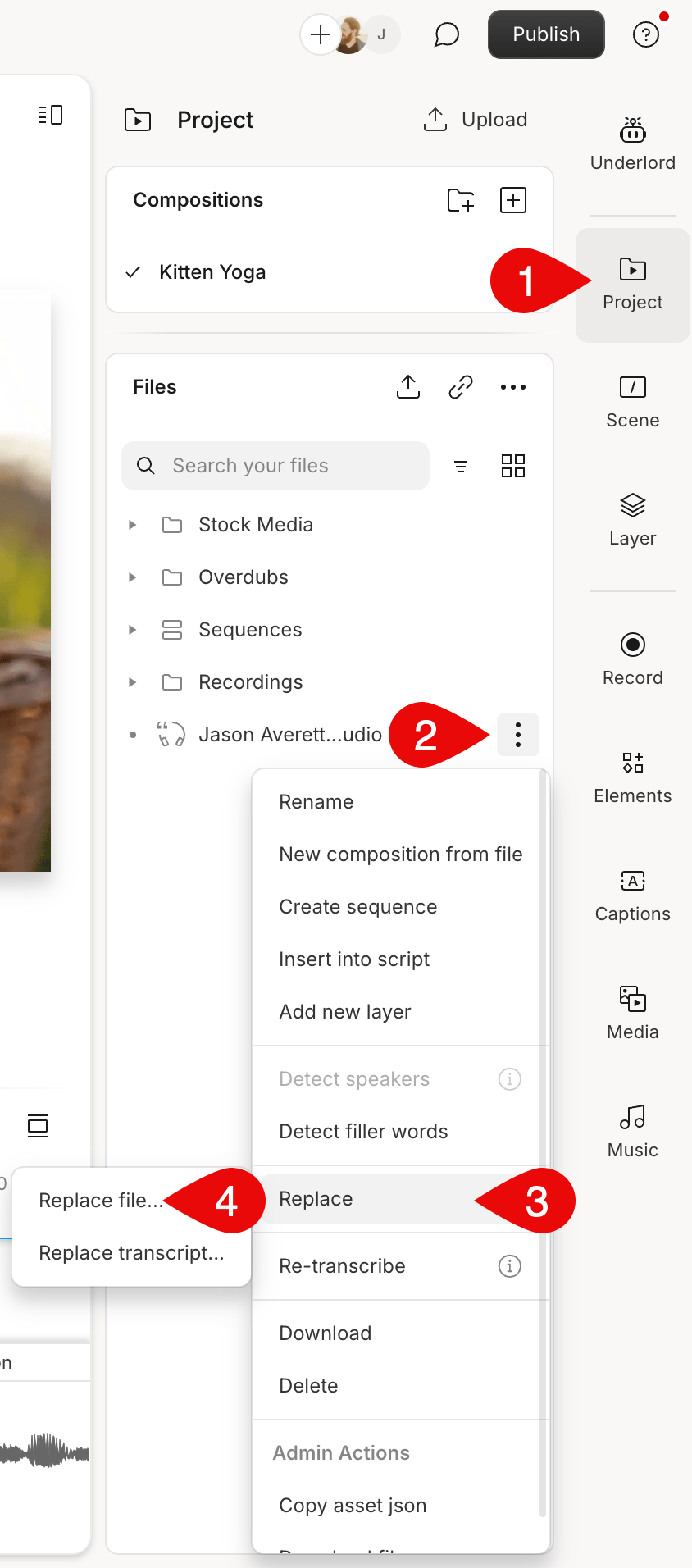
1. Open the **Project** panel on the right-hand side. Make sure you're looking at the **Files** section.
2. Click the  **Ellipsis**button next to the file you want to replace.
3. Select **Replace > Replace file**...\\
**Ellipsis**button next to the file you want to replace.
3. Select **Replace > Replace file**...\\
 **Replacing a file will maintain your current edits**
Replacing a file with the same underlying content will not result in a loss of your previous edits. Ensure your content matches to retain all your current edits when using this tool.
## Considerations for transcribed files
Replacing a transcribed file does not regenerate the transcript or change the alignment between the script text and other audio and video elements. Note that both the [original and optimized files](/working-in-projects/project-file-management) will be replaced.
**Replacing a file will maintain your current edits**
Replacing a file with the same underlying content will not result in a loss of your previous edits. Ensure your content matches to retain all your current edits when using this tool.
## Considerations for transcribed files
Replacing a transcribed file does not regenerate the transcript or change the alignment between the script text and other audio and video elements. Note that both the [original and optimized files](/working-in-projects/project-file-management) will be replaced.