> ## Documentation Index
> Fetch the complete documentation index at: https://help.descript.com/llms.txt
> Use this file to discover all available pages before exploring further.
# Adjust A/V Sync Offset for a Media File
> Use A/V sync offset to correct a consistent delay between the audio and video in a single media file.
If your video and audio are out of sync, use A/V sync offset to get them back into alignment.
**Not what you're looking for?**
If you need to align timing *between* multiple tracks in a sequence, use the [Sequence Editor](/script-editing/sequence-editor) instead.
## How to adjust A/V sync offset
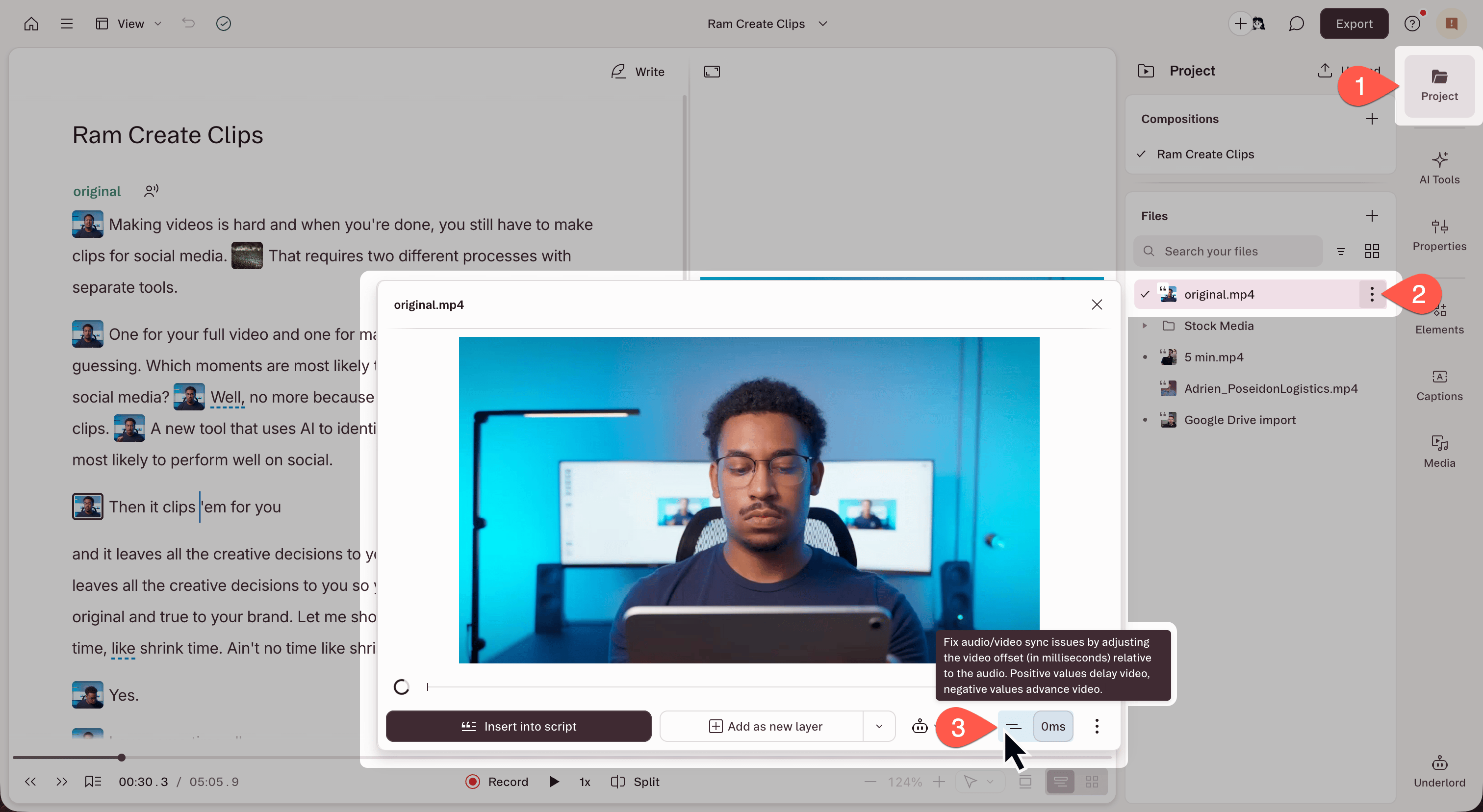
1. Open the **Project** panel from the right-hand sidebar.
2. In the **Files** section, click the **⋮** menu next to the file name.
3. Select **Set A/V sync offset**. The file preview modal opens.
4. Use the sync slider in the bottom-right corner of the modal to adjust the offset.
* **Negative value:** moves the audio earlier. Use this when audio is playing too late (lips move, then you hear the words).
* **Positive value:** moves the audio later. Use this when audio is playing too early (you hear words before lips move).
 ## When to use this vs. the Sequence Editor
Use **A/V sync offset** when a single file has a consistent delay baked in, when the audio and video are always off by the same amount regardless of where you are in the file.
Use the Sequence Editor when you need to adjust the timing between multiple tracks in a sequence. For example, aligning a separate microphone recording with your camera footage. Use arrow keys to [nudge clips frame by frame](/script-editing/sequence-editor) for fine-grained control.
## When to use this vs. the Sequence Editor
Use **A/V sync offset** when a single file has a consistent delay baked in, when the audio and video are always off by the same amount regardless of where you are in the file.
Use the Sequence Editor when you need to adjust the timing between multiple tracks in a sequence. For example, aligning a separate microphone recording with your camera footage. Use arrow keys to [nudge clips frame by frame](/script-editing/sequence-editor) for fine-grained control.