> ## Documentation Index
> Fetch the complete documentation index at: https://help.descript.com/llms.txt
> Use this file to discover all available pages before exploring further.
# Switch Between Multiple Drives
> Jump between multiple drives with a single account using the drive selector.
You can be a part of several drives with a single Descript account. Switch between them from the drive selector.
## Switch between drives
1. Open the [Drive view](/descript-tour/drive-view).
2. Click your **drive name** in the top-left corner of the window.
3. Select a different drive from the dropdown menu.
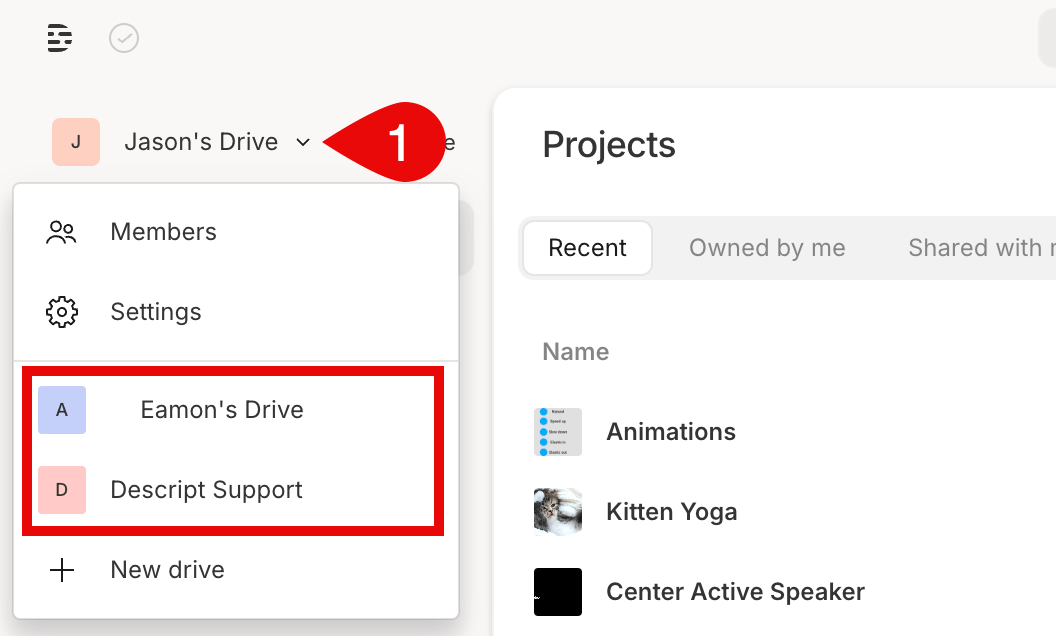 If you only see one drive, that means you haven’t created or joined any others yet. To add another drive for separate billing, project organization, or team collaboration, see our guide on [creating an additional drive](/account-and-app-settings/create-additional-drives).
**Drive creation is restricted for SSO users**
Accounts managed through single sign-on (SSO) can’t create additional drives. If you need another drive, reach out to your Admin.
If you only see one drive, that means you haven’t created or joined any others yet. To add another drive for separate billing, project organization, or team collaboration, see our guide on [creating an additional drive](/account-and-app-settings/create-additional-drives).
**Drive creation is restricted for SSO users**
Accounts managed through single sign-on (SSO) can’t create additional drives. If you need another drive, reach out to your Admin.